


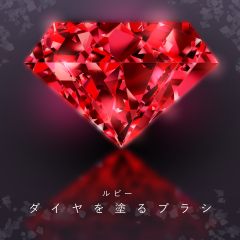
Diamond Painting Brush 4-Ruby-/HJ (ダイヤ塗るブラシ4-ルビー-/HJ) ダイヤ塗るブラシ4-ルビー-/HJ


A brush that paints diamonds and jewelry at the speed of seconds. Anyone can easily apply sparkling gems. A gem-specific color with a red color like ruby.
ダイヤや宝石を秒速で塗るブラシ。誰でも簡単にキラキラ輝く宝石がパパっと塗れます。ルビーのような赤色の宝石専用カラー。

Also, it is possible to change the color from editing, but if it is a slight change, it will shine beautifully, but if you change the shade significantly, it will not be very beautiful. Therefore, we recommend that you use it exclusively for red gemstones.


How to paint a video
Color (3) along the guide line of (2), and after painting
There is a little space between the lines, so duplicate the painted image.

* Example of creation with a brush that paints diamonds (content ID: 1941319).
(All line drawings are a set of 16 types of diamond line drawings (content ID: 1941301)


また編集から色変更は可能ですが、多少の変更であれば美しく輝きますが、大きく色合いを変えますとあまりきれいではありません。そのため赤色の宝石専用として使っていただく事をお勧めします。
動画の塗り方
②のガイド線に沿って③に色を塗り、塗った後は
線と線の間が少し空いてますので、塗った画像を複製し
※ダイヤを塗るブラシ(コンテンツID:1941319)での作成例。
(線画はすべてダイヤの線画16種セット(コンテンツID:1941301)
Update history

 Report problematic material
For those who don’t have a Clip Studio account
- Name of product/software
- Detailed information about the issue

-
 CLIP STUDIO PAINT PRO/EX
-
CLIP STUDIO PAINT DEBUT
 Re-download


 Checkout Now
 Purchase successful.
 See save location for materials


Published : 2 months ago
Last updated : 2 months ago





-
 MVP ◆This user has contributed greatly to the management of the community, by posting many great responses to the questions asked. Once every three months, MVPs are determined based on the points earned during that period and will be recognized accordingly.
-
 New Valuable Player (NVP) ◆These are the next-best contributors to the community after MVPs. This is awarded to users who have not yet won an MVP award, based on the number of points they have earned.
-
 Official Expert ◆Chosen out of all MVP awardees, who are already proof of excellence, this is a testimony of outstanding correspondence in the community. After careful screening, they are appointed by CELSYS and assume their position.Note: Formally called “Evangelists”
-
 Official Moderator of CELSYS ◆Moderators are official CELSYS staff members who are fluent in Japanese as well as various other languages. Moderators are not experts on the software or illustration, so they are not able to directly answer your questions. However, moderators provide communication and language support to ensure that everyone can smoothly communicate with each other.
-
 CELSYS official accountThe Official Administrator Account