



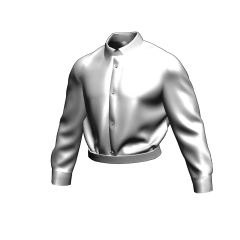
It is a shirt to move according to the desired angle. I assume a company employee or a student wearing a uniform. Because it corresponds to the pose for the 3D drawing figure, please help for per, such as in conjunction with the pose material on hand. 欲しいアングルに合わせて動かせるシャツです。会社員や制服を着ている学生を想定しています。3Dデッサン人形用のポーズにも対応していますので、お手持ちのポーズ素材と合わせてあたり等にお役立て下さい。

↑ Two kinds of sleeves version that is rolled up arm and sleeves normal is set.
(The cube at the bottom is just to make the foot location easier to understand.)
Lifesize higher than the default drawing dolls, it is a little wider than the width of the shoulder.

↑ The whole picture.

↑ You can move to match the angle and pose.
Because it is the same as the drawing doll, the person who is accustomed might move better.


↑ You can read the pose for drawing dolls.
Because there is the part which does not match because of the pose of the original element, the place that it is sank, please move and correct it.
Because the sleeve end might turn to an unnatural one, please adjust the arm rolled version while correcting the direction like the GIF video.

↑ Although it is basically a per-use model, it is an LT conversion example. The line such as the collar is firmly.
Below is the recommended configuration for 3D editing.
• Sub tool detail → environment → rendering settings → backface [off]
Apply light source [on]
Display settings for editing [fast]
↑通常の袖版と腕まくりしている袖版の2種がセットなっています。
(下部の立方体は足の場所を分かり易くするためだけのものです)
デフォルトのデッサン人形と比べて等身高め、少し肩幅が広めのつくりです。
↑全体像です。
↑ポーズやアングルに合わせて動かす事が出来ます。
デッサン人形と同じつくりなので、慣れている方はもっとうまく動かせるかもしれません。
↑デッサン人形用のポーズを読み込めます。
元が素体用のポーズのため合わない部分もありますので、めり込んでしまうような箇所は動かして修正をお願いします。
腕まくり版は袖端が不自然な方に向く場合があるので、gif動画のように向きを修正しながら調節をお願い致します。
↑基本的にあたり用モデルではありますが、LT変換例です。襟などの線はしっかりとでます。
以下、3D編集時の推奨環境設定です。
・サブツール詳細 → 環境 → レンダリング設定 → バックフェースカリング を 【オフ】
・光源の影響を受ける を 【オン】
・編集表示設定 を 【高速】
Category 1 カテゴリ1




Other materials by tori_kai


Popular “Material catalog” materials


New materials


Badges
-
 MVP ◆This user has contributed greatly to the management of the community, by posting many great responses to the questions asked. Once every three months, MVPs are determined based on the points earned during that period and will be recognized accordingly.
 -
 New Valuable Player (NVP) ◆These are the next-best contributors to the community after MVPs. This is awarded to users who have not yet won an MVP award, based on the number of points they have earned.
 -
 Official Expert ◆Chosen out of all MVP awardees, who are already proof of excellence, this is a testimony of outstanding correspondence in the community. After careful screening, they are appointed by CELSYS and assume their position.Note: Formally called “Evangelists”
 -
 Official Moderator of CELSYS ◆Moderators are official CELSYS staff members who are fluent in Japanese as well as various other languages. Moderators are not experts on the software or illustration, so they are not able to directly answer your questions. However, moderators provide communication and language support to ensure that everyone can smoothly communicate with each other.
 -
 CELSYS official accountThe Official Administrator Account