


Nordic-style fabric (textile pattern + brush) (北欧風・布の柄(テキスタイルパターン+ブラシ)) 北欧風・布の柄(テキスタイルパターン+ブラシ)
Content ID:1884453
-
244


Nordic-style seamless pattern (tone) and brush.
In total, 20 types (in addition to variations of white and brush width),
There are nine designs and two brushes with some designs.
Clothes and textiles, such as dresses and skirts,
Fabrics such as curtains and sofas,
Pouches, bags, cups, stationery, and other items.
How about decorating the interior?
北欧風のシームレス模様のパターン(トーン)とブラシです。
合計20種類(パターン白地入・ブラシ幅違いのものをあわせて)で、
図柄は9デザイン+一部デザインを使用したブラシ2本があります。
ワンピースやスカートなど洋服のテキスタイルや、
カーテン、ソファなどのファブリック、
ポーチやバッグやカップ、文房具などの小物や
インテリアの装飾などにいかがでしょうか。
自然なシームレスになるように留意して作成しました。
漫画の作中でのさまざまなサイズで使用することを想定し、
大きくても小さくてもキレイに見えるようドット単位での調整を頑張りました。
小さく使ったときに画像が崩れないようにとも考えて
一部をのぞいてあえて二値(モノクロ)のアンチエイリアス無しで作成しております。
アンチエイリアスをつけたい場合は、フィルタ・ガウスぼかしなどを使ってください。
トーン貼り・グレー・彩色などは、アンチエイリアス無しの二値データなので、
簡単に選択範囲がとれます。
ぜひともアレンジしてご活用くださいね。
Scandinavian-style seamless pattern (tone) and brush.
With a total of 20 types (including those with a white background and different brush widths),
There are 9 designs + 2 brushes using some designs.
Textiles for clothes such as dresses and skirts,
Fabrics for curtains, sofas, etc.
Small items such as pouches, bags, cups, stationery, etc.
How about for interior decoration etc.
Created with care to be natural and seamless.
Assuming that it will be used in various sizes during the production of manga,
I worked hard to make adjustments in dot units so that it looks beautiful regardless of whether it is large or small.
Thinking that the image will not collapse when used small
Except for some parts, it is intentionally created without binary (monochrome) antialiasing.
If you want to add antialiasing, use filters, Gaussian blur, etc.
You can easily make a selection.
Please arrange and use it by all means.


You can layer layers of clipped and colored effects,
I colored it with a layer color.
So that the line does not disappear even if you use it small
Except for some patterns, it is made in monochrome.
Assuming that it will be used for various things
We have devised a way to make it look beautiful regardless of whether it is used large or small.
Lines and outlines to create a Scandinavian atmosphere
It is adjusted in dot units.
It is also nice to use it by reversing black and white.
If you use a material with a white background, the pattern below will not show through.
Only the CI building was registered at the tip.
J1 is recommended when drawing along a ruler.
The setting of the influence source of the orientation is "Line direction".
The orientation is aligned along a ruler such as a curve or circle.
This also contains the "direction of the line".
When drawing on a vector layer, you can change the orientation
by selecting it with the object tool.
the pattern would look natural.
★☆★ 収録素材一覧 ★☆★
Recording material list

Explanation of various ways to arrange

a-How to make it look like fabric
Create a toned solid layer and paste it over the part you want to look like a fabric.
Change "Dot Settings" to "Lines" from the layer properties,
Change the value of "Angle".
(I set it to 45 in this example)
Apply a layer color to make the main color white.
Change the number of tones and density tones,
Please adjust it to your liking.
Match the layer you want to flip, then in the top menu
"Layer"→"New color correction layer"→ Select "Invert tone".
A "tone inversion layer" is created on the top, and the image below is inverted.
(You can also do it in color)
Decrease the opacity of the layer, and if it is gray, use it as it is,
To make a tone, click "Effect"→"Tone" in the layer properties.
If you want to change the ground color, specify "Transparent" in the color gamut specification,
make a selection range, and paint it there.
(Making a stock of selections is useful for changing colors later)
Color the color layer and place it above the pattern layer.
Use the layer effect to make various changes and change the opacity to get the color you like.
Original manuscript / layer effect-screen / hard light / addition + opacity 60%
Converts an image layer to a raster.
Select the layer you want to convert and right-click or
Select "Convert Layer" from the layers in the top menu and select
Specify "Raster layer" and "Expression color gray" and select OK.
Select "Blur"→"Gauss Blur" from the filter on the top menu
→Change the number of "Blur range" to get the desired blur.
Original manuscript ・ Blur range 16 ・ Blur range 24
(Layer effect uses screen)
★ ☆ ★ ☆ ★ ☆ ★ ☆ ★ ☆ ★ ☆ ★ ☆ ★ ☆ ★ ☆ ★ ☆
説明用の画像はサンプルなので線を入れていますが、実際の素材には入っていません。
Since the image for explanation is a sample, I put a line, but it is not included in the actual material.
CとIのパターンは127mm(3000px)、
それ以外は95mm(2250px)四方の600dpiにて作成しています。
Other than that, it is created at 600dpi on 95mm (2250px) square.
自然なシームレスになるように留意して作成しました。
漫画の作中でのさまざまなサイズで使用することを想定し、
大きくても小さくてもキレイに見えるようドット単位での調整を頑張りました。
小さく使ったときに画像が崩れないようにとも考えて
一部をのぞいてあえて二値(モノクロ)のアンチエイリアス無しで作成しております。
アンチエイリアスをつけたい場合は、フィルタ・ガウスぼかしなどを使ってください。
トーン貼り・グレー・彩色などは、アンチエイリアス無しの二値データなので、
簡単に選択範囲がとれます。
ぜひともアレンジしてご活用くださいね。
Scandinavian-style seamless pattern (tone) and brush.
With a total of 20 types (including those with a white background and different brush widths),
There are 9 designs + 2 brushes using some designs.
Textiles for clothes such as dresses and skirts,
Fabrics for curtains, sofas, etc.
Small items such as pouches, bags, cups, stationery, etc.
How about for interior decoration etc.
Created with care to be natural and seamless.
Assuming that it will be used in various sizes during the production of manga,
I worked hard to make adjustments in dot units so that it looks beautiful regardless of whether it is large or small.
Thinking that the image will not collapse when used small
Except for some parts, it is intentionally created without binary (monochrome) antialiasing.
If you want to add antialiasing, use filters, Gaussian blur, etc.
You can easily make a selection.
Please arrange and use it by all means.
You can layer layers of clipped and colored effects,
I colored it with a layer color.
So that the line does not disappear even if you use it small
Except for some patterns, it is made in monochrome.
Assuming that it will be used for various things
We have devised a way to make it look beautiful regardless of whether it is used large or small.
Lines and outlines to create a Scandinavian atmosphere
It is adjusted in dot units.
It is also nice to use it by reversing black and white.
If you use a material with a white background, the pattern below will not show through.
Only the CI building was registered at the tip.
J1 is recommended when drawing along a ruler.
The setting of the influence source of the orientation is "Line direction".
The orientation is aligned along a ruler such as a curve or circle.
This also contains the "direction of the line".
When drawing on a vector layer, you can change the orientation
by selecting it with the object tool.
the pattern would look natural.
★☆★ 収録素材一覧 ★☆★
Recording material list
Explanation of various ways to arrange
a-How to make it look like fabric
Create a toned solid layer and paste it over the part you want to look like a fabric.
Change "Dot Settings" to "Lines" from the layer properties,
Change the value of "Angle".
(I set it to 45 in this example)
Apply a layer color to make the main color white.
Change the number of tones and density tones,
Please adjust it to your liking.
Match the layer you want to flip, then in the top menu
"Layer"→"New color correction layer"→ Select "Invert tone".
A "tone inversion layer" is created on the top, and the image below is inverted.
(You can also do it in color)
Decrease the opacity of the layer, and if it is gray, use it as it is,
To make a tone, click "Effect"→"Tone" in the layer properties.
If you want to change the ground color, specify "Transparent" in the color gamut specification,
make a selection range, and paint it there.
(Making a stock of selections is useful for changing colors later)
Color the color layer and place it above the pattern layer.
Use the layer effect to make various changes and change the opacity to get the color you like.
Original manuscript / layer effect-screen / hard light / addition + opacity 60%
Converts an image layer to a raster.
Select the layer you want to convert and right-click or
Select "Convert Layer" from the layers in the top menu and select
Specify "Raster layer" and "Expression color gray" and select OK.
Select "Blur"→"Gauss Blur" from the filter on the top menu
→Change the number of "Blur range" to get the desired blur.
Original manuscript ・ Blur range 16 ・ Blur range 24
(Layer effect uses screen)
★ ☆ ★ ☆ ★ ☆ ★ ☆ ★ ☆ ★ ☆ ★ ☆ ★ ☆ ★ ☆ ★ ☆
説明用の画像はサンプルなので線を入れていますが、実際の素材には入っていません。
Since the image for explanation is a sample, I put a line, but it is not included in the actual material.
CとIのパターンは127mm(3000px)、
それ以外は95mm(2250px)四方の600dpiにて作成しています。
Other than that, it is created at 600dpi on 95mm (2250px) square.
Nordic-style fabric pattern (textile patterns) 北欧風・布の柄(テキスタイルパターン)
-
A1 Pavilion-Tree Trees A1館-ツリー Tree
-
A2-kan-Tree with white trees: White-mat A2館-ツリー/白地付 Tree : White-mat
-
B1 Pavilion-leaf simple Leaf-alone B1館-リーフ単体 Leaf-alone
-
B2 Pavilion-leaf unit/white Leaf-alone: White-mat B2館-リーフ単体/白地付 Leaf-alone : White-mat
-
C1-Building Simple Building-single C1館-建物単体 Building-single
-
C2-Building Simple/white Building-single: White-mat C2館-建物単体/白地付 Building-single : White-mat
-
D1 House-Variety flower A Flower-variety-A D1館-バラエティフラワーA Flower-variety-A
-
D2 Hall-Variety flower A/white Flower-variety-A: White-mat D2館-バラエティフラワーA/白地付 Flower-variety-A : White-mat
-
E1-Leaf Multiple Leaf-multiple E1館-リーフ複数 Leaf-multiple
-
E2-kan-leaf/white Leaf-multiple: White-mat E2館-リーフ複数/白地付 Leaf-multiple : White-mat
-
Formula 1-Flower 2 color Flower-Bicolor F1館-フラワー2色 Flower-Bicolor
-
F2 House-Flower 2 colors/white Flower-Bicolor: White-mat F2館-フラワー2色/白地付 Flower-Bicolor : White-mat
-
G1 House-Flower monochromatic Flower-monochrome G1館-フラワー単色 Flower-monochrome
-
G2 Hall-Flower Monochromatic/white Flower-monochrome: White-mat G2館-フラワー単色/白地付 Flower-monochrome : White-mat
-
H1 Pavilion-variety flower B Flower-variety-B H1館-バラエティフラワーB Flower-variety-B
-
H2 House-Variety flower B/white Flower-variety-B: White-mat H2館-バラエティフラワーB/白地付 Flower-variety-B : White-mat
-
I1 Pavilion-building chock-Building-tightly I1館-建物ぎっしり Building-tightly
-
I2 Hall-building Chock/white Building-tightly: White-mat I2館-建物ぎっしり/白地付 Building-tightly : White-mat


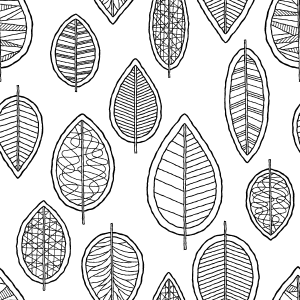


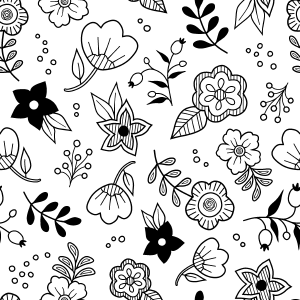


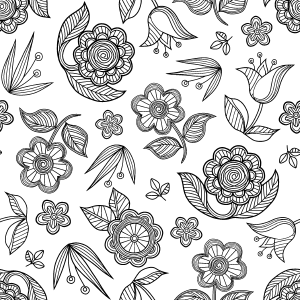


Nordic style, cloth handle (brush) 北欧風・布の柄(ブラシ)




Other materials by 背景職人の館


Popular “Material catalog” materials


New materials




-
 MVP ◆This user has contributed greatly to the management of the community, by posting many great responses to the questions asked. Once every three months, MVPs are determined based on the points earned during that period and will be recognized accordingly.
 -
 New Valuable Player (NVP) ◆These are the next-best contributors to the community after MVPs. This is awarded to users who have not yet won an MVP award, based on the number of points they have earned.
 -
 Official Expert ◆Chosen out of all MVP awardees, who are already proof of excellence, this is a testimony of outstanding correspondence in the community. After careful screening, they are appointed by CELSYS and assume their position.Note: Formally called “Evangelists”
 -
 Official Moderator of CELSYS ◆Moderators are official CELSYS staff members who are fluent in Japanese as well as various other languages. Moderators are not experts on the software or illustration, so they are not able to directly answer your questions. However, moderators provide communication and language support to ensure that everyone can smoothly communicate with each other.
 -
 CELSYS official accountThe Official Administrator Account