



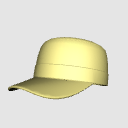
I want to draw a work cap more easily.
If you are worried, please try using this 3D material.
Because I can adjust the size and orientation freely
You can get crispy and Atari by the angle you want to draw.
Because I can adjust the direction of the collar, please use it in the shape of the favor!
『もっと簡単にワークキャップ描きたいな~』
とお悩みでしたら、この3D素材を使ってみてください。
大きさ・向きなどを自由に調整できるので
描きたいアングルでサクッとアタリが取れますよ。
ツバの向きも調整できるのでお好みの形にしてお使いください!

rendering settings [Method of lighting: Goo Lo]

The approximate size is as follows.

1 What does the material look like?
Looks like this is the feature.
(1) extract line of textures, no tone work


2 Do you have color variations?
Available in khaki, blue, white, red, and transparent.


So...
[レンダリング設定][照明の方式:グーロー]
大体のサイズは以下の通りです。
1.素材はどのように見えますか?
機能だとこのように表示されます。
(1)テクスチャのライン抽出有り、トーンワーク無し
2.カラーバリエーションはありますか?
カーキ、青、白、赤、透過を用意しています。
それではー
Material マテリアル
-
Khaki _Khaki カーキ_Khaki
-
White _white. 白_white
-
Through the _Transmission. 透過_Transmission
-
Green _Blue. 青_Blue
-
Chi _Red. 赤_Red





Configuration. 配置
-
default layout 初期レイアウト
Update history
Ver2
I was able to adjust the direction of the collar.
ver2
ツバの向きを調整できるようにしました
Old version


Other materials by AG_


Popular “3D object” materials





New materials





-
 MVP ◆This user has contributed greatly to the management of the community, by posting many great responses to the questions asked. Once every three months, MVPs are determined based on the points earned during that period and will be recognized accordingly.
 -
 New Valuable Player (NVP) ◆These are the next-best contributors to the community after MVPs. This is awarded to users who have not yet won an MVP award, based on the number of points they have earned.
 -
 Official Expert ◆Chosen out of all MVP awardees, who are already proof of excellence, this is a testimony of outstanding correspondence in the community. After careful screening, they are appointed by CELSYS and assume their position.Note: Formally called “Evangelists”
 -
 Official Moderator of CELSYS ◆Moderators are official CELSYS staff members who are fluent in Japanese as well as various other languages. Moderators are not experts on the software or illustration, so they are not able to directly answer your questions. However, moderators provide communication and language support to ensure that everyone can smoothly communicate with each other.
 -
 CELSYS official accountThe Official Administrator Account