




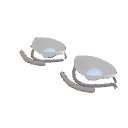
Clip Studio Paint를 사용하는 아티스트들을 위해 디자인된 3D 애니메이션 아이 레퍼런스입니다. A 3D anime eye reference designed for artists using Clip Studio Paint.
3D 모델을 Clip Studio Paint로 가져와 캔버스에 배치하세요. 나중에 더 쉽게 접근할 수 있도록 머티리얼 팔레트에 저장할 수도 있습니다.
2. 눈을 회전시키기객체 도구를 사용하여 모델을 회전시키고 다양한 각도에서 눈을 바라보세요. 이렇게 하면 그 모양과 시점에서 어떻게 변하는지 이해하는 데 도움이 됩니다.
3. 도면 참고 자료로 사용하기다양한 각도에서 애니메이션 눈을 그릴 때는 모델을 가이드로 활용하세요. 눈꺼풀, 눈 모양, 눈썹 위치, 깊이를 관찰하여 그림을 더 정확하고 자연스럽게 보이게 하세요.
4. 뷰 조정원하는 각도를 찾을 때까지 모델을 회전시키고 재배치하세요. 앞면, 측면, 그리고 3/4 뷰를 참고할 수 있습니다.
목적: 이 자료는 Clip Studio Paint 내에서 직접 회전 가능한 3D 레퍼런스를 제공함으로써, 다양한 시점에서 애니메이션 눈을 그리기 쉽게 하기 위해 만들어졌습니다.
Import the 3D model into Clip Studio Paint and place it on your canvas. You can also save it to your Material palette for easier access later.
2. Rotating the EyeUse the Object tool to rotate the model and view the eye from different angles. This helps you understand its shape and how it changes in perspective.
3. Using It as a Drawing ReferenceUse the model as a guide when drawing anime eyes from different angles. Observe the eyelids, eye shape, eyebrow placement, and depth to make your drawings more accurate and natural-looking.
4. Adjusting the ViewRotate and reposition the model until you find the angle you need. You can use it as a reference for front, side, and three-quarter views.
Purpose: This material is intended to make drawing anime eyes from different perspectives easier by providing a rotatable 3D reference directly inside Clip Studio Paint.
재료 Material

 문제 있는 소재 신고
CLIP STUDIO 계정이 없는 경우
- 제품/서비스명
- 자세한 문의 내용

 취득이 완료되었습니다.
 소재 저장 위치 보기
 가져오기 방법 알아보기


공개일 : 27 minutes ago
갱신일 : 27 minutes ago








-
 MVP ◆질문에 적절한 답변을 많이 게시하고 커뮤니티 운영에 크게 공헌한 사용자입니다. MVP는 3개월에 한 번, 그 사이에 획득한 포인트를 바탕으로 결정하고 표창을 실시하고 있습니다.
-
 NVP(New Valuable Player) ◆MVP 다음으로 커뮤니티 운영에 공헌한 사용자입니다. 이제까지 MVP 수상 경험이 없는 분 중에서 획득한 포인트를 바탕으로 결정하여 표창을 실시하고 있습니다.
-
 공식 엑스퍼트 ◆뛰어난 응답자의 증표인 MVP수상자 중에서 선택된 커뮤니티에서 가장 뛰어난 응답자의 증표입니다. 심사를 거쳐서 저희 회사에서 의뢰할 경우 취임되십니다.※ 옛 명칭 '에반젤리스트'
-
 셀시스 공인 모더레이터 ◆모더레이터는 일본어와 기타 언어로 말할 수 있는 셀시스 공인 스태프입니다. 소프트웨어나 창작 전문가가 아니므로 직접 의문을 해결할 수는 없지만 여러분이 순조롭게 소통할 수 있도록 언어나 커뮤니케이션 측면에서 지원합니다.
-
 셀시스 공식운영에 관련된 공식 계정입니다.