


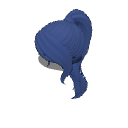
앞머리가 있는 하이 포니테일 3D 헤어 (High Ponytail 3D Hair with Bangs) High Ponytail 3D Hair with Bangs


Blender에서 머리카락 소재의 크기를 신중하게 조정하고, 머리에 완벽하게 맞도록 여러 차례 미세 조정을 했습니다. 사용 준비가 되어 있으니, 모든 것이 최적의 핏을 위해 세밀하게 조정되었다는 확신을 가지고 마음껏 즐길 수 있습니다!
머리카락은 세 부분으로 나뉘어 있어요. 포니테일과 앞머리를 켜거나 끌거나 이동 할 수 있습니다
하지만 머리카락은 단일 메쉬로 이루어져 있어 포즈를 취할 수 없습니다. 😔
이 머리는 "3D 드로잉 피규어-버전 2 (여성)" 모델에 맞춰져 있습니다. 머리가 크거나 작은 크기에 맞게 스케일을 조정해 주세요.

머리에 재료를 붙이는 거 잊지 마세요!
1단계: 3D 피규어를 캔버스에 가져오세요.
(먼저 이걸 꼭 하세요. 3D 피규어를 포즈한 후에 그렇게 하면, 머리카락이 포즈와 제대로 맞거나 정렬되지 않습니다.)
2단계: 3D 피규어를 선택한 상태(같은 레이어에서)에서 머리카락 재질을 가져오세요. 재료가 피규어에서 멀리 떨어진 곳에서 생성되더라도 걱정하지 마세요; 그냥 다음 단계로 진행하세요.

3단계: 렌치 아이콘을 클릭하여 하위 도구 상세 팔레트를 열고 객체 목록 탭으로 이동하세요.

4단계: 머리카락 재질을 리스트의 3D 피규어에 드래그 앤 드롭하여 하위 레이어로 만듭니다.

5단계: 바로 아래의 첨부점 메뉴를 펼친 후 헤드를 선택하세요.

머리카락은 자동으로 머리와 일직선이 맞아집니다.
이제 머리카락이 인형에 붙어 있으므로, 어떤 포즈를 잡아도 머리를 자연스럽게 따라갑니다.
I carefully adjusted the hair material’s size in Blender and made numerous fine-tunings to ensure it fits perfectly when attached to the head. It’s ready to use, so you can enjoy it with confidence knowing everything has been fine-tuned for the best fit!
The hair comes in 3 separate parts. You can toggle the ponytail and bangs on or off, or move them
however, the hair is a single mesh and is not poseable. 😔
This hair is fitted for the "3D drawing figure-Ver.2 (Female)" model. Please adjust the scale for larger or smaller heads.
Don’t forget to attach the material to the head!
Step 1: Import your 3D figure onto the canvas.
(Make sure to do this first. If you do it after posing the 3D figure, the hair will not fit or align correctly with the pose.)
Step 2: With your 3D figure selected (on the same layer), import your hair material. Don't worry if the material spawns far away from the figure; just proceed to the next step.
Step 3: Click the wrench icon to open the Sub Tool Detail palette and navigate to the Object list tab.
Step 4: Drag and drop the hair material onto the 3D figure in the list to make it a child layer.
Step 5: Expand the Attachment point menu directly below and select Head.
The hair will automatically align with the head.
Since the hair is now attached to the figure, it will follow the head seamlessly no matter what pose you apply.
재료 Material

 문제 있는 소재 신고
CLIP STUDIO 계정이 없는 경우
다음 내용을 읽고 메일로 문의해 주시기 바랍니다.
- 제품/서비스명
- 자세한 문의 내용

사용할 수 있는 소프트웨어
-
 CLIP STUDIO PAINT PRO/EX
-
CLIP STUDIO PAINT DEBUT
 재다운로드
'연간 이용액 / 월정액 플랜'으로 인증하지 않은 기기에서도 이용하려면 GOLD 또는 CLIPPY로 구입해 주시기 바랍니다.

가격
10

보유 잔액
 취득하기
 구입이 완료되었습니다.
 소재 저장 위치 보기









배지
-
 MVP ◆질문에 적절한 답변을 많이 게시하고 커뮤니티 운영에 크게 공헌한 사용자입니다. MVP는 3개월에 한 번, 그 사이에 획득한 포인트를 바탕으로 결정하고 표창을 실시하고 있습니다.
-
 NVP(New Valuable Player) ◆MVP 다음으로 커뮤니티 운영에 공헌한 사용자입니다. 이제까지 MVP 수상 경험이 없는 분 중에서 획득한 포인트를 바탕으로 결정하여 표창을 실시하고 있습니다.
-
 공식 엑스퍼트 ◆뛰어난 응답자의 증표인 MVP수상자 중에서 선택된 커뮤니티에서 가장 뛰어난 응답자의 증표입니다. 심사를 거쳐서 저희 회사에서 의뢰할 경우 취임되십니다.※ 옛 명칭 '에반젤리스트'
-
 셀시스 공인 모더레이터 ◆모더레이터는 일본어와 기타 언어로 말할 수 있는 셀시스 공인 스태프입니다. 소프트웨어나 창작 전문가가 아니므로 직접 의문을 해결할 수는 없지만 여러분이 순조롭게 소통할 수 있도록 언어나 커뮤니케이션 측면에서 지원합니다.
-
 셀시스 공식운영에 관련된 공식 계정입니다.