



언더필 과정을 가속화합니다. speeds up the underfill process.
질감이 있는 브러시에서는 잘 작동하지만, 단순한 둥근 브러시가 가장 잘 맞을 수도 있습니다.
- 래스터 레이어만 사용할 수 있습니다.
- 어떤 색상이든 사용할 수 있습니다
사용법:
- 마감된 도형(선에 틈이 없는 것)을 그리세요.
- 자동 행동 버튼을 눌러.

선은 메인 드로잉 색상으로 만들어야 하며, 기본 색상 채우기는 선택한 서브 드로잉 색상으로 만듭니다. 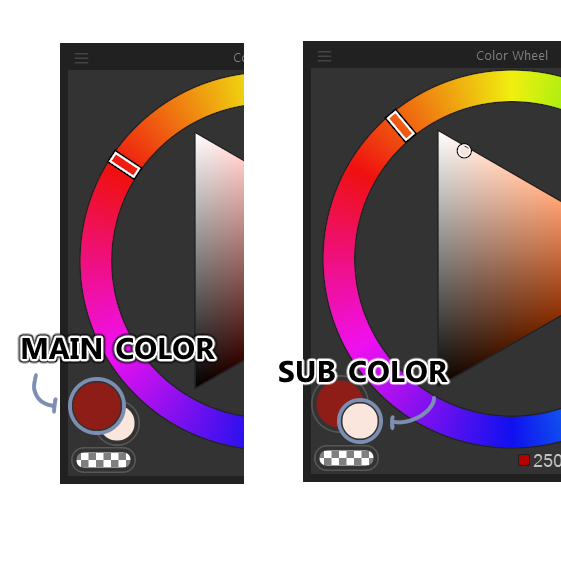

레이어 순서를 조정해서 언더필 효과를 만듭니다.
팁: 자동 행동이 사용할 때마다 이름을 반복하므로, 혼동을 피하려면 레이어 이름을 그에 맞게 변경하세요.
It works with brushes that have texture, but a simple round brush might work best.
- Raster layers Only.
- Any color can be used
Use:
- Draw a closed figure (no gaps in the linework)
- Press the auto action button
Linework should be created using the Main drawing color; the base color fill will be created using the Sub drawing color of your choosing.
Adjust the layer order to create the underfill effect.
Tip: Since the auto-action repeats names each time its used, rename the layers accordingly to avoid confusion.


'오토 액션'의 인기 소재




신규 소재



배지
-
 MVP ◆질문에 적절한 답변을 많이 게시하고 커뮤니티 운영에 크게 공헌한 사용자입니다. MVP는 3개월에 한 번, 그 사이에 획득한 포인트를 바탕으로 결정하고 표창을 실시하고 있습니다.
 -
 NVP(New Valuable Player) ◆MVP 다음으로 커뮤니티 운영에 공헌한 사용자입니다. 이제까지 MVP 수상 경험이 없는 분 중에서 획득한 포인트를 바탕으로 결정하여 표창을 실시하고 있습니다.
 -
 공식 엑스퍼트 ◆뛰어난 응답자의 증표인 MVP수상자 중에서 선택된 커뮤니티에서 가장 뛰어난 응답자의 증표입니다. 심사를 거쳐서 저희 회사에서 의뢰할 경우 취임되십니다.※ 옛 명칭 '에반젤리스트'
 -
 셀시스 공인 모더레이터 ◆모더레이터는 일본어와 기타 언어로 말할 수 있는 셀시스 공인 스태프입니다. 소프트웨어나 창작 전문가가 아니므로 직접 의문을 해결할 수는 없지만 여러분이 순조롭게 소통할 수 있도록 언어나 커뮤니케이션 측면에서 지원합니다.
 -
 셀시스 공식운영에 관련된 공식 계정입니다.