



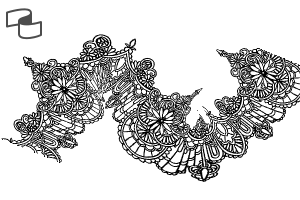
이 브러시 세트에는 Clip Studio Paint용 4가지 종류의 레이스 리본 브러시가 포함되어 있습니다. 이 브러시들은 옷, 액세서리, 배경 장식에 꽃무늬와 장미 디테일을 더 효율적으로 추가할 수 있도록 설계되었습니다.
이 세트에 포함된 내용:
- 플로럴 레이스 테더
- 드레이프 플로럴 레이스
- 로즈 메시 레이스
- 장미 드레이프 레이스
This brush set contains 4 types of lace ribbon brushes for Clip Studio Paint. These brushes are designed to help you add floral and rose details to clothing, accessories, or background decorations more efficiently.
Included in this set:
- Floral Lace Border
- Draped Floral Lace
- Rose Mesh Lace
- Rose Draped Lace


레이스 보더 Lace Border


'Oos'님의 다른 소재


'소재집'의 인기 소재


신규 소재


-
 MVP ◆질문에 적절한 답변을 많이 게시하고 커뮤니티 운영에 크게 공헌한 사용자입니다. MVP는 3개월에 한 번, 그 사이에 획득한 포인트를 바탕으로 결정하고 표창을 실시하고 있습니다.
 -
 NVP(New Valuable Player) ◆MVP 다음으로 커뮤니티 운영에 공헌한 사용자입니다. 이제까지 MVP 수상 경험이 없는 분 중에서 획득한 포인트를 바탕으로 결정하여 표창을 실시하고 있습니다.
 -
 공식 엑스퍼트 ◆뛰어난 응답자의 증표인 MVP수상자 중에서 선택된 커뮤니티에서 가장 뛰어난 응답자의 증표입니다. 심사를 거쳐서 저희 회사에서 의뢰할 경우 취임되십니다.※ 옛 명칭 '에반젤리스트'
 -
 셀시스 공인 모더레이터 ◆모더레이터는 일본어와 기타 언어로 말할 수 있는 셀시스 공인 스태프입니다. 소프트웨어나 창작 전문가가 아니므로 직접 의문을 해결할 수는 없지만 여러분이 순조롭게 소통할 수 있도록 언어나 커뮤니케이션 측면에서 지원합니다.
 -
 셀시스 공식운영에 관련된 공식 계정입니다.