



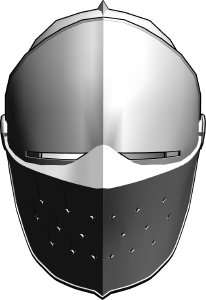
단순한 기사 헬멧 모형이었다.
블렌더로 만들었어요.
A simple model of a knight helmet.
Made with Blender.
모델은 다운로드 탭에서 볼 수 있어야 하며, 그 후 캔버스로 드래그할 수 있습니다.
모델은 Clip Studio 페인트에서 이렇게 보여야 합니다:

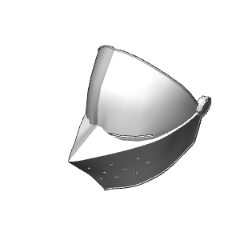
메인 폴더에는 바이저와 실제 헬멧 두 개의 메시가 들어 있습니다. 이 두 가지는 완전히 분리될 수 있습니다:

바이저의 경우, 원점이 옆에 있는 나사 주위에 배치되어 있어 위아래로 더 자연스럽게 움직일 수 있습니다:

포즈를 더 쉽게 취하기 위해 모델을 3D 캐릭터의 머리에 부착 지점으로 부착하는 것을 추천합니다:

귀에 약간의 클리핑이 있을 수 있으니, 무시하거나 3D 캐릭터 머리 크기를 바꿔서 문제가 해결될 때까지 조절할 수 있습니다.


The model should be available in the downloads tab, after which it can be dragged onto the canvas.
The model should look like this in Clip Studio paint:
The main folder contains 2 meshes, being the visor and the actual helm. These can be fully separated:
For the visor, the origin point is placed around the screw on the side, so it can be moved up and down more naturally:
To make posing easier, I recommend attaching the models to the head of the 3-D character with an attachment point:
There will be some clipping with the ears, which you can either ignore, or you can change the dimensions of the 3D character’s head until the issue is resolved.
카테고리 1 Category 1








'aBookshelf'님의 다른 소재


'소재집'의 인기 소재


신규 소재




배지
-
 MVP ◆질문에 적절한 답변을 많이 게시하고 커뮤니티 운영에 크게 공헌한 사용자입니다. MVP는 3개월에 한 번, 그 사이에 획득한 포인트를 바탕으로 결정하고 표창을 실시하고 있습니다.
 -
 NVP(New Valuable Player) ◆MVP 다음으로 커뮤니티 운영에 공헌한 사용자입니다. 이제까지 MVP 수상 경험이 없는 분 중에서 획득한 포인트를 바탕으로 결정하여 표창을 실시하고 있습니다.
 -
 공식 엑스퍼트 ◆뛰어난 응답자의 증표인 MVP수상자 중에서 선택된 커뮤니티에서 가장 뛰어난 응답자의 증표입니다. 심사를 거쳐서 저희 회사에서 의뢰할 경우 취임되십니다.※ 옛 명칭 '에반젤리스트'
 -
 셀시스 공인 모더레이터 ◆모더레이터는 일본어와 기타 언어로 말할 수 있는 셀시스 공인 스태프입니다. 소프트웨어나 창작 전문가가 아니므로 직접 의문을 해결할 수는 없지만 여러분이 순조롭게 소통할 수 있도록 언어나 커뮤니케이션 측면에서 지원합니다.
 -
 셀시스 공식운영에 관련된 공식 계정입니다.