


기본 디지털 일러스트 브러쉬 (Basic Digital Illustration Brushes) Basic Digital Illustration Brushes
콘텐츠 ID:1928226
-
11,392


기본 서클 및 기본 팁으로 만든 브러시 무리. 기본 브러시의 확장으로 생각하십시오. A bunch of brushes made from the basic circle & basic tips. Think of it as an extension of the default brushes.


- Velocity & Tilt가 있는 펜 - G 펜의 기본 변형.
- 중간 압력 펜 - 많은 테이퍼없이 라인을 즐기는 사람들을 위해.
- 속도를 가진 중간 압력 - 속도의 자연스러운 수축을 위해 속도 제어가 추가되었습니다. 약간 거칠다.
- 거친 중간 압력 - 더 유기적 인 느낌을 위해.
- 저압 - 압력이 거의없는 펜. 미세 라이너에 익숙한 사람들에게 좋습니다.
- Needly Ink - 압력에 Extreme Lows & Highs가있는 펜.
- 기본 지터 펜 - 스플로치 잉크.
- 스프레이 중간 압력 - 약간 거친 느낌을 남기는 스프레이 펜입니다. 스프레이 설정을 변경하면 끝없는 변형이 발생합니다.
- 듀오 팁 - 두 개의 점. 다른 효과의 각도를 변경합니다.
- 듀오 팁 - 다음 선 - 팁 각도가 변경된 예입니다.
- Comet Runner Smooth - 내 혜성 러너 브러시, 입자 잉크 브러시의 변형.
- Comet Runner 별칭 - 혜성 러너의 단색 변형으로, 이전에 출판 한 브러시의 복제본입니다 (따라서 자유롭게 삭제하십시오).


- 하드 스퀘어 - 하드 스퀘어 팁이있는 펜. 모서리에 적합합니다.
- 하드 다이아몬드 스퀘어 - 같은 펜이지만 회전했습니다. 자유롭게 삭제하십시오.
- 둥근 사각형 - 둥근 모서리가있는 사각형입니다.
- 둥근 삼각형 - 삼각형 끝이있는 펜은 둥근 가장자리를 가지고 있습니다.
- 둥근 사각형 서예 - 둥근 사각형의 서예 변형. 필요에 따라 각도를 Chnage.
- 하드 사각형 사각형 서예 - 날카로운 가장자리 사각형 서예 변형. 단색으로 설정하면 앨리어싱을 자유롭게 변경할 수 있습니다.
- 압력 서예 - 압력에 따라 변하는 서예 펜으로 글쓰기에 적합합니다. 모든 서예 브러시에 필요한 각도를 조정하십시오.
- 리본 서예 - 서예 브러시의 매우 얇은 너비 변형. 리본에 좋습니다!
- 리본 서예 러프 - 재미있는 유기농 서예 브러시.
- (사진, 죄송합니다!) 다이아몬드 브러시 - 길이가 긴 다이아몬드입니다. 두께와 각도를 수정하면 다양한 캘리그래피 결과를 얻을 수 있습니다.

- 기본 연필 - 가장 기본적인 디지털 연필입니다. 텍스처나 고유한 팁을 사용하지 않습니다. 대신 스프레이 도구를 사용하여 텍스처와 분산을 생성합니다. 팁을 교체하면 이 펜슬과 어두운 연필이 깔끔한 결과를 얻을 수 있습니다. :o
- 어두운 연필 - 약간의 조정으로, 이것은 기본 연필의 어두운 버전입니다. 기본 연필의 2H 하드에 부드러운 연필.
- 스케치 브러시 러프 (Sketchbrush Rough) - 내가 출판 한 두 번째 브러시의 약간의 압력 변화로 오늘날까지도 내가 가장 좋아하는 드로잉 도구 중 하나입니다.
- 듀오 컬러 스케쳐 - 당신은 결코 충분한 재미있는 낙서를 가질 수 없습니다. :)

- 다색 도트 마커 - 색상 지터가 적용된 일반 펜입니다. 원하는 만큼 양을 조정합니다.
- 폴카닷 - 고르지 않은 폴카닷 장식을 만듭니다.
- Funny Dot Maker - 멀티 컬러 마커의 간격 변형.
- Pen with Velocity & Tilt - Basic variation of the G pen.
- Medium Pressure Pen - For those who enjoy even lines without much taper.
- Medium Pressure with Speed - Added velocity control for a natural shrink on speed. Slightly rough.
- Rough Medium Pressure - For a more organic feelling.
- Low Low Pressure - Pen with very little pressure. Good for people used to fineliners.
- Needly Ink - Pen with Extreme Lows & Highs on pressure.
- Basic Jitter Pen - Splotchy ink.
- Spray medium Pressure - a spray pen that leaves a little grainy feeling. Changing the spray settings creates an endless amount of variation.
- Duo Tip - Two dots. Change the angle for a different Effect.
- Duo Tip - Following Line - An example of the tip angle changed.
- Comet Runner Smooth - A variation on my comet runner brush, a particle inker brush.
- Comet Runner Aliased - The monochrome variation of the Comet Runner, a duplicate of a brush I previously published (so feel free to delete it).
- Hard Square - Pen with a hard Square tip. Perfect for corners.
- Hard Diamond Square - The same pen but rotated. Feel free to delete it.
- Round Square - A square wiht rounded corners.
- Rounded Triangle - a pen with a triangle tip, has round edges.
- Rounded Square Calligraphy - Calligraphy variation of the round square. Chnage the angle as needed.
- Hard Rectangle Square Calligraphy - Sharp edges rectangle calligraphy variant. Set for monochrome, feel free to change the aliasing.
- Pressured Calligraphy - A calligraphy pen that changes with pressure, great for writing. Adjust angle as needed for all calligraphy brushes.
- Ribbon Calligraphy - a very thin width variation of a calligraphy brush. Great for, well, ribbons!
- Ribbon Calligraphy Rough - Fun organic calligraphy brush.
- (not pictured, sorry!) Diamond Brush - a diamond that is longer lengthwise. Modifying its thickness and angle provides a variety of calligraphic results.
- Basic Pencil - The most basic digital pencil. Does not use texture or a unique tip. Instead, it uses the spray tool for generating texture & variance. This and the Darker Pencil will have neat results if you replace the tip. :o
- Darker Pencil - With some slight adjustments, this is the darker version of the Basic Pencil. The Soft Pencil to the Basic Pencil's 2H hard.
- Sketchbrush Rough - A slight pressure variation on the second brush I ever published, still one of my favorite drawing utensils to this day.
- Duo Colored Sketcher - You can never have enough fun doodlers. :)
- Multicolor Dot Marker - A plain pen that has color jitter applied to it. Adjust the amounts as much as you want.
- Polkadot - Makes uneven polkadot decorations.
- Funny Dot Maker - A spaced out variation of the Multicolored Marker.
라운드 팁 Round Tip


각도 팁 Angular Tip


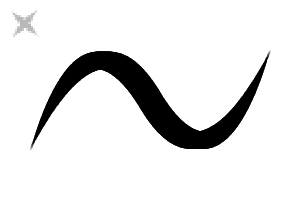

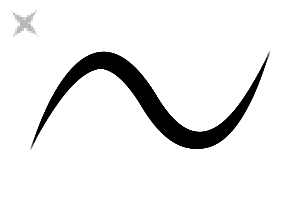
달필 Calligraphy


Particles & Other Strange Tips Particles & Other Strange Tips


스케치 Sketching


여분의 Extra


'saturns_day'님의 다른 소재


'소재집'의 인기 소재


신규 소재


-
 MVP ◆질문에 적절한 답변을 많이 게시하고 커뮤니티 운영에 크게 공헌한 사용자입니다. MVP는 3개월에 한 번, 그 사이에 획득한 포인트를 바탕으로 결정하고 표창을 실시하고 있습니다.
 -
 NVP(New Valuable Player) ◆MVP 다음으로 커뮤니티 운영에 공헌한 사용자입니다. 이제까지 MVP 수상 경험이 없는 분 중에서 획득한 포인트를 바탕으로 결정하여 표창을 실시하고 있습니다.
 -
 공식 엑스퍼트 ◆뛰어난 응답자의 증표인 MVP수상자 중에서 선택된 커뮤니티에서 가장 뛰어난 응답자의 증표입니다. 심사를 거쳐서 저희 회사에서 의뢰할 경우 취임되십니다.※ 옛 명칭 '에반젤리스트'
 -
 셀시스 공인 모더레이터 ◆모더레이터는 일본어와 기타 언어로 말할 수 있는 셀시스 공인 스태프입니다. 소프트웨어나 창작 전문가가 아니므로 직접 의문을 해결할 수는 없지만 여러분이 순조롭게 소통할 수 있도록 언어나 커뮤니케이션 측면에서 지원합니다.
 -
 셀시스 공식운영에 관련된 공식 계정입니다.