


제3의 규칙 (3x3 그리드 어떤 캔버스! ) (Rule of thirds ( 3x3 grid any canvas! )) Rule of thirds ( 3x3 grid any canvas! )
콘텐츠 ID:1875487
-
1,971


자동 조정 가능한 3x3 그리드가 포함된 30% 불투명도로 새 레이어를 만드는 자동 작업 세트입니다.
그것은 당신의 작곡에 대한 빠른 도움을 제공, "세 번째의 규칙"을 가진 사람들을 돕기 위해 만들어졌다!
그냥 명령 표시 줄에 설정 된 자동 작업 세트를 추가 하 고 그것은 한 번의 클릭에 당신을 위해 모든 것을 할 것 이다!
Auto action set which creates a new layer with 30% opacity which contains an automatically adjustable 3x3 grid.
It was made to help people with the "rule of thirds" , providing a quick help for your compositions!
Just add the Auto action set to your command bar and It would do everyhting for you in one click!
먼저, 자산을 다운로드하고 가져 오기




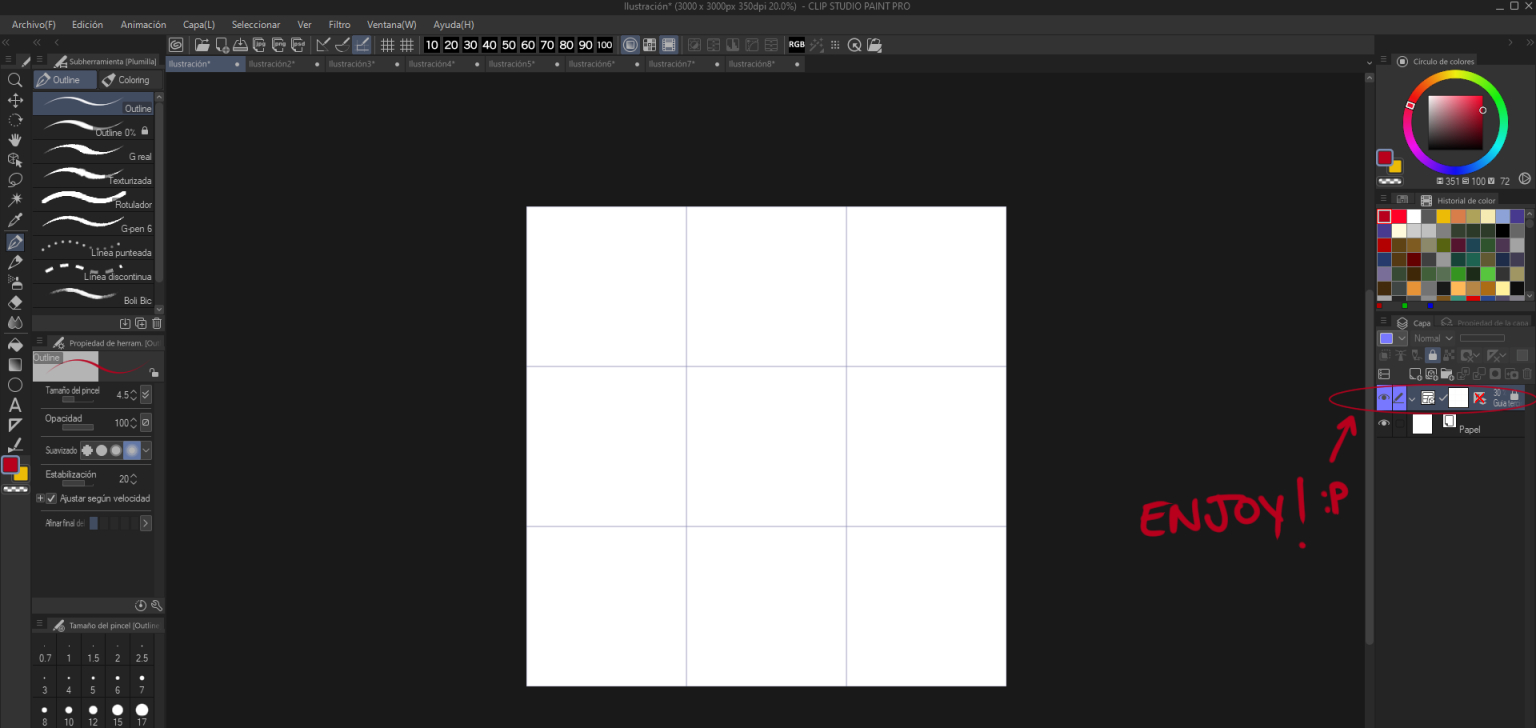
이 후 다음과 같은 몇 가지 단계를 따르십시오.
1. Rght는 명령 표시줄을 클릭하여 설정 메뉴를 열고"명령 표시줄 설정"을 선택합니다.

2. v 아이콘을 클릭하여 사용 가능한 다양한 옵션을 표시하고"자동 작업" 을 선택합니다.

3. "세 번째 규칙"이라는 자동 작업 집합을 선택하고 캔버스 3x3이라는 작업을추가합니다.

4. 이제 작업 세트가 명령 표시줄에 표시되어 클릭하기만 하면 됩니다!

5. 이렇게 하면 30% 불투명도와 캔버스를 동일한 부분으로 나누는 3x3 그리드가 있는 새 레이어가 생성됩니다. 그것은 어떤 캔버스 크기에 적응!
이것은 당신의 그림을 스케치 할 때 가장 잘 작동합니다. 이제 클릭 한 번만 사용할 수있는 "세 번째규칙"그리드가 있습니다!

즐기고 재미를!
추신 : 나는 불투명성의 양을 선택하고 내 요구에 맞게 조정레이어를 차단했다. 자신의 필요에 자산을 편집 주시기 바랍니다!
First, download the asset and import it
After this, follow this few steps:
1. Rght click on your command bar to open the setting menu of it and choose "command bar settings".
2. Click on the v icon to show the different options available and choose "Auto action"
3. Choose the auto action set called "rule of thirds" and add the action called Canvas 3x3.
4. Now the action set will appear in your command bar , to use it just click on it!
5.This will create a new layer with 30% opacity and a 3x3 grid that divides the canvas in equal parts. It adapts to any canvas size!
This works the best when sketching your drawing. Now you have your "rule of thirds" grid available with only 1 click !
Enjoy and have fun !
PS: I choose that amount of opacity and blocked the layer to adjust it to my needs. Feel free to edit the asset to your own needs!








'오토 액션'의 인기 소재


신규 소재


배지
-
 MVP ◆질문에 적절한 답변을 많이 게시하고 커뮤니티 운영에 크게 공헌한 사용자입니다. MVP는 3개월에 한 번, 그 사이에 획득한 포인트를 바탕으로 결정하고 표창을 실시하고 있습니다.
 -
 NVP(New Valuable Player) ◆MVP 다음으로 커뮤니티 운영에 공헌한 사용자입니다. 이제까지 MVP 수상 경험이 없는 분 중에서 획득한 포인트를 바탕으로 결정하여 표창을 실시하고 있습니다.
 -
 공식 엑스퍼트 ◆뛰어난 응답자의 증표인 MVP수상자 중에서 선택된 커뮤니티에서 가장 뛰어난 응답자의 증표입니다. 심사를 거쳐서 저희 회사에서 의뢰할 경우 취임되십니다.※ 옛 명칭 '에반젤리스트'
 -
 셀시스 공인 모더레이터 ◆모더레이터는 일본어와 기타 언어로 말할 수 있는 셀시스 공인 스태프입니다. 소프트웨어나 창작 전문가가 아니므로 직접 의문을 해결할 수는 없지만 여러분이 순조롭게 소통할 수 있도록 언어나 커뮤니케이션 측면에서 지원합니다.
 -
 셀시스 공식운영에 관련된 공식 계정입니다.