



イラストとコミックページ用のレイヤーテンプレートと補完的なオートアクション layers template and complementary auto-action for illustration and comic's page
これは自分用に作った色 分けレイヤー テンプレート で 、色付きのレイヤー を好 むので 、 すべてを管理 しやすく 、迷いすぎ ないように しています。
「PROGRESS」「eye_strain_prevention」「SKETCH」 は「Draft Layer」に設定され ており、 オンになって もエクスポート 時に 表示 されませんが、 ホームページには 表示されます。

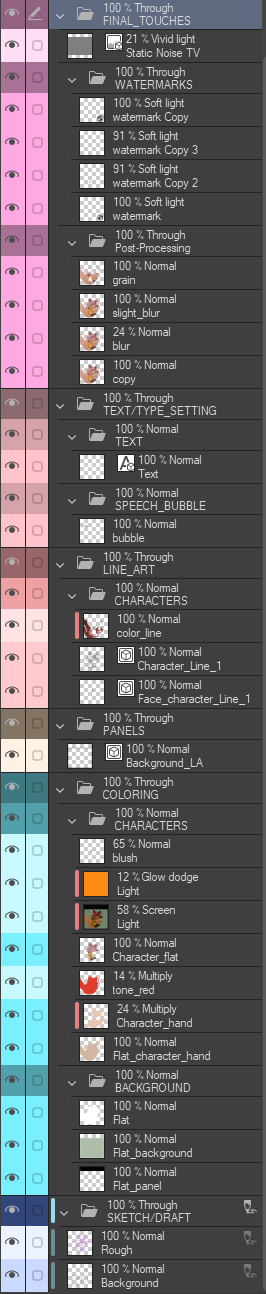
そして、こちら が すべての フォルダ を開いた 状態で の様 子です:
ご希望 のまま 追加 ・ 削除 を 遠慮なくご自由に!
私のAnsol イラスト の スペース はこう です ;

この素材は何をするのでしょうか?
このテンプレート はイラストに追加 し、 複数のネム付き フォルダ、 サブフォルダ 、 レイヤーを追加します
オートアクション のおかげで 、色 のやり直しや レイヤー作成 が簡単に できます
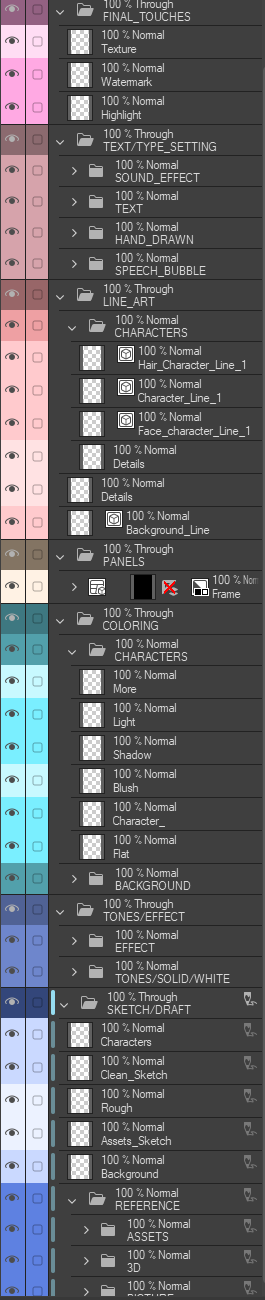
このテンプレート には8 つの主要な カテゴリーがあります ;
- 進捗 |これは画像素材が入ったフォルダで、イラストをどの状態で残したかを一目で思い出すのに役立ちます。
- 仕上げ |赤いマゼンタ
- テキスト/タイプ設定 |ピンクがかった赤
- 線画 |カッパーローズ
- パネル |茶色がかった灰色
- 塗り絵 |色あせた翡翠
- トーン/エフェクト |ダスキーブルー
- スケッチ/ドラフト |ブルージェイ
メインフォルダの上に1つの眼精疲労防止レイヤーが追加されました。
「PROGRESS」「eye_strain_prevention」「SKETCH」 は「Draft Layer」に設定され ており、 オンになって もエクスポート 時に 表示 されませんが、 ホームページには 表示されます。
(˶ˆ꒳ˆ˵)
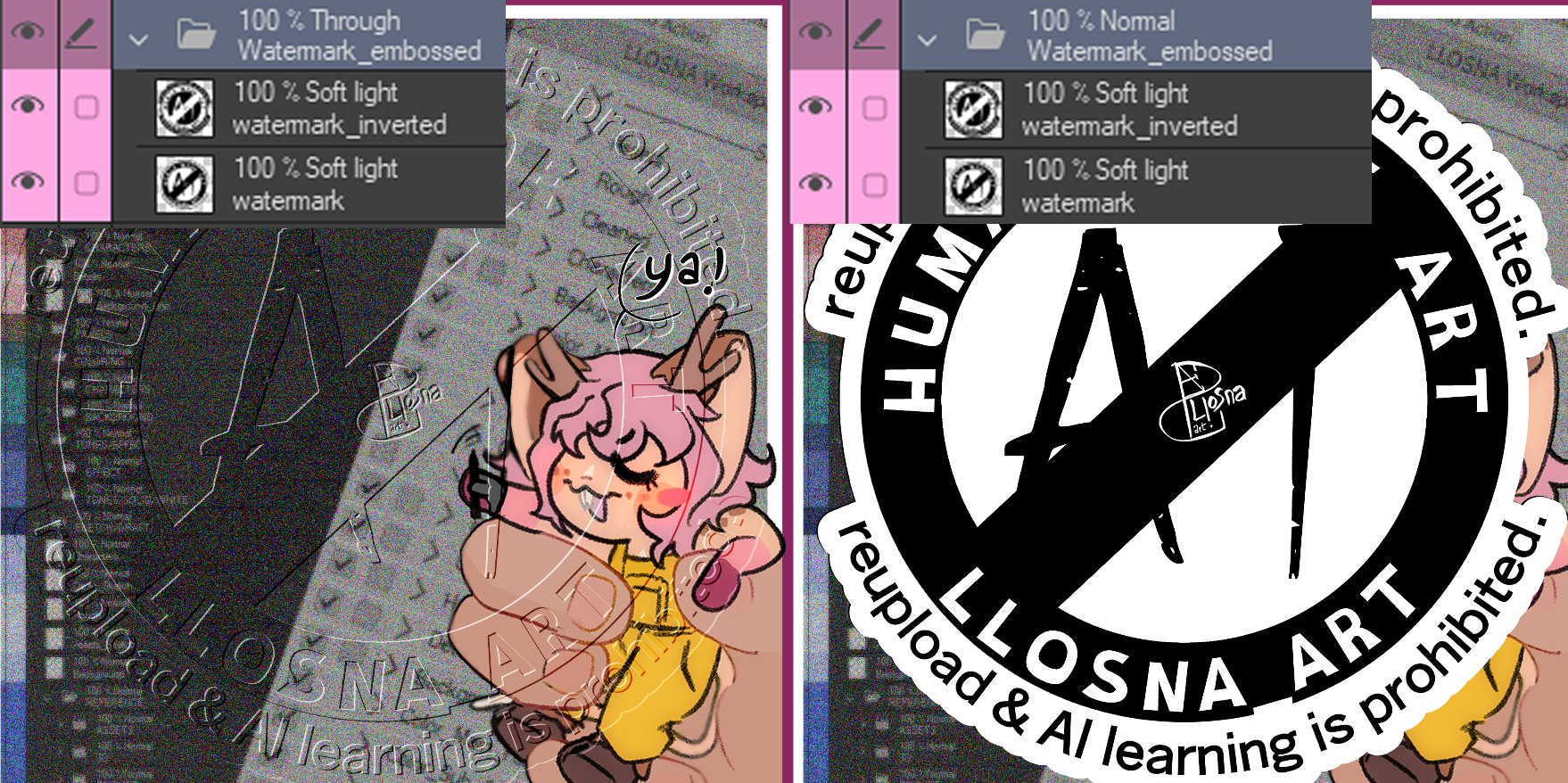
すべてのフォルダは「通過」に設定されています。
これにより、フォルダ 内の レイヤー の 個々の ブレンドモードが 、その 下の レイヤーに 渡 すことができます。
「Through」がないと 、ブレンドモード はフォルダ 自体のブレンドモードにデフォルトで 移行します。
例として画像を挙げます:「Through」と「Normal」に設定した場合
ദ്ദി ˉ͈̀꒳ˉ͈́ )✧
進捗フォルダ:
ページの好きな 場所に 配置 でき 、 追加すると キャンバス に合 います。8 つのバリエーションがあり、 それぞれ のメインフォルダの シェードで色分けされています 。
こちらがその 様子 です;
こちらがその 様子 です;

どうやって設定すればいいですか?
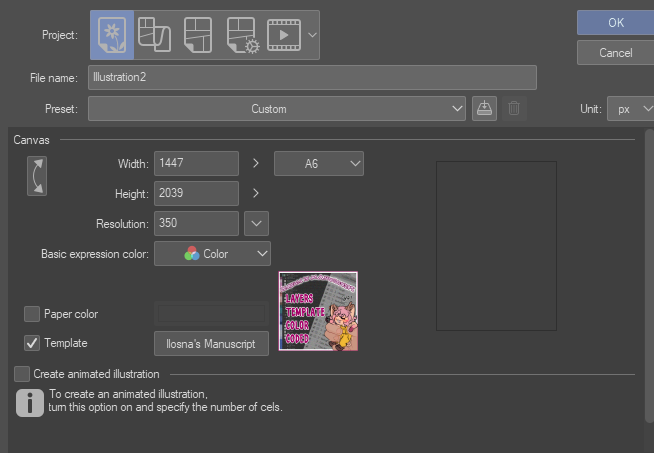
まず「template」ボタンのgをクリックし、「 downloaded material」 から検索 するか、検索オプションで 「LLOSNA」と入力 して 追加できます
あるいは 、素材から レイヤーに ドラッグ して移動させる方法もあります。
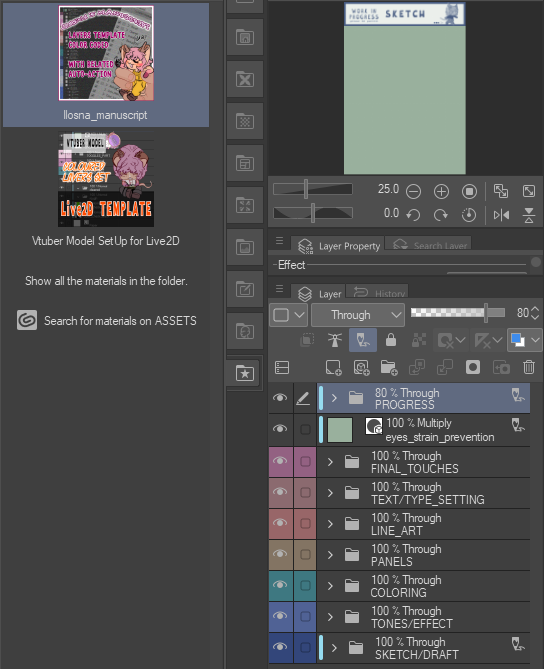
この 写真 はテンプレート を追加 したとき の見た目も示 しています!
そして、こちら が すべての フォルダ を開いた 状態で の様 子です:
できるだけシンプルに しよう としました
可能な限り、必要なもの を比較的揃えながら 。ご希望 のまま 追加 ・ 削除 を 遠慮なくご自由に!
私のAnsol イラスト の スペース はこう です ;
不要なフォルダやレイヤー は消 して、 自分のもの を追加 しました。ニーズに応じて :3
﹌﹌﹌﹌﹌﹌﹌﹌﹌﹌﹌﹌﹌﹌﹌﹌
それで、 ネム付き レイヤーと カラー レイヤーを追加 し、 レイヤー の 色 を切り替え る自動アクション を作り ました!
だから すべて を手動でやらなく ていいのです。
繰り返しますが、これはあくまで厳密 な最低限の操作で、特に名前付きの レイヤーを作る 場合は 、主に カラー アクションを使って レイヤー を簡単にリカラー できます。
ദ്ദി◝ ⩊ ◜.ᐟ
空の 自動アクションで 区切 られ、 できるだけ読み やすくしています

以上が私の話です! 良い 一日 を。 そして私の研究 に 興味 を持ってく れてありがとう (本当に時間がかかってしまいました笑)
૮₍ ´ ꒳ `₎ა
* マテリアルカタログの更新方法を理解しようと必死に戦っているので、一つ再作成し、画像内のテキストを進行フォルダから削除し、サムネイルのフォントを変えました
This is a colour coded layers template I made for myself, because I prefer to have my layers with colours, as it is easier for me to keep track of everything without getting too lost.
The "PROGRESS", "eye_strain_prevention" and "SKETCH" are set on "Draft Layer", wich mean they will not show when you export your work even if they are turned on, but they will still be shown on your homepage.
And here it is with all folder open :
Here's how my space looks for my Ansoll illustration ;
WHAT DOES THIS MATERIAL DO ?
This template add to your illustration, multiple nammed folders, subfolders and layers
The auto-action make it easier to recolor and create layers
The Template has eight main categories ;
- PROGRESS | This is a folder with Image material to help you remember in what state you left the illustration at in one simple look.
- FINAL TOUCHES | Reddish Magenta
- TEXT/TYPE SETTING | Pinkish Red
- LINE ART | Copper Rose
- PANELS | Brownish Grey
- COLORING | Faded Jade
- TONES/EFFECT | Dusky Blue
- SKETCH/DRAFT | Blue Jay
One Eye Strain Prevention layer was added on top of the main folders.
The "PROGRESS", "eye_strain_prevention" and "SKETCH" are set on "Draft Layer", wich mean they will not show when you export your work even if they are turned on, but they will still be shown on your homepage.
(˶ˆ꒳ˆ˵)
All folders are set on "Through";
It allows the individual blending modes of those layers in the folder to pass through to the layers below the folder.
Without "Through", the blending modes will default to the blend mode of the folder itself.
Here's a picture exemple : With set on "Through" and set on "Normal"
ദ്ദി ˉ͈̀꒳ˉ͈́ )✧
Progress Folder :
You can Place it where you want on the page, and it fit your canvas when added, there is eight variant, colored with their corresponding's main folder's shade.
Here how it looks ;
Here how it looks ;
HOW TO SET UP ?
You can add it first by clicking on the "template" button and searching it from "downloaded material"or writing "LLOSNA" in the search option
Or by dragging it to your layers, from your materials.
This picture also show how the template looks when added !
And here it is with all folder open :
I tried to keep it as basic as possible, all while having relatively what is needed.
Do not hesitate to add and remove as you wish !
Do not hesitate to add and remove as you wish !
Here's how my space looks for my Ansoll illustration ;
I erased the folders and layers I didn't need, and added my owns, depending of my needs :3
﹌﹌﹌﹌﹌﹌﹌﹌﹌﹌﹌﹌﹌﹌﹌﹌
Now with that, I created an auto-action that add nammed and colored layers, as well as just switch the color of the layers !
So I don't have to do everything manually.
Again, it's just the strict minimum, especially for creating ones with names, I mostly use the color action to easily recolor my layers.
ദ്ദി◝ ⩊ ◜.ᐟ
They are separated with empty auto-action to be as easily readable as possible
And that's all for me ! Have a nice day, and thanks for being interested in my work (it took me so long lmao)
૮₍ ´ ꒳ `₎ა
* fighting for my life understanding how to uptate material catalogue, so I just recreated one, edit to remove the text in the image from the progress folder and change the font in the thumbnails
ポップアップレイヤーテンプレート Pop-Up Layers Template

補完的なオートアクション Complementary Auto Action



"Llsona"さんの別の素材

"素材集"の人気素材


新着素材





バッジ
-
 MVP ◆質問に対して適切な回答を数多く投稿し、コミュニティの運営に大きく貢献したユーザーです。MVPは3ヶ月に一度、その間に獲得したポイントを元に決定し、表彰を行っています。
 -
 NVP (New Valuable Player) ◆MVPに次いでコミュニティの運営に貢献したユーザーです。これまでMVPの受賞経験のない方から、獲得したポイントを元に決定し、表彰を行なっています。
 -
 公式エキスパート ◆優れた回答者の証であるMVP受賞者の中からさらに選ばれた、コミュニティで最も優良な回答者の証です。審査を経て当社から依頼し就任いただいています。※旧名称「エバンジェリスト」
 -
 セルシス公認モデレーター ◆モデレーターは、日本語とその他の言語が話せるセルシス公認のスタッフです。ソフトウェアや創作のエキスパートではないので、直接疑問を解決することはできませんが、みなさんがスムーズにコミュニケーションできるように、言葉やコミュニケーションの側面からサポートします。
 -
 セルシス公式運営に関連した公式アカウントです。