



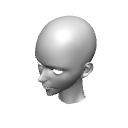
<CLIP studio="" paint="" ver3.04以上が必要になります="">It is a 3D Object of a woman's head that allows you to adjust the expression using the shape key function.
You can also move your eyes or mouth to only one side.</CLIP>
<CLIP STUDIO PAINT ver3.04以上が必要になります>
シェイプキーの機能を使用して表情を調整できる女性の頭部の3Dオブジェクトです。
目や口を片側だけ動かすこともできます。
*CLIP STUDIO PAINT Ver3.04 or higher is required.
Please be sure to check the version you are using in advance.


* Due to specifications, if multiple shape keys are used together, some shades will be darker.
It has a bone in the neck so you can angle it.

Operate the sliders for each item from "Shape" and "Shape key operation" in the 3D tool property.
(If you cannot find "Shape Key Operation" in the tool property in ver3.04 or higher, please check the "object" section of the sub tool detail.) )
* Actual data does not shade the eyes and teeth.
00_Eye_Close
Close your eyes (adjustable to both at the same time or to the left and right)

00_Eye_Close_Smile
Close your eyes and laugh (both at the same time or you can adjust one by one)

00c_EyeCorner_Move_Down
Lowering the eyes

00d_Eye_Surprise
Zoom vertically to open your eyes (both at the same time or adjustable to the left and right)

00e_Eyes_Move Down
Lower your eyes

01a_Eyebrow_Anger
Eyebrow movement / anger (both at the same time or one side can be adjusted)

01b_Eyebrow_Sad
Moving eyebrows and sadness (both at the same time or one can be adjusted)

01c_Eyebrow_Move_Down
Lower your eyebrows (you can adjust both at the same time or one at a time)

01c_Eyebrow_Move_Up
Raise your eyebrows (you can adjust both at the same time or one at a time)

02a_Mouth_Smaller
Make your mouth smaller

02b_Mouth_Smile
Mouth movement and laughter (both at the same time, left and right can be adjusted, combined with Mouth_Open)

02c_Mouth_Open
Open your mouth

02d_Mouth_Open_Anger (in combination with 02c_Mouth_Open)
Opening the mouth, anger, screaming

02d_Mouth_Open_TeethClose (in combination with 02c_Mouth_Open)
Keep your mouth open and close your teeth (may not mesh well, 50~60 recommended for both sides)

03a_Jaw_Sharpen
Thin and pointed jaws

03b_Jaw_Shorten
Shrink from the nose down

04_Nose_Sharpen
Pointed nose

05a_Face_Sharpen
Sharpen the front face line

05_Face_Width
Reduce the width of the face

99a_Neck_Shape
Changed the shape of the neck and trapezius muscles to be closer to reality

99z_Neck_Fold
Fold the neck (used when attaching to a headless character material)

※CLIP STUDIO PAINT ver3.04以上が必要になります。
必ずご使用のバージョンを事前にご確認ください。
<使用例・LT変換例>
※仕様上、複数のシェイプキーを併用すると一部の陰影が濃くなります
首にボーンが入っているので角度をつけることができます。
3Dツールプロパティの「シェイプ」「シェイプキーの操作」から各項目のスライダーを操作してください。
(ver3.04以上でツールプロパティに「シェイプキーの操作」が見つからない場合は、サブツール詳細の「オブジェクト」項をご確認ください。)
<シェイプキーリスト>
※実際のデータは目と歯に陰影が付きません
00_Eye_Close
目を閉じる(両方同時もしくは左右片方ずつ調整可)
00_Eye_Close_Smile
目を閉じる・笑い(両方同時もしくは左右片方ずつ調整可)
00c_EyeCorner_Move_Down
目じりを下げる
00d_Eye_Surprise
目を見開くように縦方向に拡大する(両方同時もしくは左右片方ずつ調整可)
00e_Eyes_Move Down
目を下げる
01a_Eyebrow_Anger
眉毛を動かす・怒り(両方同時もしくは左右片方ずつ調整可)
01b_Eyebrow_Sad
眉毛を動かす・悲しみ(両方同時もしくは左右片方ずつ調整可)
01c_Eyebrow_Move_Down
眉毛を下げる(両方同時もしくは左右片方ずつ調整可)
01c_Eyebrow_Move_Up
眉毛を上げる(両方同時もしくは左右片方ずつ調整可)
02a_Mouth_Smaller
口を小さくする
02b_Mouth_Smile
口を動かす・笑い(両方同時もしくは左右片方ずつ調整可、Mouth_Openと併用可)
02c_Mouth_Open
口を開ける
02d_Mouth_Open_Anger(02c_Mouth_Openと併用)
口を開ける・怒り、叫び
02d_Mouth_Open_TeethClose(02c_Mouth_Openと併用)
口を開けたまま歯だけ閉じる(上手く噛み合わない場合があります、双方50~60推奨)
03a_Jaw_Sharpen
顎を細く尖らせる
03b_Jaw_Shorten
鼻から下を縮める
04_Nose_Sharpen
鼻を尖らせる
05a_Face_Sharpen
正面のフェイスラインをシャープにする
05_Face_Width
顔の幅を縮小する
99a_Neck_Shape
首と僧帽筋の形状をリアル寄りに変更
99z_Neck_Fold
首を折りたたむ(頭部のないキャラクター素材に取り付ける際に使用)
Material マテリアル


Other materials by ys_cs


Popular “3D object” materials


New materials


Badges
-
 MVP ◆This user has contributed greatly to the management of the community, by posting many great responses to the questions asked. Once every three months, MVPs are determined based on the points earned during that period and will be recognized accordingly.
 -
 New Valuable Player (NVP) ◆These are the next-best contributors to the community after MVPs. This is awarded to users who have not yet won an MVP award, based on the number of points they have earned.
 -
 Official Expert ◆Chosen out of all MVP awardees, who are already proof of excellence, this is a testimony of outstanding correspondence in the community. After careful screening, they are appointed by CELSYS and assume their position.Note: Formally called “Evangelists”
 -
 Official Moderator of CELSYS ◆Moderators are official CELSYS staff members who are fluent in Japanese as well as various other languages. Moderators are not experts on the software or illustration, so they are not able to directly answer your questions. However, moderators provide communication and language support to ensure that everyone can smoothly communicate with each other.
 -
 CELSYS official accountThe Official Administrator Account