



It is a brush that draws double lines with adjustable line width and gap of line. 線の太さと線の間隔を調整可能な二重線を描くブラシです。
Since the line width and gap of line can be adjusted separately, the problem of "increasing the brush size to widen the gap of line makes the line thicker and difficult to draw", which is common with brushes that draw evenly spaced lines. Please use it when drawing decorations.
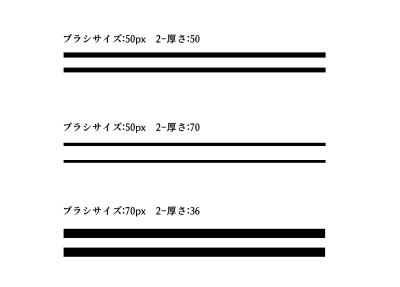
You can adjust the overall size with "brush size" and the spacing with "2-thickness".
At a thickness of 50, the spacing is twice as wide as the line width, and at a thickness of 33 or 34, the spacing and line width are almost the same.
If you are not sure how many values between the line width and the interval should be drawn just right, we recommend drawing a line with the vector layer so that you can adjust the numerical value later.
* Due to the structure of the brush, unintended lines may remain at the beginning and end of drawing.
It is made to be difficult to come out with post-correction, but please be careful when using it.
If you can draw the post-correction strongly, it will be even more difficult to appear, but it is not recommended because the deformation of the line after correction will be severe. If it is already difficult to draw lines in the post-correction state at the time of downloading, unintended lines may remain easily, but please weaken the correction or turn off the correction.
線の太さと線の間隔をそれぞれ別に調整できるので、等間隔線を描くブラシにありがちな「線の間隔を広げるためにブラシサイズを大きくすると線が太くなって描きづらい」という問題が緩和されます。装飾などを描く際にご利用ください。
「ブラシサイズ」で全体の大きさを、「2-厚さ」で間隔の広さを調整できます。
厚さ50で間隔の広さが線の太さの二倍に、厚さ33or34で間隔の広さと線の太さがほぼ同じになります。
線の太さと間隔がどのくらいの数値で描けばちょうどいいかがよく分からないという方は、ベクターレイヤーで線を引くと後から数値を調整できるのでおすすめです。
※ブラシの構造上、描き始めと描き終わりに意図しない線が残ることがあります。
後補正で出にくいようにはしていますが、使う際はご注意ください。
後補正を強く描けると更に出にくくなりますが、補正後の線の変形が激しくなるので推奨しません。ダウンロード時の後補正の状態で既に線が描きにくいという方は、意図しない線が残りやすくなる可能性がありますが、補正を弱めるか補正を切ってお使いください。


Popular “Brush” materials


New materials


Badges
-
 MVP ◆This user has contributed greatly to the management of the community, by posting many great responses to the questions asked. Once every three months, MVPs are determined based on the points earned during that period and will be recognized accordingly.
 -
 New Valuable Player (NVP) ◆These are the next-best contributors to the community after MVPs. This is awarded to users who have not yet won an MVP award, based on the number of points they have earned.
 -
 Official Expert ◆Chosen out of all MVP awardees, who are already proof of excellence, this is a testimony of outstanding correspondence in the community. After careful screening, they are appointed by CELSYS and assume their position.Note: Formally called “Evangelists”
 -
 Official Moderator of CELSYS ◆Moderators are official CELSYS staff members who are fluent in Japanese as well as various other languages. Moderators are not experts on the software or illustration, so they are not able to directly answer your questions. However, moderators provide communication and language support to ensure that everyone can smoothly communicate with each other.
 -
 CELSYS official accountThe Official Administrator Account