



【Notice of major version upgrade】
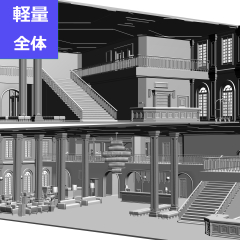
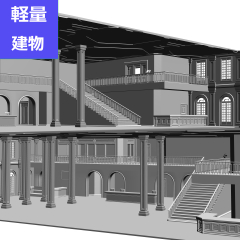
In addition to the previous original version, four lightweight versions have been added that can be used according to the work environment and usage scene.
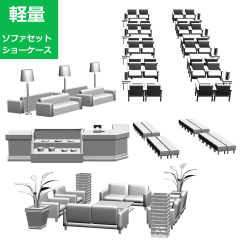
When you download a product, 5 files will be registered in the material palette at once. Please use it according to the environment and application.
* If you have already purchased, you can download it again at no additional charge.
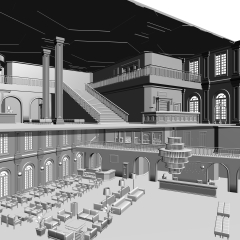
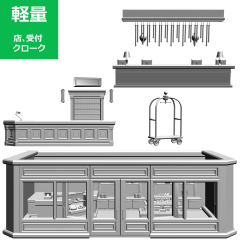
Hotel (3). In addition to the lobby and reception of the atrium hotel, it was built in the image of a luxurious and classic hotel with a cloakroom and multiple shops (exterior-only restaurant, gift shop, café). Lights (11 types), chandeliers, desks (3 types), stands (5 types), shelves (2 types), tables (3 types), sofas (5 types), cash registers, clocks, plants, monitors, menus, menu stands, signboards, cakes (5 types), sweets (5 types), cheese (2 types), ham, bottles (3 types), bottles (3 types), bags, boxes (7 types), elevators (doors and buttons), carts, cloakrooms There are 36 items: shop (3 types), rooms, pillars (3 types), stairs (2 types), railings, windows (2 types), walls, ceilings, floors, doors (6 types).
【大幅バージョンアップのお知らせ】
従来のオリジナル版に加え、作業環境や使用シーンに合わせて使い分けができる軽量版4種類を追加しました。
商品をダウンロードしていただくと、5ファイルが一括で素材パレットに登録されます。環境や用途に合わせてご活用ください。
※既に購入いただいた方は追加料金なしで再ダウンロード可能です。
ホテル③です。吹き抜けのホテルのロビー、レセプションの他にクロークや複数の店(外観のみのレストラン、ギフトショップ、喫茶)がある豪奢でクラシックなホテルをイメージして造りました。ライト(11種類)、シャンデリア、机(3種類)、台(5種類)、棚(2種類)、テーブル(3種類)、ソファー(5種類)、レジ、時計、植物、モニター、メニュー、メニュースタンド、看板、ケーキ(5種類)、お菓子(5種類)、チーズ(2種類)、ハム、ボトル(3種類)、ビン(3種類)、袋、箱(7種類)、エレベータ(扉・ボタン)、カート、クローク、店(3種類)、部屋、柱(3種類)、階段(2種類)、手すり、窓(2種類)、壁、天井、床、扉(6種類)の36アイテムです。


3D background (entire space) 3D背景(空間全体)
3D furniture 3D家具
Update history
【Notice of major version upgrade】
In addition to the previous original version, four lightweight versions have been added that can be used according to the work environment and usage scene.
When you download a product, 5 files will be registered in the material palette at once. Please use it according to the environment and application. We apologize for the inconvenience, but please delete unnecessary files.
※※ If you have already purchased, you can download it again at no additional charge.
【大幅バージョンアップのお知らせ】
従来のオリジナル版に加え、作業環境や使用シーンに合わせて使い分けができる軽量版4種類を追加しました。
商品をダウンロードしていただくと、5ファイルが一括で素材パレットに登録されます。環境や用途に合わせてご活用ください。お手数ですが不要なファイルは削除ください。
※※既に購入いただいた方は追加料金なしで再ダウンロード可能です。
Old version


Other materials by Oshino_Oku


Popular “Material catalog” materials


New materials


-
 MVP ◆This user has contributed greatly to the management of the community, by posting many great responses to the questions asked. Once every three months, MVPs are determined based on the points earned during that period and will be recognized accordingly.
 -
 New Valuable Player (NVP) ◆These are the next-best contributors to the community after MVPs. This is awarded to users who have not yet won an MVP award, based on the number of points they have earned.
 -
 Official Expert ◆Chosen out of all MVP awardees, who are already proof of excellence, this is a testimony of outstanding correspondence in the community. After careful screening, they are appointed by CELSYS and assume their position.Note: Formally called “Evangelists”
 -
 Official Moderator of CELSYS ◆Moderators are official CELSYS staff members who are fluent in Japanese as well as various other languages. Moderators are not experts on the software or illustration, so they are not able to directly answer your questions. However, moderators provide communication and language support to ensure that everyone can smoothly communicate with each other.
 -
 CELSYS official accountThe Official Administrator Account