



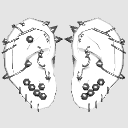
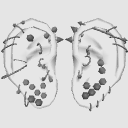
It is a set of ears, piercings.
It can be used together with head models.


■Material
There are no settings.
■Layout
There are no settings.
■Movable
There are no settings.
■How to use
Open the sub tool detail from the tool property object edit it from the list.


Please use it by showing/hiding each part from the list.
・Editing example・


Ear display off Piercing display off
・ List of recorded earrings ・

【Industrial】
Ball/Cone

【Spiral】
Right-handed ball/cone
Left-handed ball/cone

【Circular】
Ball/Cone

【Stud】
Ball × ball
Ball × Love Red
Cone × balls
Cone × Love Red

【Hoop】
The one with a rounded tip is called a ball, and the one with a sharp end is called a cone.
Each piercing can be moved independently.
There are some types that cannot be set depending on the part.
耳、ピアスのセットです。
頭部モデルなどと合わせて使えます。
■マテリアル
設定はありません。
■レイアウト
設定はありません。
■可動
設定はありません。
■使い方
ツールプロパティからサブツール詳細を開いてオブジェクトリストから編集します。
一覧から各パーツの表示/非表示を切り替えて使用してください。
・編集例・
耳表示オフ ピアス表示オフ
・収録ピアス一覧・
【インダストリアル】
ボール/コーン
【スパイラル】
右巻き・ボール/コーン
左巻き・ボール/コーン
【サーキュラー】
ボール/コーン
【スタッド】
ボール×ボール
ボール×ラブレッド
コーン×ボール
コーン×ラブレッド
【フープ】
先の丸いものをボール、尖っているものをコーンと表記しています。
ピアスはそれぞれ個別に動かすことができます。
部位によっては設定できない種類があります。
Material マテリアル
-
default material 初期マテリアル
Configuration 配置
-
default layout 初期レイアウト


Other materials by binta


Popular “3D object” materials


New materials




Badges
-
 MVP ◆This user has contributed greatly to the management of the community, by posting many great responses to the questions asked. Once every three months, MVPs are determined based on the points earned during that period and will be recognized accordingly.
 -
 New Valuable Player (NVP) ◆These are the next-best contributors to the community after MVPs. This is awarded to users who have not yet won an MVP award, based on the number of points they have earned.
 -
 Official Expert ◆Chosen out of all MVP awardees, who are already proof of excellence, this is a testimony of outstanding correspondence in the community. After careful screening, they are appointed by CELSYS and assume their position.Note: Formally called “Evangelists”
 -
 Official Moderator of CELSYS ◆Moderators are official CELSYS staff members who are fluent in Japanese as well as various other languages. Moderators are not experts on the software or illustration, so they are not able to directly answer your questions. However, moderators provide communication and language support to ensure that everyone can smoothly communicate with each other.
 -
 CELSYS official accountThe Official Administrator Account