


Animated human, easy grisaille layer template (アニメ塗り人間の、簡単グリザイユレイヤーテンプレート) アニメ塗り人間の、簡単グリザイユレイヤーテンプレート
Content ID:2272982
-
134


Grisaille shading difficult! I want to intuitively add colors and shade easily like anime painting! This layer template was created from that thought.
It is also possible to intuitively adjust the shadow according to the picture and situation.
グリザイユの陰影難しい!アニメ塗りみたいに直感的に色を置いて簡単に陰影をつけたい!という思いから作ったレイヤーテンプレートです。
絵柄やシチュエーションに合わせて直感的に陰影を調整することも可能です。
It is a grisaille-like layer template made by a person who can only paint anime, and who tried grisaille painting and was defeated.
For those who are not good at thinking about the intensity of shadows, I made it possible to establish with a single black pen except for the inherent colors.
●How to put out the material
Select from the new template (below the paper color column) or drag and drop from the material list onto the canvas.
●How to use
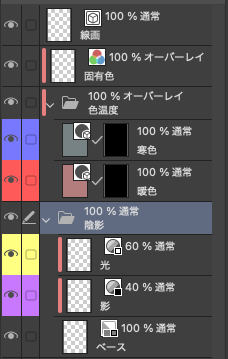
It consists of the following layer below:
I will explain them one by one.
Line art Monochrome is the basic color, please adjust the color etc. appropriately according to what you want to draw.
Feel free to paint without thinking about intrinsic colors and shadows.
Color temperature This is to change the color when shading, please use it for things that do not want gray shadows.
┗ Cool colors It is recommended to paint them in cool shades such as green and blue.
┗ Warm colors It is recommended to apply natural colors in warm shades such as red and yellow.
Shading It is used when writing light and shadows, conversely, there is no need to think about shadows outside of here.
┗ Light Please use it when applying light, it is adjusted so that it does not become too white no matter how dark it is, but if you feel that the light is strong or weak, fine-tune the layer density slider.
┗ Shadows Please use it when painting shadows, no matter how dark you write, it is adjusted so that it does not become too black, but if you feel that the shadows are dark or light, fine-tune the layer density slider.
Base When you start coloring, please paint from here first. It is also possible to draw a translucent one by changing the expression color setting to gray.
アニメ塗りしかできない、グリザイユ塗りに挑戦しては敗退した人間が作ったグリザイユっぽいレイヤーテンプレートです。
陰影の濃さを考えるのが苦手な人のために固有色以外は真っ黒なペン一本で成立するようにしました。
●素材の出し方
新規のテンプレートから選択(用紙色の欄の下にあります)、もしくは素材一覧からキャンバスにドラッグ&ドロップしてください。
●使い方
以下のレイヤーで構成されています。
一つ一つ解説を入れます。
線画 モノクロが基本色となっています、描きたいものによって適宜カラーなどに調整してください。
固有色 陰影などは考えず気軽に塗ってください。
色温度 陰影をつけた時の色味を変えるためのものです、灰色の影をつけたくないものにお使いください。
┗寒色 固有色が緑や青などの涼しげな色合いのものに塗るのがおすすめです。
┗暖色 固有色が赤や黄色などの暖かい色合いのものに塗るのがおすすめです。
陰影 光や影を書き込むときに使います、逆にいうとここ以外で陰影を考える必要はありません。
┗光 光を塗る時にお使いください、どんなに濃く書き込んでも白くなりすぎないように調整してありますが、もし光が強いまたは弱いと感じたらレイヤー濃度のスライダーを微調整してください。
┗影 影を塗る時にお使いください、どんなに濃く書き込んでも黒くなりすぎないように調整してありますが、もし影が濃いまたは薄いと感じたらレイヤー濃度のスライダーを微調整してください。
ベース 色塗りを始める時はまずここから塗ってください。表現色設定をグレーに変更することで半透明のものを描く事も可能です。





Popular “Layer template” materials


New materials




Badges
-
 MVP ◆This user has contributed greatly to the management of the community, by posting many great responses to the questions asked. Once every three months, MVPs are determined based on the points earned during that period and will be recognized accordingly.
 -
 New Valuable Player (NVP) ◆These are the next-best contributors to the community after MVPs. This is awarded to users who have not yet won an MVP award, based on the number of points they have earned.
 -
 Official Expert ◆Chosen out of all MVP awardees, who are already proof of excellence, this is a testimony of outstanding correspondence in the community. After careful screening, they are appointed by CELSYS and assume their position.Note: Formally called “Evangelists”
 -
 Official Moderator of CELSYS ◆Moderators are official CELSYS staff members who are fluent in Japanese as well as various other languages. Moderators are not experts on the software or illustration, so they are not able to directly answer your questions. However, moderators provide communication and language support to ensure that everyone can smoothly communicate with each other.
 -
 CELSYS official accountThe Official Administrator Account