



I auto action what I saw on Twitter that looks like it was taken with a flash. フラッシュで撮ったみたいにできるTwitterで見かけたものをオートアクションにしました。
It is a auto action that can be made in a photographic style that looks like it was taken by burning flash or light.
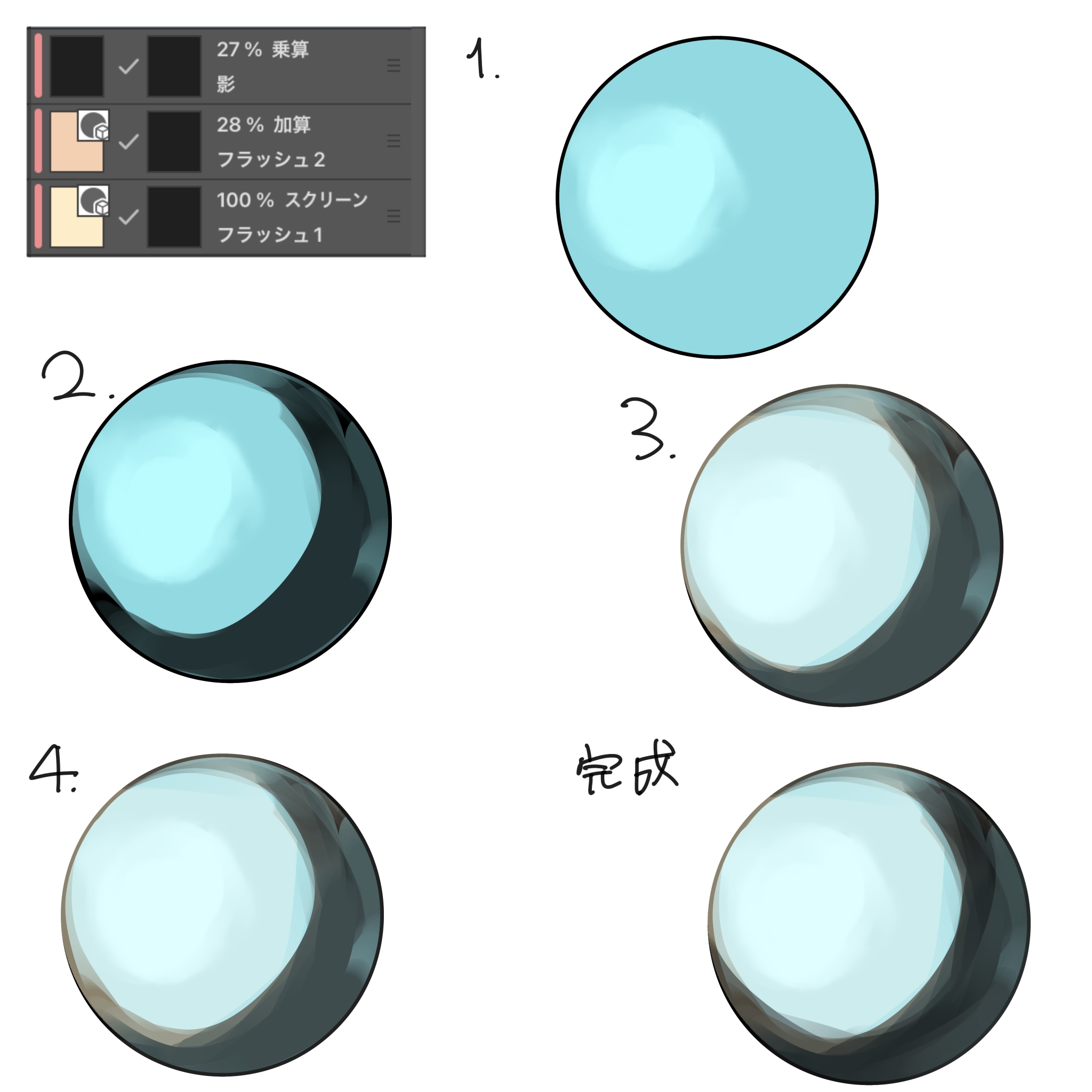
I saw it on Twitter, so I made it myself.
Since it is in a layer order that is easy for me to do, I recommend changing the layer order to your liking
It is the Twitter of the person who referred to ↓
https://x.com/omimi_0505/status/2046218858021969952?s=61
- Highlight with addition (place the light with the airbrush where the most light is shining)
- Place a shadow roughly.
- Brush the areas with a lot of light on the screen
- Add one more layer and adjust it if you like.
When drawing, it is easy to draw towards the layer mask when taking shapes, and adjust the color with layers.
フラッシュや光を焚いて撮ったような写真風にできるオートアクションです。
Twitterで見かけたので自分なりに作ってみました。
私がやりやすいレイヤーの順番になっているため、お好みでレイヤー順を変更することをお勧めします
参考にさせていただいた方のTwitterです↓
https://x.com/omimi_0505/status/2046218858021969952?s=61
- 加算でハイライト(一番光が当たっているところにエアブラシで光を置きます)
- 大体で影を置きます。
- スクリーンで光が多い部分をブラシで描きます
- お好みでもう一枚レイヤーを増やして調整します
描く時は、形をとる時はレイヤーマスクの方に描いて、色調整はレイヤーでするとしやすいです。








Other materials by えむちゃむ

Popular “Auto Action” materials


New materials


Badges
-
 MVP ◆This user has contributed greatly to the management of the community, by posting many great responses to the questions asked. Once every three months, MVPs are determined based on the points earned during that period and will be recognized accordingly.
 -
 New Valuable Player (NVP) ◆These are the next-best contributors to the community after MVPs. This is awarded to users who have not yet won an MVP award, based on the number of points they have earned.
 -
 Official Expert ◆Chosen out of all MVP awardees, who are already proof of excellence, this is a testimony of outstanding correspondence in the community. After careful screening, they are appointed by CELSYS and assume their position.Note: Formally called “Evangelists”
 -
 Official Moderator of CELSYS ◆Moderators are official CELSYS staff members who are fluent in Japanese as well as various other languages. Moderators are not experts on the software or illustration, so they are not able to directly answer your questions. However, moderators provide communication and language support to ensure that everyone can smoothly communicate with each other.
 -
 CELSYS official accountThe Official Administrator Account