


SF passage kit (bulkhead operation panel, luminous color compatible) (SF通路キット(隔壁操作パネル・発光カラー対応)) SF通路キット(隔壁操作パネル・発光カラー対応)
Content ID:2270629
-
23


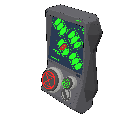
This is a partition wall operation panel 3D material for the SF passage kit series.
As a wall-mounted SF terminal, it can be used to create areas around passages and gates.
Supports switching between display display and button display, and changing the light emission color.
By combining it with the "SF passage kit (bulkhead type1/type2)", it can also be used for opening and closing gimmick production.
SF通路キットシリーズ向けの隔壁操作パネル3D素材です。
壁面設置型のSF端末として、通路・ゲート周辺の演出に使用できます。
ディスプレイ表示やボタン表示の切り替え、発光カラー変更に対応。
「SF通路キット(隔壁type1/type2)」と組み合わせることで、開閉ギミック演出にも使用可能です。


Material マテリアル


Other materials by wakS


Popular “3D object” materials


New materials




-
 MVP ◆This user has contributed greatly to the management of the community, by posting many great responses to the questions asked. Once every three months, MVPs are determined based on the points earned during that period and will be recognized accordingly.
 -
 New Valuable Player (NVP) ◆These are the next-best contributors to the community after MVPs. This is awarded to users who have not yet won an MVP award, based on the number of points they have earned.
 -
 Official Expert ◆Chosen out of all MVP awardees, who are already proof of excellence, this is a testimony of outstanding correspondence in the community. After careful screening, they are appointed by CELSYS and assume their position.Note: Formally called “Evangelists”
 -
 Official Moderator of CELSYS ◆Moderators are official CELSYS staff members who are fluent in Japanese as well as various other languages. Moderators are not experts on the software or illustration, so they are not able to directly answer your questions. However, moderators provide communication and language support to ensure that everyone can smoothly communicate with each other.
 -
 CELSYS official accountThe Official Administrator Account