



It is a set of embroidery cloth style pattern and cross stitch style pattern.
You can change the color with the layer color.
刺繍布風のパターンとクロスステッチ風のパターンのセットです。
レイヤーカラーで色変更が可能です。
In addition to being used as a pattern material, it is also possible to process pixel art in a cross-stitch style.
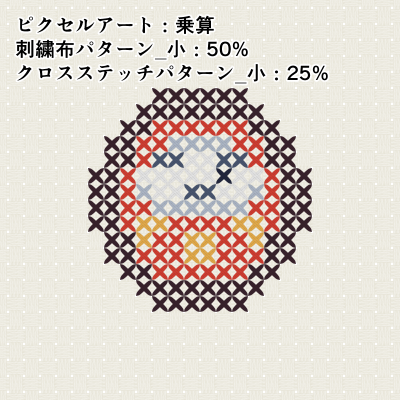
Processing Procedure
- Create a new canvas size in multiples of 8.
- Align the embroidery pattern with the center or the center point to the corner of the canvas.
- Align the cross-stitch pattern with the center or the center point at the corner of the canvas.
- Match the size of the embroidery fabric pattern and the cross-stitch pattern.
- Enlarge the original pixel art in multiples of 8 (using the nearest neighbor method).
- Place the enlarged pixel art on top of a layer of cross-stitch pattern.
- Align the enlarged pixel art with the cross-stitch pattern.
- Mask the cross-stitch pattern to match the enlarged pixel art transparency.
- Clipping enlarged pixel art with layer below.
- Set the combine mode of the enlarged pixel art to multiply or burn (linear).
パターン素材としてお使いいただける他、ピクセルアートをクロスステッチ風に加工することも可能です。
加工手順
- 新規キャンバスのサイズを8の倍数で作成する。
- 刺繡布パターンを中央、または中心点をキャンバスの角に合わせて配置する。
- クロスステッチパターンを中央、または中心点をキャンバスの角に合わせて配置する。
- 刺繡布パターンとクロスステッチパターンのサイズを合わせる。
- 原寸のピクセルアートを8の倍数で拡大する(ニアレストネイバー法使用)。
- 拡大したピクセルアートをクロスステッチパターンのレイヤーの上に配置する。
- 拡大したピクセルアートの位置をクロスステッチパターンに合わせる。
- 拡大したピクセルアート透過部分に合わせて、クロスステッチパターンにマスクをかける。
- 拡大したピクセルアートを下のレイヤーでクリッピングする。
- 拡大したピクセルアートの合成モードを乗算か焼き込み(リニア)に設定する。
Embroidery cloth pattern 刺繍布パターン


Cross-stitch pattern クロスステッチパターン







Other materials by せちる


Popular “Material catalog” materials


New materials




Badges
-
 MVP ◆This user has contributed greatly to the management of the community, by posting many great responses to the questions asked. Once every three months, MVPs are determined based on the points earned during that period and will be recognized accordingly.
 -
 New Valuable Player (NVP) ◆These are the next-best contributors to the community after MVPs. This is awarded to users who have not yet won an MVP award, based on the number of points they have earned.
 -
 Official Expert ◆Chosen out of all MVP awardees, who are already proof of excellence, this is a testimony of outstanding correspondence in the community. After careful screening, they are appointed by CELSYS and assume their position.Note: Formally called “Evangelists”
 -
 Official Moderator of CELSYS ◆Moderators are official CELSYS staff members who are fluent in Japanese as well as various other languages. Moderators are not experts on the software or illustration, so they are not able to directly answer your questions. However, moderators provide communication and language support to ensure that everyone can smoothly communicate with each other.
 -
 CELSYS official accountThe Official Administrator Account