


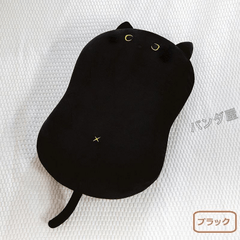

(1) Place the material on the canvas
Drag from the material palette to the canvas

(2) Adjust the size
Select the object tool and click on the material
Scale because the frame comes out (since it is a tiling material, it will be repeated infinitely even if it is enlarged)

(3) Adjust to the angle of the ground
Align with the perspective of the ground with free transform

(4) Cut out in the shape of the ground
Using layer mask, etc.,
Hide unnecessary parts

After rasterize
Add, delete, set tone, etc.
Let it blend in
①素材をキャンバスに置く
素材パレットからキャンバスにドラッグ
②サイズを調整
オブジェクトツールを選び、素材をクリック
枠が出るので拡大縮小(タイリング素材なので大きくしても無限に繰り返されます)
③地面の角度に合わせる
自由変形で地面のパースに合わせる
④地面の形に切り抜く
レイヤーマスクなどを使って、
いらない部分を非表示にする
ラスタライズしてから
書き足したり消したり、トーンを置くなどして
なじませてください


Other materials by 故障少々

Popular “Image material” materials





New materials








Badges
-
 MVP ◆This user has contributed greatly to the management of the community, by posting many great responses to the questions asked. Once every three months, MVPs are determined based on the points earned during that period and will be recognized accordingly.
 -
 New Valuable Player (NVP) ◆These are the next-best contributors to the community after MVPs. This is awarded to users who have not yet won an MVP award, based on the number of points they have earned.
 -
 Official Expert ◆Chosen out of all MVP awardees, who are already proof of excellence, this is a testimony of outstanding correspondence in the community. After careful screening, they are appointed by CELSYS and assume their position.Note: Formally called “Evangelists”
 -
 Official Moderator of CELSYS ◆Moderators are official CELSYS staff members who are fluent in Japanese as well as various other languages. Moderators are not experts on the software or illustration, so they are not able to directly answer your questions. However, moderators provide communication and language support to ensure that everyone can smoothly communicate with each other.
 -
 CELSYS official accountThe Official Administrator Account