


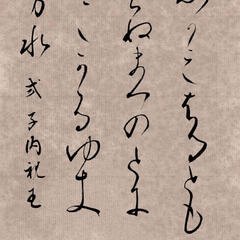

■ A sign calling attention to perverts and suspicious people. It can be used as it is as a image material. You can create a sense of perspective by using how to transform "free transform" etc. in "Zoom in, reduce, and rotate". ■変態・不審者への注意を呼びかける看板。画像素材としてそのまま利用できます。「拡大・縮小・回転」で変形方法「自由変形」等を使うと遠近感を出したりすることができます。

■ Example (1) free transform → How to add thickness
This material is a flat image, but you can easily express the thickness and three-dimensional effect by duplicate layer it, shifting it slightly, and changing the display color.
If you adjust the perspective with the free transform, it will blend naturally into the background.


■ Example (2) How to apply texture such as faintness and scratches
Stains, faints and scratches can be added by layering brushes and textured materials.
By layering grunge textures and noise with multiplication and overlay, you can easily express the old texture.
============
◆ Examples of use for horror ((1) free transform →how to add thickness) → ((2) How to apply textures such as faints and scratches) If you are an advanced user→, you can transform it or remove the image to create a horror atmosphere......

◆Examples of daily use
(1) free transform →how to add thickness) If you are → advanced, you can spice up a little scenery by devising a gaussian blur as it is......

■ 使用例① 自由変形 → 厚みの付け方
本素材は平面画像ですが、レイヤーを複製して少しずらし、表示色を変更することで簡単に厚みや立体感を表現できます。
自由変形で遠近感を調整すると、背景に自然になじみます。
■ 使用例② かすれ・傷などのテクスチャのつけ方
汚れ・かすれ・傷はブラシやテクスチャ素材を重ねることで追加できます。
グランジテクスチャやノイズを乗算・オーバーレイで重ねると、古びた質感を簡単に表現できます。
============
◆ホラー向けの使用例(①自由変形→厚みの付け方)→(② かすれ・傷などのテクスチャのつけ方)→上級者であれば変形させたり画像を削ればホラーな雰囲気に……
◆日常系向けの使用例
(①自由変形→厚みの付け方)→上級者であれば、そのままガウスぼかしなど一工夫すればちょっとした風景のスパイスに……


Other materials by 書道っぽい背景工房

Popular “Layer template” materials


New materials




Badges
-
 MVP ◆This user has contributed greatly to the management of the community, by posting many great responses to the questions asked. Once every three months, MVPs are determined based on the points earned during that period and will be recognized accordingly.
 -
 New Valuable Player (NVP) ◆These are the next-best contributors to the community after MVPs. This is awarded to users who have not yet won an MVP award, based on the number of points they have earned.
 -
 Official Expert ◆Chosen out of all MVP awardees, who are already proof of excellence, this is a testimony of outstanding correspondence in the community. After careful screening, they are appointed by CELSYS and assume their position.Note: Formally called “Evangelists”
 -
 Official Moderator of CELSYS ◆Moderators are official CELSYS staff members who are fluent in Japanese as well as various other languages. Moderators are not experts on the software or illustration, so they are not able to directly answer your questions. However, moderators provide communication and language support to ensure that everyone can smoothly communicate with each other.
 -
 CELSYS official accountThe Official Administrator Account