



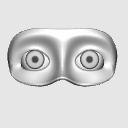
It is a 3D material that can be taken around the eyes. 目と瞳のあたりがとれる3D素材です。

I made it so that it is easy to take the shape of the eyes and the movement of the eyes.
Since it is 3D Object, please use it while moving.
Since the unevenness is also firmly attached, I think it will be useful for grasping the unevenness of the eyebrows and face.

↑ Since the pupil and pupil are made in a regular circle, you can check the degree of eye closure at an oblique angle.
It is also possible to move the position of the eyes.

Please move it to your liking.
If you want to return the position of the pupil, please return with the button to return to the initial pose below.

You can also tress by lowering the transparency in the same way as a 3D element.
目の形と瞳の動きのあたりが取りやすくなるように作成してみました。
3Dオブジェクトなので動かしながらご使用ください。
凹凸もしっかり付けているので、眉毛や顔の凹凸の把握にも役立つかと思います。
↑瞳と瞳孔は正円で作成しているので、斜めの角度で目の潰れ具合等確認できます。
また瞳の位置の可動も可能です。
お好みで可動してご使用ください。
瞳の位置を戻したい場合は下記の初期ポーズに戻すボタンで戻って下さい。
3D素体と同じように透明度を下げてトレスも出来ます。
Material マテリアル
-
default material 初期マテリアル
configuration 配置
-
default layout 初期レイアウト


Other materials by まるまるねっこ


Popular “3D object” materials



New materials





Badges
-
 MVP ◆This user has contributed greatly to the management of the community, by posting many great responses to the questions asked. Once every three months, MVPs are determined based on the points earned during that period and will be recognized accordingly.
 -
 New Valuable Player (NVP) ◆These are the next-best contributors to the community after MVPs. This is awarded to users who have not yet won an MVP award, based on the number of points they have earned.
 -
 Official Expert ◆Chosen out of all MVP awardees, who are already proof of excellence, this is a testimony of outstanding correspondence in the community. After careful screening, they are appointed by CELSYS and assume their position.Note: Formally called “Evangelists”
 -
 Official Moderator of CELSYS ◆Moderators are official CELSYS staff members who are fluent in Japanese as well as various other languages. Moderators are not experts on the software or illustration, so they are not able to directly answer your questions. However, moderators provide communication and language support to ensure that everyone can smoothly communicate with each other.
 -
 CELSYS official accountThe Official Administrator Account