



This is a paper template for the name and a auto action to save each page separately ネーム用の用紙テンプレートと、ページごとに分けて保存するオートアクションになります

Use with the following campus size resolutions

Name paper with margins


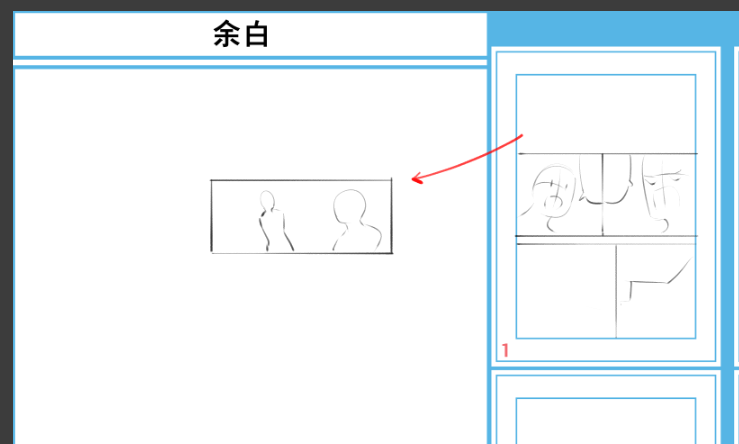


Feel free to use the margins...

Use it for graffiti when you get stuck...

Split only the frames you want to use when you want to modify them, etc. ...
How to use the auto action
there is a paginated folder in the name sheet

Select (1) located within this file

Then play the downloaded name output auto action

Play auto action and each page
Automatically select and start saving
Please change the output range to selection when saving

After that, name the file you want to save and the jpg image with the name you want to save, and you're done!
以下のキャンパスサイズ解像度で使用してください
余白のあるネーム用紙です
余白の使い方はご自由に…
行き詰った時の落書きに使ったり…
修正したいときに使いたいコマだけいったん分割したり等々…
オートアクションの使い方
ネーム用紙の中にページ分けフォルダがあります
このファイル内にある①を選択してください
その後ダウンロードしたネーム出力用のオートアクションを再生
オートアクションを再生するとそれぞれのページを
自動で選択し保存を始めます
保存する際に出力範囲を選択範囲に変更してください
後は保存したいファイルと保存するネームのjpg画像に名前をそれぞれ付けて完了です!
Name Paper ネーム用紙





Other materials by 大山散歩


Popular “Material catalog” materials


New materials





Badges
-
 MVP ◆This user has contributed greatly to the management of the community, by posting many great responses to the questions asked. Once every three months, MVPs are determined based on the points earned during that period and will be recognized accordingly.
 -
 New Valuable Player (NVP) ◆These are the next-best contributors to the community after MVPs. This is awarded to users who have not yet won an MVP award, based on the number of points they have earned.
 -
 Official Expert ◆Chosen out of all MVP awardees, who are already proof of excellence, this is a testimony of outstanding correspondence in the community. After careful screening, they are appointed by CELSYS and assume their position.Note: Formally called “Evangelists”
 -
 Official Moderator of CELSYS ◆Moderators are official CELSYS staff members who are fluent in Japanese as well as various other languages. Moderators are not experts on the software or illustration, so they are not able to directly answer your questions. However, moderators provide communication and language support to ensure that everyone can smoothly communicate with each other.
 -
 CELSYS official accountThe Official Administrator Account