




[Free to use! ] Cafe 3D Model Set Lightweight Version 【無料で使える!】カフェの3Dモデルセット軽量版

Are you worried about drawing the background of a café scene in a manga or illustration?
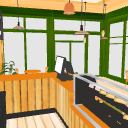
I made this 3D model of this café from my own experience of struggling to draw a café scene, so I wanted to help you as much as possible.
What we were particular about was **"easy to use"**.
If you use the preset textures as they are, you don't need any complicated settings, just load them into the CLIP STUDIO PAINT and the background will be ready in no time.
I hope this model can contribute to your creative activities! Please feel free to use it

I was not used to the placement and angle adjustment of 3D materials in CLIP STUDIO PAINT, and at first I was always confused, so I summarized the setting examples of placement and line drawing style as follows. Please take a look if you like.
********************************************************************
《Example of placement method to make line art style》


We will also describe how to hide the window frame.

This time, we have released a 3D model of the second store of "Cafe _FREE01" "Cafe _FREE01_2nd" in watercolor.
Hand-drawn lines and pale watercolor coloring are included in the model, and can be used as a warm background like a hand-drawn perspective without LT conversion.
Content ID: 2302875
If you have time, I would appreciate it if you could take a look.
漫画やイラストのカフェシーン背景の作画に悩んでいませんか?
このカフェの3Dモデルは、私自身がカフェシーンを描くのに苦労している経験から、少しでも皆さんの力になりたいと思い作りました。
こだわったのは**「気軽に使えること」**。
予め設定されたテクスチャをそのままでお使いの場合、複雑な設定は一切不要で、CLIP STUDIO PAINTに読み込むだけで、すぐに背景が完成します。
このモデルが、皆さんの創作活動に少しでも貢献できたら嬉しいです!ぜひご自由にお使いください
私はCLIP STUDIO PAINTで3D素材の配置やアングル調整に慣れてなく、最初は戸惑うことばかりでしたので、配置や線画風に表示する設定例を以下のようにまとめてみました。よろしかったらあわせてご覧ください。
********************************************************************
《線画風にする配置方法例》
窓枠を非表示にする方法もあわせて記載いたします。
この度、「カフェ_FREE01」の2号店にあたる3Dモデル 「カフェ_FREE01_2nd」水彩の中のカフェを公開いたしました。
手描き風のラインと淡い水彩調の着色をモデルに収録しており、LT変換なしで、手描きパースのような温かみのある背景としてお使いいただけます。
コンテンツID:2302875
お時間がございましたら、ぜひご覧いただけますと幸いです。
material マテリアル
-
default material 初期マテリアル
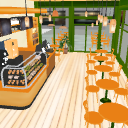
disposition 配置
-
Default set Default set
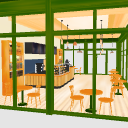
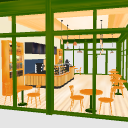
angle アングル
-
Cover illustration Cover illustration
-
From the entrance エントランスから
-
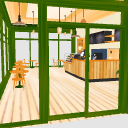
1 from the audience 客席から1
-
2 from the audience 客席から2
-
3 from the audience 客席から3
-
From the cash register レジから
-
From the kitchen 厨房から
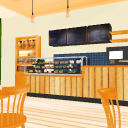
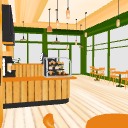
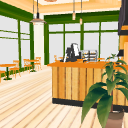
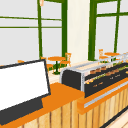
Update history
2026.9.6 update
2025.9.18 First release
2026.9.6 更新
2025.9.18 初回公開


Other materials by 伝説(レジェ)


Popular “3D object” materials





New materials





-
 MVP ◆This user has contributed greatly to the management of the community, by posting many great responses to the questions asked. Once every three months, MVPs are determined based on the points earned during that period and will be recognized accordingly.
 -
 New Valuable Player (NVP) ◆These are the next-best contributors to the community after MVPs. This is awarded to users who have not yet won an MVP award, based on the number of points they have earned.
 -
 Official Expert ◆Chosen out of all MVP awardees, who are already proof of excellence, this is a testimony of outstanding correspondence in the community. After careful screening, they are appointed by CELSYS and assume their position.Note: Formally called “Evangelists”
 -
 Official Moderator of CELSYS ◆Moderators are official CELSYS staff members who are fluent in Japanese as well as various other languages. Moderators are not experts on the software or illustration, so they are not able to directly answer your questions. However, moderators provide communication and language support to ensure that everyone can smoothly communicate with each other.
 -
 CELSYS official accountThe Official Administrator Account