


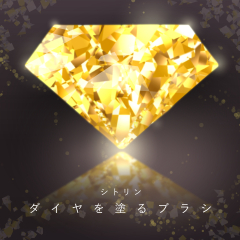


A brush that paints diamonds and jewelry at the speed of seconds. Anyone can easily apply sparkling gems. Citrine-like yellow gem-specific color.
ダイヤや宝石を秒速で塗るブラシ。誰でも簡単にキラキラ輝く宝石がパパっと塗れます。シトリンのようなイエローの宝石専用カラー。
A series in which shining fragments paint glittering diamonds.

It is made of color brushes and cannot be changed from the palette.
Since it is a colored brush, anyone can easily apply a jewel like a swatch.
〈Example of citrine depiction〉

* The ruler is drawn straight and drawn on it.
You can paint it more diamond-like by using the line art of the set of 16 types of diamond line drawings (content ID: 1941301), which is available for free.

How to paint a video
This is the layer composition of (1) line art, (2) line art in the middle, and (3) base.
Color (3) along the guide line of (2), and hide the lineart of (1) and (2) after painting.
There is a little space between the lines, so I duplicate the painted image and blur it with a filter. Its merge layers.
After that, I further duplicated the integrated image and shifted the blurred one down a little to blur the outline below.
Overlay the luminous layer on top of the integrated image and make it glow to complete.
Shine more with a little effort
Edit the painted image →tonal correction→ sharpen the contrast with brightness contrast to make it shine more.
* Example of creation with a brush that paints diamonds (content ID: 1941319).
All line drawings are included in the set of 16 diamond line drawings (content ID: 1941301).

Brush series for painting diamondsThere are also other colors!


Other glitter materials are also being released!

If you have any questions or requests about using HJ's materials, please feel free to contact us on Twitter! You can send DMs without following them.
輝く破片が煌びやかなダイヤを塗るシリーズ。
カラーブラシでできており色変更はパレットからはできません。
カラーブラシなので誰でも簡単に見本のような宝石を塗ることができます。
〈シトリンの描写例〉
※まっすぐに定規をひきその上に描写しております。
無料公開しているダイヤの線画16種セット(コンテンツID:1941301)の線画を使うことでよりダイヤっぽく塗ることができます。
動画の塗り方
①線画 ②中の線画 ③下地 のレイヤー構成です。
②のガイド線に沿って③に色を塗り、塗った後は①と②の線画を非表示にします。
線と線の間が少し空いてますので、塗った画像を複製しフィルターでぼかしています。その画像を統合します。
その後統合画像をさらに複製しぼかしたものを下に少しずらして下の輪郭を少しぼかしています。
統合画像の上に発光レイヤーを重ね、光らせて完成です。
さらにひと手間でもっと輝く
塗り終わった画像を編集→色調補正→明るさコントラストでコントラストをはっきりさせるとより輝きます。
※ダイヤを塗るブラシ(コンテンツID:1941319)での作成例。
線画はすべてダイヤの線画16種セット(コンテンツID:1941301)に収録しています。
ダイヤを塗るブラシシリーズほかの色もあります!
ほかにもキラキラ素材を公開中!
HJの素材の使用感や疑問点、リクエスト等ご意見はツイッターからお気軽にどうぞ!フォローしなくてもDMを送れます。
Update history





Other materials by HJ*


Popular “Material catalog” materials


New materials






-
 MVP ◆This user has contributed greatly to the management of the community, by posting many great responses to the questions asked. Once every three months, MVPs are determined based on the points earned during that period and will be recognized accordingly.
 -
 New Valuable Player (NVP) ◆These are the next-best contributors to the community after MVPs. This is awarded to users who have not yet won an MVP award, based on the number of points they have earned.
 -
 Official Expert ◆Chosen out of all MVP awardees, who are already proof of excellence, this is a testimony of outstanding correspondence in the community. After careful screening, they are appointed by CELSYS and assume their position.Note: Formally called “Evangelists”
 -
 Official Moderator of CELSYS ◆Moderators are official CELSYS staff members who are fluent in Japanese as well as various other languages. Moderators are not experts on the software or illustration, so they are not able to directly answer your questions. However, moderators provide communication and language support to ensure that everyone can smoothly communicate with each other.
 -
 CELSYS official accountThe Official Administrator Account