


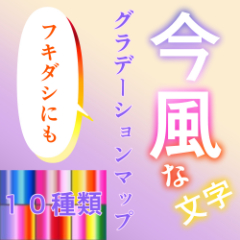
10 types gradient map modern logo characters (今風なロゴ文字グラデーションマップ10種類) 今風なロゴ文字グラデーションマップ10種類
Content ID:2020440
-
64


I made it for the logo of the material thumbnail.
It is a gradient map that is often found in modern title logos.
It seems that it can also be used for webtoon balloon color.
素材サムネイルのロゴ作り用に作りました。
今風なタイトルロゴに多い感じのグラデーションマップです。
webtoonのフキダシ色にも使えそうです。
As a reminder, we do not take colors from the work logo with an eyedropper.
Also, there is no specific logo to refer to.
I took the color from the flowers of my own photos that I vividly retouched.
The main colors are pink, purple, light blue, and orange for women,
It contains 10 types of gradient map made in 9 colors and more colors.
There may be a better way, but I'll leave you with an example.

Type in the text. I wrote it in white for the time being.
The font is Iwata Antic B.
This is called "Text Layer (A)".
Duplicate (copy) the character layer (A) and then hide it.
Register the gradient map for each gradient (look this up as it will be a long explanation). If you want to try it for the time being, please use your sky gradient etc.) (B) I rasterize directly color with a gradient.
* If the transparent is not locked, the whole will be colored.
The example is using logo 6.
After that, integrate (B) with about 2 layer copies (3 sheets in total).
I wrote it in white, so I didn't change the color or put on a border.

* To change the color, use it after registering this DL gradient map.

You can also invert the color with the horizontal ■ button with an arrow below the bar.
Please also enjoy webtoon's balloon.
念のための記載として、作品ロゴ等からスポイトで色をとったりはしていません。
また、参考にした特定のロゴはありません。
鮮やかめにレタッチした自作写真の花などから色をとりました。
女性向けっぽい桃色、紫色、水色、オレンジ色がメインで、
9色と多めの色で作ったグラデーションマップが10種類入っています。
もっといい方法があるかもしれませんが、作例を置いておきます。
文字を打ち込みます。とりあえず白で書きました。
フォントはイワタアンチック体Bです。
これを「文字レイヤー(A)」とします。
文字レイヤー(A)をレイヤー複製(コピー)してから非表示へ。
グラデーションマップを各グラデーション登録して(これは説明が長くなるので調べてください。とりあえずやってみる場合は、お手持ちの空グラデーションなどでどうぞ)ラスタライズした(B)に直接グラデーションで色をつけます。
※透明部分をロックしていないと全体に色がついてしまいます。
作例はロゴ6を使用です。
その後に(B)をレイヤーコピー2枚ぐらい(合計3枚お好みの枚数)して統合してください。
白で書いていたので、色変えもフチもつけていません。
※色変更はDLしたこのグラデーションマップを登録してから使います。
バーの下にある矢印のついた横長の■ボタンで色味の反転もできます。
webtoonのフキダシにもどうぞ。
gradient map グラデーションマップ


Other materials by _せら


Popular “Material catalog” materials


New materials


-
 MVP ◆This user has contributed greatly to the management of the community, by posting many great responses to the questions asked. Once every three months, MVPs are determined based on the points earned during that period and will be recognized accordingly.
 -
 New Valuable Player (NVP) ◆These are the next-best contributors to the community after MVPs. This is awarded to users who have not yet won an MVP award, based on the number of points they have earned.
 -
 Official Expert ◆Chosen out of all MVP awardees, who are already proof of excellence, this is a testimony of outstanding correspondence in the community. After careful screening, they are appointed by CELSYS and assume their position.Note: Formally called “Evangelists”
 -
 Official Moderator of CELSYS ◆Moderators are official CELSYS staff members who are fluent in Japanese as well as various other languages. Moderators are not experts on the software or illustration, so they are not able to directly answer your questions. However, moderators provide communication and language support to ensure that everyone can smoothly communicate with each other.
 -
 CELSYS official accountThe Official Administrator Account