



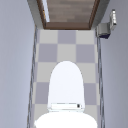
Toilet with shower.
The toilet seat and the lid operate.
Toilet room and door also included.
Please take a look at the background and illustrations of commercial magazines.
シャワー付きトイレです。
便座やフタが稼働します。
トイレ室内や扉も付属。
商業誌の背景やイラストなどにどうぞ。
The toilet seat and the lid operate.
Toilet room and door also included.
Please take a look at the background and illustrations of commercial magazines.


便座やフタが稼働します。
トイレ室内や扉も付属。
商業誌の背景やイラストなどにどうぞ。
Material マテリアル
-
default material 初期マテリアル
-
White 白
-
Gray グレー
-
Chi 赤
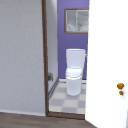


Configuration 配置
-
default layout 初期レイアウト
-
Room Without Walls 部屋壁_なし
-
Toilet Wall without トイレ壁_なし
-
Toilet Wall _ No right トイレ壁_右なし
-
Toilet wall without left トイレ壁_左なし
-
Toilet wall, no back トイレ壁_奥なし
-
Cleaning nozzles Without Walls 洗浄ノズル_壁なし
-
Stool Cover Up 便フタ_上げ
-
Toilet seat up 便座_上げ
-
Door closed ドア_閉じ
-
No lever レバーなし
-
Cleaning nozzles 洗浄ノズル


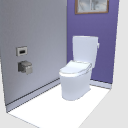


Angle アングル
-
Default デフォルト
-
Pull 引き
-
Overlooking 俯瞰
-
Diagonal One 斜め1
-
Diagonal 2 斜め2
-
Behind 後ろ
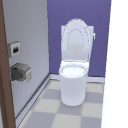
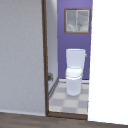


pose parts 可動パーツ
-
Door ドア
-
Stool cover 便フタ
-
Right window 窓(右)
-
Window (left) 窓(左)
-
Lever レバー
-
Toilet 便座


Other materials by shuchan


Popular “3D object” materials





New materials


-
 MVP ◆This user has contributed greatly to the management of the community, by posting many great responses to the questions asked. Once every three months, MVPs are determined based on the points earned during that period and will be recognized accordingly.
 -
 New Valuable Player (NVP) ◆These are the next-best contributors to the community after MVPs. This is awarded to users who have not yet won an MVP award, based on the number of points they have earned.
 -
 Official Expert ◆Chosen out of all MVP awardees, who are already proof of excellence, this is a testimony of outstanding correspondence in the community. After careful screening, they are appointed by CELSYS and assume their position.Note: Formally called “Evangelists”
 -
 Official Moderator of CELSYS ◆Moderators are official CELSYS staff members who are fluent in Japanese as well as various other languages. Moderators are not experts on the software or illustration, so they are not able to directly answer your questions. However, moderators provide communication and language support to ensure that everyone can smoothly communicate with each other.
 -
 CELSYS official accountThe Official Administrator Account