



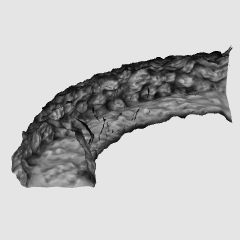
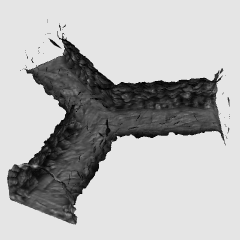
It is a collection of 3D material of the cave which seems to be well.
There are several different types of caves, so you can place your favorite caves in copy and paste as you like.
よくありそうな洞窟の3D素材集です。
洞窟の形は何種類かあるのでコピー&ペーストで好きなように配置してお好みの洞窟をつくれます。
Example of deployment Part 1

Example of deployment Part 1 LT Conversion example

Example of placement Part 1 image of Contour line only

LT Conversion Example

Deployment Example # 2

Example of placement Part 2 3D image

Example of deployment Part 2 LT Conversion example

Example of placement Part 2 image of Contour line only

Attention points
There are no outer polygons to reduce the capacity.
When the light source is adjusted, it becomes a comparatively good feeling when I set it in the opposite side to the originally hit.
For example, if you want to have a light source from the top, set the light source to hit from the bottom when the LT conversion will have a light source on top.
配置例その1
配置例その1 LT変換例
配置例その1 輪郭線のみの画像
LT変換設定例
配置例その2
配置例その2 3D画像
配置例その2 LT変換例
配置例その2 輪郭線のみの画像
注意点など
容量削減のため外側のポリゴンはありません。
光源を調整する際は、本来当たる側と逆向きに設定すると比較的いい感じになります。
例えば上から光源があるようにしたい時は、下から光源が当たるように設定するとLT変換の際には上に光源があるようになります。
Category 1 カテゴリ1







Other materials by ヒデキ:3D素材制作


Popular “Material catalog” materials


New materials




Badges
-
 MVP ◆This user has contributed greatly to the management of the community, by posting many great responses to the questions asked. Once every three months, MVPs are determined based on the points earned during that period and will be recognized accordingly.
 -
 New Valuable Player (NVP) ◆These are the next-best contributors to the community after MVPs. This is awarded to users who have not yet won an MVP award, based on the number of points they have earned.
 -
 Official Expert ◆Chosen out of all MVP awardees, who are already proof of excellence, this is a testimony of outstanding correspondence in the community. After careful screening, they are appointed by CELSYS and assume their position.Note: Formally called “Evangelists”
 -
 Official Moderator of CELSYS ◆Moderators are official CELSYS staff members who are fluent in Japanese as well as various other languages. Moderators are not experts on the software or illustration, so they are not able to directly answer your questions. However, moderators provide communication and language support to ensure that everyone can smoothly communicate with each other.
 -
 CELSYS official accountThe Official Administrator Account