



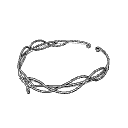
一個簡單的頭環模型。
用 Blender 製作。
A simple model of a circlet.
Made with Blender.
模型應該會在下載標籤中顯示,之後可以拖曳到畫布上。


模型在 Clip Studio 畫圖中應該是這樣:

為了讓擺姿勢更簡單,我建議將模型用固定點固定在3D角色的頭部上:

我發現也可以把模型倒掛,或當作項鍊使用。你也可以透過在Y軸上拉伸來調整外觀。

The model should be available in the downloads tab, after which it can be dragged onto the canvas.
The model should look like this in Clip Studio paint:
To make posing easier, I recommend attaching the model to the 3-D character’s head with an attachment point:
I found that it’s also possible to use the model upside down or to use it as a necklace. You could also play with it’s appearance by stretching it across the y-axis.
材料 Material








「aBookshelf」的其他素材


「3D物件」的人氣素材





最新素材



徽章
-
 MVP ◆針對問題投稿了眾多適切的回答,對社群有顯著貢獻的用戶。每3個月一次,會依據期間內獲得的點數選出MVP用戶,並進行表揚。
 -
 NVP(New Valuable Player) ◆繼MVP後,對社群營運做出良好貢獻的用戶。將從不曾獲選為MVP的用戶中,依據獲得的點數進行評選、表揚。
 -
 官方推廣大使 ◆從被證明為優良回答用戶的MVP獲獎者中選出社群中最優異的回答者。並經審查後由本社委託就任。※舊名稱為「Evangelist」
 -
 CELSYS公認Moderator ◆Moderator為會使用日文及其他語言的CELSYS公認工作人員。由於並非軟體或創作的專業人士,Moderator無法直接為用戶解決疑問,但能在語言、交流方面提供支援,幫助用戶們順利地進行溝通。
 -
 CELSYS官方為與營運相關的官方帳號。