



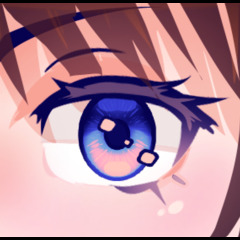
이 붓 세트로 몇 초 만에 완벽한 애니메이션 눈을 그려보세요! Draw perfect anime eyes in seconds with this brush set!
【 사용 방법 ]
(1) - 주색과 부색을 선택하세요.
⤷ 메인 컬러는 2차 컬러보다 덜 채도가 있고 더 어둡게 만드는 걸 추천해요.
(2) - 원하는 붓 크기와 두께를 선택하세요.
⤷ 캐릭터의 머리가 돌려져 있으면 바깥쪽 눈이 더 얇고 약간 작아질 수 있습니다.
⤷ 캐릭터를 더 아이처럼 보이게 하기 위해 눈을 더 크고 크게 만들 수 있습니다.
(3) - 눈을 원하는 위치에 그리세요.
⤷ 모양이 원하는 모양이 아니면 쉽게 변형하거나 액체화할 수 있습니다.
(4) - 눈 하이라이트 브러시를 사용해 눈을 반짝이게 하세요.
⤷ 하이라이트의 모양과 위치를 원하는 대로 커스터마이즈할 수 있는데, 하이라이트는 아이브러시와 별개이기 때문입니다.
이 모든 단계가 완료되었지만, 더 많은 맞춤화를 원한다면 아래의 추가 단계를 고려해 보세요:
(5) - 그라데이언트 맵을 사용하세요.
⤷ 최상의 결과(그라데이언트 맵에 존재하는 대부분의 색상)를 위해, 눈을 그릴 때 검은색을 주색으로, 흰색을 부차색으로 사용하세요.
⤷ CSP에 이미 포함된 그라디언트 맵을 사용하거나, 직접 실험하거나, 자산에서 다운로드한 맵을 사용할 수 있습니다.
[!] 그라데이언트 맵을 사용하게 된다면, 그 후에 하이라이트를 추가하는 것을 추천합니다. 이렇게 하면 하이라이트와 윤곽선 색상을 더 잘 조절할 수 있는데, 때로는 눈 색깔과 다르게 하고 싶을 수도 있기 때문입니다.
(6) - 새 레이어에서 눈 위에 에어브러시를 바르고 블렌딩 모드를 사용하세요.
⤷ 글로우 는 눈을 빛나는 것처럼 보이게 할 수 있습니다.
⤷ 곱셈 은 눈을 음영 처리하는 데 사용할 수 있습니다.
⤷ 오버레이 는 눈을 더욱 생동감 있게 보이게 하는 데 사용할 수 있습니다.

같은 선라이즈(보라색) 그라데이언트 맵에 또 다른 예시가 있는데, 원래 메인 색상과 보조 색상이 각각 검정과 흰색이고, 위 두 번째 예시의 네이비와 시안색이 아닙니다. 보시다시피, 색상이 훨씬 더 선명해 보입니다.

썸네일에서 예시들을 보여드릴게요. 각 눈의 주된 색상과 2차 색상은 검정과 흰색이며, 서로 다른 Somber Shade 그라데이션 맵(CSP에 포함됨)이 있습니다. 중간 톤 색상은 눈 위에 에어브러시로 겹쳐 겹쳐 보낸다.

【 How to use 】
(1) - Pick a main color and a secondary color.
⤷ I recommend making the main color less saturated but darker than the secondary color.
(2) - Choose the brush size and thickness you want.
⤷ If the character's head is turned, the outer eye may be thinner and slightly smaller.
⤷ You can make the eyes wider and bigger to make the character look more childlike.
(3) - Draw the eyes where you want them to be.
⤷ If the shape doesn't look the way you want, you can easily transform or liquify it to the shape you want.
(4) - Use the eye highlights brush to make the eyes look shiny.
⤷ You can customize the shape and location of the highlights to however you like since it's separate from the eye brush.
These are all the steps you need to do, but if you want more customization, consider the additional steps below:
(5) - Use a gradient map.
⤷ For the best results (most amount of colors in gradient map present), use black as a main color and white as a secondary color when drawing the eye.
⤷ You can use the gradient maps already included in CSP, experiment with your own, or use ones downloaded from assets.
[!] If you end up using a gradient map, I recommend adding highlights afterwards. This allows you to have more control over the color of the highlights and outline, since sometimes you may want them to be different from the eye color.
(6) - Airbrush over the eye in a new layer and use blending modes.
⤷ Glow can be used to make the eyes look like they are glowing.
⤷ Multiply can be used to shade the eyes.
⤷ Overlay can be used to make the eye look even more vibrant.
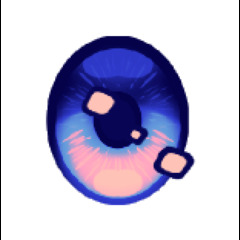
Here's another example on the same Sunrise (purple) gradient map, but with the original main and secondary colors being black and white respectively instead of navy and cyan like in the second example above. As you can see, the colors look much more vibrant.
Here are the examples from the thumbnail. Each eye's main color and secondary colors are black and white, with different Somber Shade gradient maps (included in CSP). The mid tone color is airbrushed over the the eyes in a layer above and set to overlay.
이지 애니메 아이즈 Easy Anime Eyes


'소재집'의 인기 소재


신규 소재



배지
-
 MVP ◆질문에 적절한 답변을 많이 게시하고 커뮤니티 운영에 크게 공헌한 사용자입니다. MVP는 3개월에 한 번, 그 사이에 획득한 포인트를 바탕으로 결정하고 표창을 실시하고 있습니다.
 -
 NVP(New Valuable Player) ◆MVP 다음으로 커뮤니티 운영에 공헌한 사용자입니다. 이제까지 MVP 수상 경험이 없는 분 중에서 획득한 포인트를 바탕으로 결정하여 표창을 실시하고 있습니다.
 -
 공식 엑스퍼트 ◆뛰어난 응답자의 증표인 MVP수상자 중에서 선택된 커뮤니티에서 가장 뛰어난 응답자의 증표입니다. 심사를 거쳐서 저희 회사에서 의뢰할 경우 취임되십니다.※ 옛 명칭 '에반젤리스트'
 -
 셀시스 공인 모더레이터 ◆모더레이터는 일본어와 기타 언어로 말할 수 있는 셀시스 공인 스태프입니다. 소프트웨어나 창작 전문가가 아니므로 직접 의문을 해결할 수는 없지만 여러분이 순조롭게 소통할 수 있도록 언어나 커뮤니케이션 측면에서 지원합니다.
 -
 셀시스 공식운영에 관련된 공식 계정입니다.