


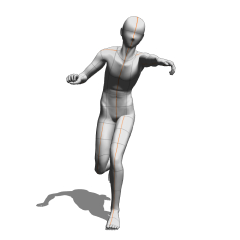

사용 방법: Material > Pos에서 기본 포즈를 캔버스로 드래그 앤 드롭하세요. 포즈를 선택한 후, 하단의 "모델에 포즈 재질 적용" 버튼을 누르고, 목록에서 포즈를 선택한 후 확인 버튼을 눌러 포즈를 적용하세요.
2인 포즈의 경우: 두 모델을 같은 레이어에 배치하고 각 모델의 '배치' 값을 맞추세요.
사용 방법: Materials > Pose에서 기본 포즈 중 하나를 캔버스에 드래그 앤 드롭하세요. 포즈를 선택한 후, 하단의 "모델에 포즈 재료 적용" 버튼을 누르고, 목록에서 포즈를 선택한 후 확인 버튼을 눌러 포즈를 적용하세요.
2인 포즈의 경우: 두 모델을 같은 레이어에 배치하고 각 모델의 "위치" 값을 맞추세요.
使い方:素材>ポーズ からデフォルトで入っているポーズをキャンバスへドラッグアンドドロップします。ポーズを選択した状態で、下部の”ポーズ素材をモデルに適用”ボタンを押し、一覧からポーズを選択してOKを押すとポーズが適用されます。
二人ポーズの場合:同じレイヤーに二体のモデルを置き、それぞれのモデルの”配置”の数値を合わせて下さい。
How to use: Drag and drop one of the default poses from Materials > Poses onto the canvas. With the pose selected, press the "Apply Pose Material to Model" button at the bottom, select a pose from the list, and press OK to apply the pose.
For two-person poses: Place both models on the same layer and match the "position" values for each model.
갱신 이력


'おぼろ君'님의 다른 소재


'소재집'의 인기 소재


신규 소재


배지
-
 MVP ◆질문에 적절한 답변을 많이 게시하고 커뮤니티 운영에 크게 공헌한 사용자입니다. MVP는 3개월에 한 번, 그 사이에 획득한 포인트를 바탕으로 결정하고 표창을 실시하고 있습니다.
 -
 NVP(New Valuable Player) ◆MVP 다음으로 커뮤니티 운영에 공헌한 사용자입니다. 이제까지 MVP 수상 경험이 없는 분 중에서 획득한 포인트를 바탕으로 결정하여 표창을 실시하고 있습니다.
 -
 공식 엑스퍼트 ◆뛰어난 응답자의 증표인 MVP수상자 중에서 선택된 커뮤니티에서 가장 뛰어난 응답자의 증표입니다. 심사를 거쳐서 저희 회사에서 의뢰할 경우 취임되십니다.※ 옛 명칭 '에반젤리스트'
 -
 셀시스 공인 모더레이터 ◆모더레이터는 일본어와 기타 언어로 말할 수 있는 셀시스 공인 스태프입니다. 소프트웨어나 창작 전문가가 아니므로 직접 의문을 해결할 수는 없지만 여러분이 순조롭게 소통할 수 있도록 언어나 커뮤니케이션 측면에서 지원합니다.
 -
 셀시스 공식운영에 관련된 공식 계정입니다.