


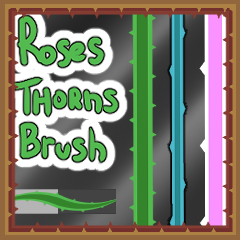


이 브러시는 간격과 가시 크기가 다른 4번을 만들었어요. (이 글 하단에 색상 변경 가이드)


자신에게 가장 만족스러운 사이즈 조합(재료 2 - 모양과 팁 사이즈)을 찾아보세요. (GIF 참조)

레이어 모드와 옵션에 원하는 대로 조합하세요


한 번의 붓질의 윤곽선이 겹치지 않습니다
(가시 없는 구체를 만들 수 있다)

<3 즐겁게 감상하세요
이제 (다소) 까다로운 부분 입니다
- 메인 컬러가 윤곽선 부분을 정의합니다 .
- 보조 색상이 내부 부분을 정의합니다.
- 브러시를 사용하려면 반드시 메인 색상에 집중하세요.
보조 색상에 있으면 결국 다음과 같습니다
"2차 색상만" 문장들.
( 두 슬롯 모두 같은 색상을 선택할 수도 있습니다.)

I made 4 iterations of this brush, with different spacing and thorn sizes. (color change guide at bottom of this post)
You can try and find the combination of sizes that satisfy you best (material 2 - shape and tip sizes). (see gif)
Combine with layer modes and options anyway you want
A single brush stroke's outline won't overlap itself
(you can make a sphere with no thorn inside)
Enjoy <3
Now, the tricky part (somewhat)
- Your Main color will define the Outline part.
- Your Secondary color will define the Inside part.
- Be SURE to be on the MAIN color to use the brush.
Being on the secondary color will end up as
"Secondary color only" lines.
(You could also select the same color on both slots).
갱신 이력



'소재집'의 인기 소재


신규 소재


배지
-
 MVP ◆질문에 적절한 답변을 많이 게시하고 커뮤니티 운영에 크게 공헌한 사용자입니다. MVP는 3개월에 한 번, 그 사이에 획득한 포인트를 바탕으로 결정하고 표창을 실시하고 있습니다.
 -
 NVP(New Valuable Player) ◆MVP 다음으로 커뮤니티 운영에 공헌한 사용자입니다. 이제까지 MVP 수상 경험이 없는 분 중에서 획득한 포인트를 바탕으로 결정하여 표창을 실시하고 있습니다.
 -
 공식 엑스퍼트 ◆뛰어난 응답자의 증표인 MVP수상자 중에서 선택된 커뮤니티에서 가장 뛰어난 응답자의 증표입니다. 심사를 거쳐서 저희 회사에서 의뢰할 경우 취임되십니다.※ 옛 명칭 '에반젤리스트'
 -
 셀시스 공인 모더레이터 ◆모더레이터는 일본어와 기타 언어로 말할 수 있는 셀시스 공인 스태프입니다. 소프트웨어나 창작 전문가가 아니므로 직접 의문을 해결할 수는 없지만 여러분이 순조롭게 소통할 수 있도록 언어나 커뮤니케이션 측면에서 지원합니다.
 -
 셀시스 공식운영에 관련된 공식 계정입니다.