



선 레이어에 밝고 어두운 그라데이션을 추가합니다. Adds a light-dark gradient to line layers.
이 방법은 펄린 잡음 효과를 이용해 무작위 패턴을 생성합니다!

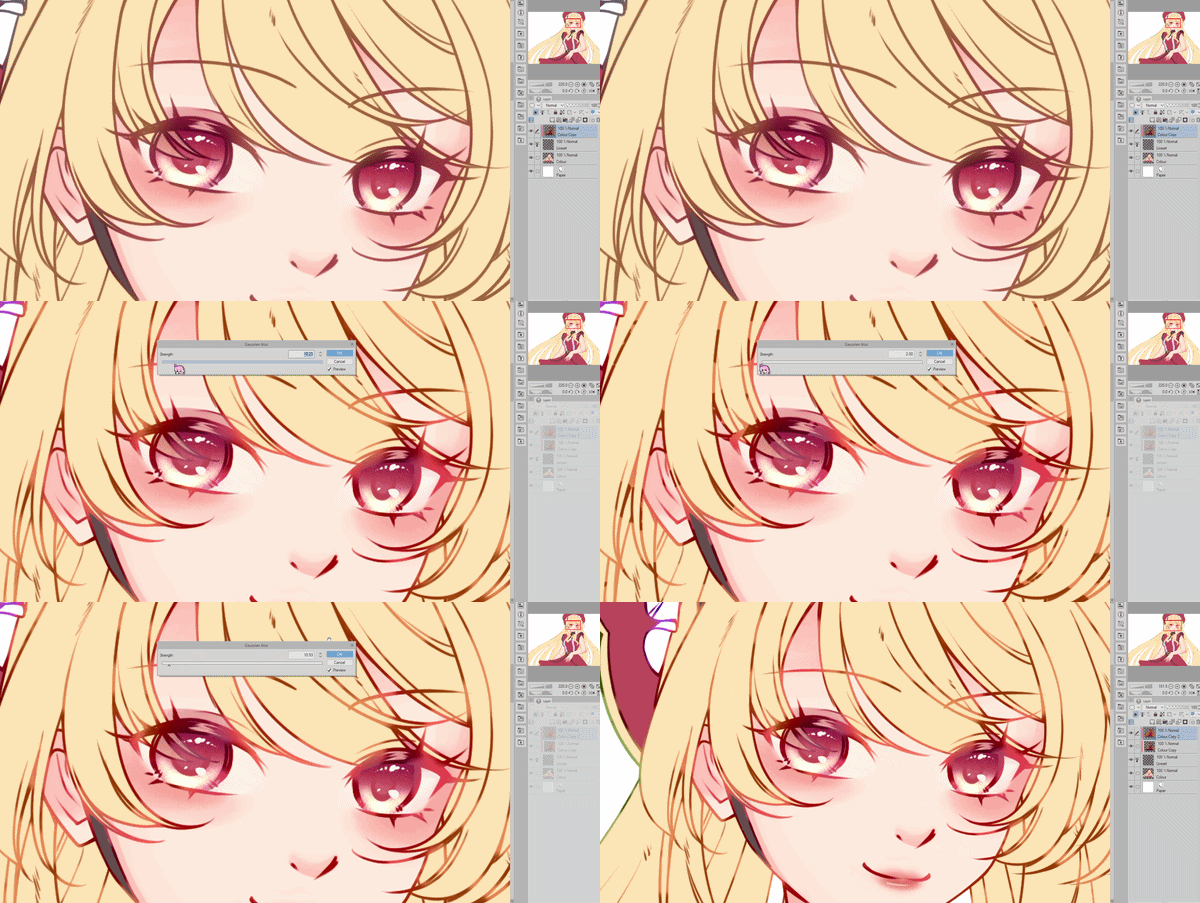
경고: 이 자동 행동을 사용하면 색상이 바뀔 수 있으며, 이후 수동으로 조정해야 할 수 있습니다. 주목해 주세요.
첫 번째 자동 행동은 라인 레이어에만 적용되므로 효과가 약합니다.
두 번째 자동 행동은 라인 레이어에 클립된 색상 레이어에 적용됩니다.
채도를 사용해 반짝이는 부분의 밝기를 조절할 수 있습니다.
예시 2의 선 색상은 자동 선 색상 자동 동작 [ID 1914696]으로 구현되었습니다.
This uses the perlin noise effect to generate a random pattern!
Warning: Using this auto action may result in colour changes that may need manual adjustment afterwards. Please take note.
First auto action is for the line layer only, so the effect is weaker.
Second auto action is for colour layers that have been clipped onto the line layer.
You can use Saturation to adjust how bright you want the shiny parts to be.
Line colours in example 2 were achieved with the Auto Line Color auto action [ID 1914696].
오토 액션 Auto action


'lunefaer'님의 다른 소재


'소재집'의 인기 소재


신규 소재


배지
-
 MVP ◆질문에 적절한 답변을 많이 게시하고 커뮤니티 운영에 크게 공헌한 사용자입니다. MVP는 3개월에 한 번, 그 사이에 획득한 포인트를 바탕으로 결정하고 표창을 실시하고 있습니다.
 -
 NVP(New Valuable Player) ◆MVP 다음으로 커뮤니티 운영에 공헌한 사용자입니다. 이제까지 MVP 수상 경험이 없는 분 중에서 획득한 포인트를 바탕으로 결정하여 표창을 실시하고 있습니다.
 -
 공식 엑스퍼트 ◆뛰어난 응답자의 증표인 MVP수상자 중에서 선택된 커뮤니티에서 가장 뛰어난 응답자의 증표입니다. 심사를 거쳐서 저희 회사에서 의뢰할 경우 취임되십니다.※ 옛 명칭 '에반젤리스트'
 -
 셀시스 공인 모더레이터 ◆모더레이터는 일본어와 기타 언어로 말할 수 있는 셀시스 공인 스태프입니다. 소프트웨어나 창작 전문가가 아니므로 직접 의문을 해결할 수는 없지만 여러분이 순조롭게 소통할 수 있도록 언어나 커뮤니케이션 측면에서 지원합니다.
 -
 셀시스 공식운영에 관련된 공식 계정입니다.