



잠자리 날개 제작을 위한 벡터화된 키트 A vectorized kit for making dragonfly wings
이 세트는 예전에 작업하던 미니 만화의 한 캐릭터를 위해 만든 거예요. 방금 이 에셋 챌린지에 윙 키트가 잘 맞는다는 걸 깨달았어요!
포함:
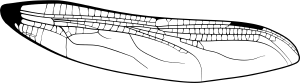
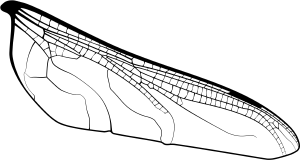
벡터 윙 베이스 두 개(상단과 하단 윙은 분리되어 있어 필요에 따라 회전, 조정, 비스크 조정이 가능합니다)

빈 공간을 쉽게 채우는 매끄러운 잠자리 톤.

사용법:
날개 바닥에 만족하면 사진에 보이는 빈 공간을 채우세요. 완드 도구로 채워진 영역을 선택하세요. 참고 채우기 도구를 사용하면 거의 자동으로 작동합니다. 또는 라쏘로 영역을 선택하거나, 영역을 참조 완드 도구로 하거나, 다른 어떤 형태로든 사용할 수 있습니다. 만화의 경우, fill(fill) 도구+선택(fill)이 가장 정확하고 빠른 방법이라고 생각합니다.

선택한 영역에 잠자리 무늬를 추가하세요. 톤의 크기를 마음에 들 때까지 조절하세요.
날개 뒤쪽에 예쁜 색을 넣고, 불투명도를 낮추거나 색상의 블렌딩 모드를 바꿔보세요.

끝났어!

여기서는 날개에 오팔/쥬얼 색상을 사용했습니다. 재미있게 해보세요, 잠자리는 정말 아름다워요!
I made this set for a character in a mini comic I was working on in the past. I just realized the wing kit works for this asset challenge!
Included:
Two vector wing bases (Top and bottom wings are separated so you can rotate, adjust, skew them for perspective as needed)
A seamless dragonfly tone to fill the empty spaces easily.
To use:
Once you’re happy with the wing bases, fill the empty spaces pictured. Wand tool select the filled area. This is near automatic if you use a reference fill tool. ALTERNATIVELY, lasso select the area, reference wand tool the area, or any other format. For comics, I find fill tool + select is the most accurate and quick way.
Add the dragonfly pattern to the selected area. Adjust the size of the tone until you’re happy.
Add pretty colors behind the wing, then reduce opacity or change the blending mode of the colors.
You’re done!
Here, I used opal/jewel colors for the wings. Have fun with it, dragonflies are beautiful!
윙 Wing

갱신 이력
2026년 8월 17일: 추가 Aug 17, 2026: Added







'Sneleste'님의 다른 소재


'소재집'의 인기 소재


신규 소재




배지
-
 MVP ◆질문에 적절한 답변을 많이 게시하고 커뮤니티 운영에 크게 공헌한 사용자입니다. MVP는 3개월에 한 번, 그 사이에 획득한 포인트를 바탕으로 결정하고 표창을 실시하고 있습니다.
 -
 NVP(New Valuable Player) ◆MVP 다음으로 커뮤니티 운영에 공헌한 사용자입니다. 이제까지 MVP 수상 경험이 없는 분 중에서 획득한 포인트를 바탕으로 결정하여 표창을 실시하고 있습니다.
 -
 공식 엑스퍼트 ◆뛰어난 응답자의 증표인 MVP수상자 중에서 선택된 커뮤니티에서 가장 뛰어난 응답자의 증표입니다. 심사를 거쳐서 저희 회사에서 의뢰할 경우 취임되십니다.※ 옛 명칭 '에반젤리스트'
 -
 셀시스 공인 모더레이터 ◆모더레이터는 일본어와 기타 언어로 말할 수 있는 셀시스 공인 스태프입니다. 소프트웨어나 창작 전문가가 아니므로 직접 의문을 해결할 수는 없지만 여러분이 순조롭게 소통할 수 있도록 언어나 커뮤니케이션 측면에서 지원합니다.
 -
 셀시스 공식운영에 관련된 공식 계정입니다.