



캐릭터 및 웹툰용 3D 꼬리 자산 3D Tail Asset for Characters and Webtoons
웹툰, 만화, 만화, 일러스트 작업 속도를 빠르게 하세요!
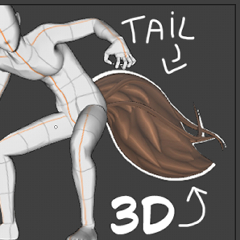
이 3D 꼬리 자산은 캐릭터 포즈를 빠르게 설정하고 까다로운 시점 각도를 극복하는 데 도움을 주기 위해 설계되었습니다.

주요 특징:
워크플로우: 어떤 장면에서든 쉽게 포즈를 취하고 꼬리를 참조 할 수 있습니다.
각도와 원근감: 어려운 카메라 앵글에서 일관된 꼬리 모양을 유지하기에 완벽합니다.
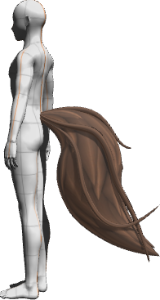
즉시 사용 프리셋: 꼬리가 이미 표준 3D 마네킹에 부착된 사전 설정 레이어가 포함되어 있습니다!
판타지와 웹툰에 이상적: 여우, 늑대 또는 어떤 캐릭터 디자인에도 훌륭합니다.
간단한 튜토리얼
꼬리를 3D 캐릭터 에 붙이는 방법
1. 3D 바디 마네킹을 캔버스에 드래그한 다음, 3D 테일 에셋을 같은 3D 레이어로 드래그합니다.
2. 테일을 선택하고 모델 아래 오브젝트 런처 바를 클릭하세요(또는 서브 툴 디테일 팔레트 -> 포즈/부착 옵션을 열세요).
3. 부착 지점을 골반(Hip, Hip)에 설정합니다.
4. 꼬리를 움직이고 회전시켜 허리/엉덩이 뒤쪽에 자연스럽게 자리 잡게 합니다.
(꼬리 크기를 자신의 캐릭터에 맞게 조절할 수도 있습니다)
이제 캐릭터의 포즈를 바꿀 때마다 꼬리가 몸과 함께 움직입니다.

참고: 이 자산에는 3D 꼬리 모델이 포함되어 있습니다. 미리보기에 보이는 몸체는 참조용으로 사용되는 표준 Clip Studio Paint 3D 마네킹입니다.
Speed up your drawing process for webtoons, manhwa, comics or illustrations!
This 3D tail asset is designed to help you quickly set up character poses and overcome tricky perspective angles.
Key Features:
Workflow: Easily pose and reference tails in any scene.
Angle and Perspective: Perfect for consistent tail shapes from difficult camera angles.
Ready-to-Use Preset: Includes a pre-configured layer with the tail already attached to the standard 3D body mannequin!
Ideal for Fantasy and Webtoons: Great for fox, wolf, or any character designs.
SIMPLE TUTORIAL
How to Attach the Tail to a 3D Character
1. Drag the 3D body mannequin onto your canvas, then drag the 3D Tail asset onto the same 3D layer.
2. Select the tail and click the Object Launcher bar below the model (or open the Sub Tool Detail palette -> Pose / Attachment).
3. Set the attachment point to Hip (Pelvis).
4. Move and rotate the tail so it sits naturally at the back of the waist/hips.
(you can also scale the tail to fit your own character better)
Now, whenever you change the character's pose, the tail will move along with the body.
Note: This asset includes the 3D tail model. The body shown in the preview is the standard Clip Studio Paint 3D mannequin used for reference.
3D 오브젝트 3D Object
프리셋 Preset


'Horry baby'님의 다른 소재


'소재집'의 인기 소재


신규 소재




배지
-
 MVP ◆질문에 적절한 답변을 많이 게시하고 커뮤니티 운영에 크게 공헌한 사용자입니다. MVP는 3개월에 한 번, 그 사이에 획득한 포인트를 바탕으로 결정하고 표창을 실시하고 있습니다.
 -
 NVP(New Valuable Player) ◆MVP 다음으로 커뮤니티 운영에 공헌한 사용자입니다. 이제까지 MVP 수상 경험이 없는 분 중에서 획득한 포인트를 바탕으로 결정하여 표창을 실시하고 있습니다.
 -
 공식 엑스퍼트 ◆뛰어난 응답자의 증표인 MVP수상자 중에서 선택된 커뮤니티에서 가장 뛰어난 응답자의 증표입니다. 심사를 거쳐서 저희 회사에서 의뢰할 경우 취임되십니다.※ 옛 명칭 '에반젤리스트'
 -
 셀시스 공인 모더레이터 ◆모더레이터는 일본어와 기타 언어로 말할 수 있는 셀시스 공인 스태프입니다. 소프트웨어나 창작 전문가가 아니므로 직접 의문을 해결할 수는 없지만 여러분이 순조롭게 소통할 수 있도록 언어나 커뮤니케이션 측면에서 지원합니다.
 -
 셀시스 공식운영에 관련된 공식 계정입니다.