



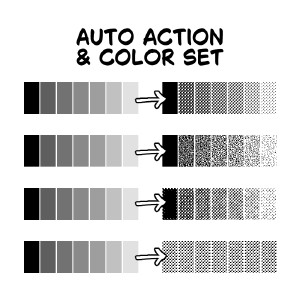
원고 드로잉에 사용하는 컬러 세트와 자동 액션 세트에 대한 재료 카탈로그입니다. Material catalog for the color set and auto action set I use for drawing manuscripts.

그런지 톤을 제외하면 기본 음향입니다. 이것은 단지 사용 편의성을 위한 것입니다.
순수 검정색을 톤과 같은 레이어에 올리는 것은 추천하지 않습니다. 저는 개인적으로 순수 검정 음영을 위해 단색 레이어를 만듭니다.
톤을 색깔별로 분리하는 것도 권장됩니다.

"톤 레이어"와 "톤 레이어 (연어)"
이 두 가지도 똑같이 해. 둘 다 회색 레이어에 새로운 레이어를 만들어주기 때문에, 단색 레이어가 있다면 도움이 됩니다. 이 버튼은 바로가기 키에 바인딩되도록 설계되어 있습니다. 유일한 차이점은 "톤 레이어(연어)"가 연어 색깔 레이어 색상을 적용한다는 점입니다. 다른 자동 행동을 적용하면 레이어 색상이 자동으로 꺼집니다.
팔레트 색상이 '빨간색'이라 아직 톤으로 변환되지 않았는지 확인할 수 있습니다.
"사용자 지정 톤 사용"/"사용자 지정 톤 (폴더 없음)"에 대한 설명:
톤 레이어를 받아 선택을 합니다. 동작이 끝난 후에는 이미지 머티리얼을 드래그 앤 드롭하면 됩니다. 첫 번째 방법은 레이어 마스크가 있는 폴더를 만들지만, 두 번째는 그렇지 않습니다.
With the exception of the grunge tone, these are default. This is just for ease of use.
I don’t recommend putting pure black on the same layer as tones. I personally make a monochrome layer for pure black shading.
It is also recommended to separate your tones by color.
"Tone Layer" and "Tone Layer (Salmon)"
These two do the same thing. They both make new layers for your tones in a Gray layer, so it’s helpful if you have monochrome layers. This is meant to be binded to a shortcut key. The only difference is that "Tone Layer (Salmon)” applies a salmon-colored layer color. When you apply the other auto actions, the layer color will be turned off automatically.
The palette color is “red” so you can see if it hasn’t been converted to tones yet.
Explanation for “Use Custom Tones”/“Custom Tones (no folder)":
It takes the tone layer and makes a selection. After the action is done, just drag and drop an image material. The first one makes a folder with a layer mask, but the second doesn’t.
세트 SET









'kaaaal'님의 다른 소재


'소재집'의 인기 소재


신규 소재






배지
-
 MVP ◆질문에 적절한 답변을 많이 게시하고 커뮤니티 운영에 크게 공헌한 사용자입니다. MVP는 3개월에 한 번, 그 사이에 획득한 포인트를 바탕으로 결정하고 표창을 실시하고 있습니다.
 -
 NVP(New Valuable Player) ◆MVP 다음으로 커뮤니티 운영에 공헌한 사용자입니다. 이제까지 MVP 수상 경험이 없는 분 중에서 획득한 포인트를 바탕으로 결정하여 표창을 실시하고 있습니다.
 -
 공식 엑스퍼트 ◆뛰어난 응답자의 증표인 MVP수상자 중에서 선택된 커뮤니티에서 가장 뛰어난 응답자의 증표입니다. 심사를 거쳐서 저희 회사에서 의뢰할 경우 취임되십니다.※ 옛 명칭 '에반젤리스트'
 -
 셀시스 공인 모더레이터 ◆모더레이터는 일본어와 기타 언어로 말할 수 있는 셀시스 공인 스태프입니다. 소프트웨어나 창작 전문가가 아니므로 직접 의문을 해결할 수는 없지만 여러분이 순조롭게 소통할 수 있도록 언어나 커뮤니케이션 측면에서 지원합니다.
 -
 셀시스 공식운영에 관련된 공식 계정입니다.