



선택한 로고에 워터마크를 만들 수 있는 마커! 이걸 AI를 혼란스럽게 만들기 위한 제안으로 봤지만, 도난당하지 않는 샘플을 보내는 데도 효과가 있어요. A marker to make watermarks out of your logo of choice! Saw this as a suggestion to make noise to mess up AI, but also works for sending samples that you don't want stolen.
예전에 스트림에서 이 방법을 보여주고 튜토리얼을 만들겠다고 했었죠.



난 한 번도 안 했어.
이제는 그런 것 같아요!
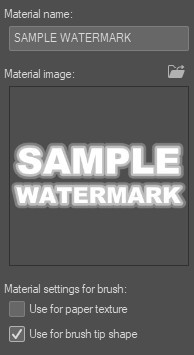
이건 워터마크를 만드는 마커예요! 제공된 붓 모양은 샘플일 뿐이며, 원하는 로고나 모양으로 쉽게 교체할 수 있습니다.
원하는 로고나 도형을 레이어에 올려서 자재로 드래그한 뒤, 그곳에 들어가면 브러시 팁 모양으로 설정하면 됩니다.
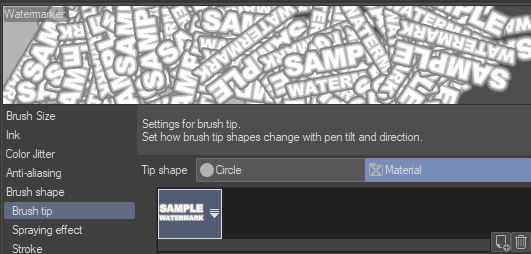
브러시 설정에 들어가서 브러시 팁 아래에서 원하는 재질 모양을 선택하세요. 모양이 많다면 쉽게 찾을 수 있는 이름인지 꼭 확인하세요!
그 후에는 붓으로 캔버스 전체를 강하게 펴면 심하게 렉이 나지 않을 거예요.
그 다음 선택한 불투명도 설정으로 오버레이로 설정하세요.

끝! 이제 이미지 세트에 워터마크가 가득합니다.
AI와 비교할 때 여전히 유효한지는 모르겠지만, 이제 워터마크가 전역에 표시되어 있고, 로고나 형태에 따라 흥미로운 텍스처를 만들 수 있습니다. 안전을 위해 제 워터마크가 실제로 이 위에 있는데, 저도 같은 방법을 추천합니다.

도움이 되었길 바랍니다. 예술 창작 즐거운 시간 보내세요!
I showed doing this on stream many moons ago and said I would make a tutorial.
I never did.
I am now I suppose!
This is a marker that makes watermarks! The provided brush shape is just a sample and can be swapped out easily with your logo or shape of choice.
Simply take the logo or shape you want on a layer, drag it over to your materials, and when it is in there, set as use for brush tip shape.
Go into the brush settings and under brush tip, select the material shape you would like. Make sure it is an easy name to find if you have a lot of shapes!
Afterwards, simply blast the whole canvas with the brush, shouldn't lag too bad or anything.
Then set to overlay with the opacity setting of your choice.
And done! You now have an image set with watermarks EVERYWHERE.
I do not know if this still holds up against AI, but it does now have your watermark all over it, and can make interesting textures depending on the logo or shape. Just to be extra safe, my watermark is actually on this, and I would suggest the same.
Hope this helps. Have a happy time making art!


'TheHamWarrior'님의 다른 소재

'브러시'의 인기 소재


신규 소재


배지
-
 MVP ◆질문에 적절한 답변을 많이 게시하고 커뮤니티 운영에 크게 공헌한 사용자입니다. MVP는 3개월에 한 번, 그 사이에 획득한 포인트를 바탕으로 결정하고 표창을 실시하고 있습니다.
 -
 NVP(New Valuable Player) ◆MVP 다음으로 커뮤니티 운영에 공헌한 사용자입니다. 이제까지 MVP 수상 경험이 없는 분 중에서 획득한 포인트를 바탕으로 결정하여 표창을 실시하고 있습니다.
 -
 공식 엑스퍼트 ◆뛰어난 응답자의 증표인 MVP수상자 중에서 선택된 커뮤니티에서 가장 뛰어난 응답자의 증표입니다. 심사를 거쳐서 저희 회사에서 의뢰할 경우 취임되십니다.※ 옛 명칭 '에반젤리스트'
 -
 셀시스 공인 모더레이터 ◆모더레이터는 일본어와 기타 언어로 말할 수 있는 셀시스 공인 스태프입니다. 소프트웨어나 창작 전문가가 아니므로 직접 의문을 해결할 수는 없지만 여러분이 순조롭게 소통할 수 있도록 언어나 커뮤니케이션 측면에서 지원합니다.
 -
 셀시스 공식운영에 관련된 공식 계정입니다.