




클립 스튜디오를 처음 사용하는 아이패드 사용자를 위한 미니멀리즘 작업 공간으로, 캔버스에서 시선을 떼지 않고도 빠른 제스처(예: 액체화, 변형, 전환 도구 등)를 할 수 있도록 설계되었습니다. 이 작업 공간은 "Quick Access" 설정에 크게 의존합니다. minimalistic workspace for ipad users new to clip studio, designed for user to be able to do quick gestures (such as liquify, transform or switch tools) without having to stop to look away from canvas. This workspace heavily relies on “Quick Access” settings.
참고: 이 작업 공간은 "빠른 접근" 설정에 크게 의존하고 있습니다. "도구"와 "하위 도구"(및 기타 설정) 창이 "빠른 접근 바"에 숨겨져 있어 캔버스 화면 크기를 늘리기 때문입니다. 이 작업 공간을 다운로드한 후 이 기능들을 사용자 지정해 주시기 바랍니다. 감사합니다.
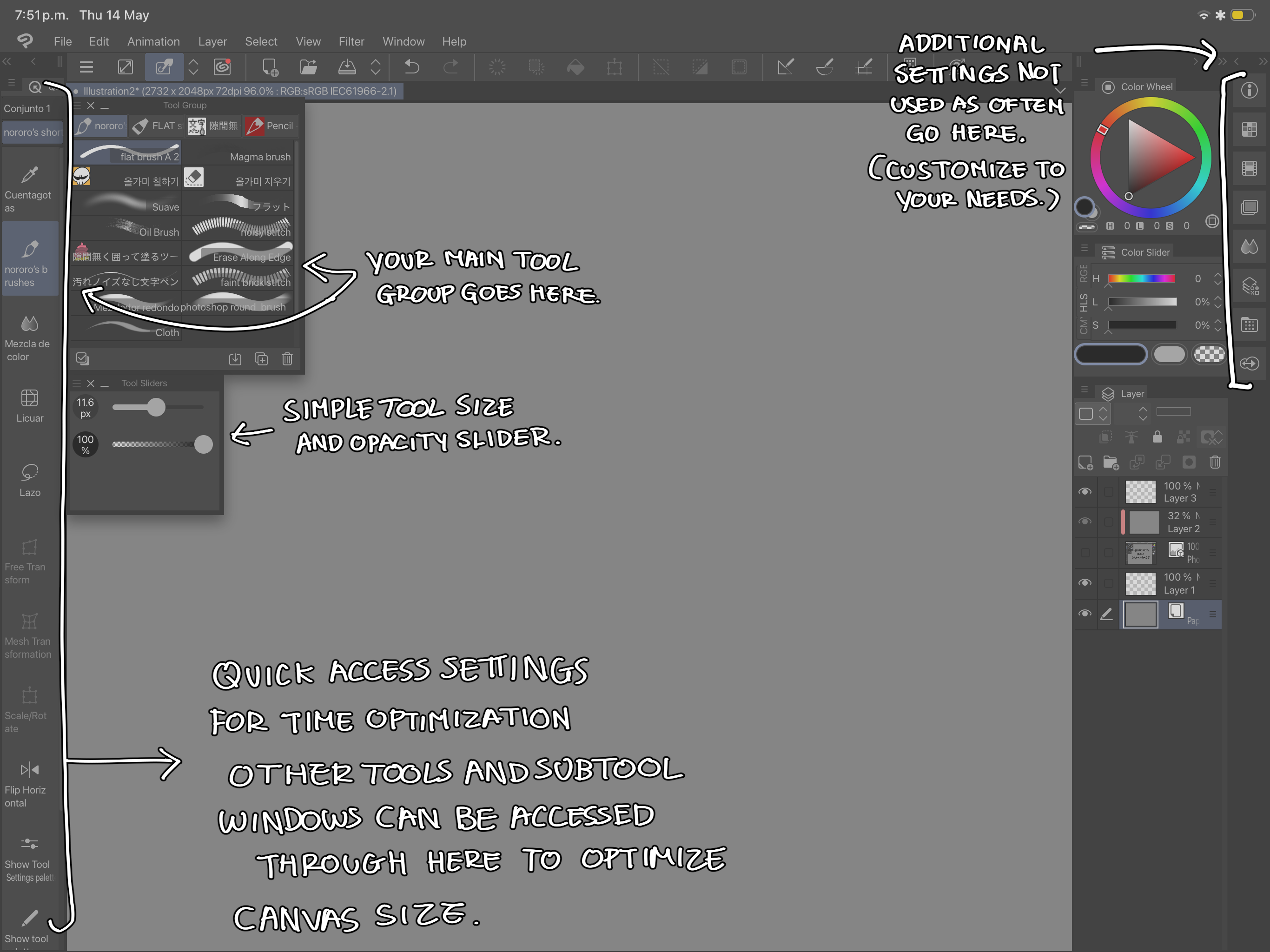
추가 제안: 작업 중에 모든 도구를 빠르게 접근 바에 업로드해 숨기는 것을 추천합니다. 빠른 작업 흐름을 위해 liquify, transform, invert 같은 도구를 퀵 액세스 바에 넣는 것을 추천합니다.
NOTE: This workspace relies heavily on “quick access” settings, as the “tool” and “subtools” (as well as other settings) windows are hidden in the “quick access bar” to increase canvas display size, please, customize these features once you have downloaded this workspace, thank you.
ADDITIONAL SUGGESTION: I recommend to upload all your tools to the quick access bar to hide them as it is convenient during your workflow. I recommend for you to put tools such as liquify, transform and invert in the quick access bar for a quicker workflow.


'워크스페이스'의 인기 소재


신규 소재


배지
-
 MVP ◆질문에 적절한 답변을 많이 게시하고 커뮤니티 운영에 크게 공헌한 사용자입니다. MVP는 3개월에 한 번, 그 사이에 획득한 포인트를 바탕으로 결정하고 표창을 실시하고 있습니다.
 -
 NVP(New Valuable Player) ◆MVP 다음으로 커뮤니티 운영에 공헌한 사용자입니다. 이제까지 MVP 수상 경험이 없는 분 중에서 획득한 포인트를 바탕으로 결정하여 표창을 실시하고 있습니다.
 -
 공식 엑스퍼트 ◆뛰어난 응답자의 증표인 MVP수상자 중에서 선택된 커뮤니티에서 가장 뛰어난 응답자의 증표입니다. 심사를 거쳐서 저희 회사에서 의뢰할 경우 취임되십니다.※ 옛 명칭 '에반젤리스트'
 -
 셀시스 공인 모더레이터 ◆모더레이터는 일본어와 기타 언어로 말할 수 있는 셀시스 공인 스태프입니다. 소프트웨어나 창작 전문가가 아니므로 직접 의문을 해결할 수는 없지만 여러분이 순조롭게 소통할 수 있도록 언어나 커뮤니케이션 측면에서 지원합니다.
 -
 셀시스 공식운영에 관련된 공식 계정입니다.