



기본적인 줄무늬 세트. A basic set of stripes.
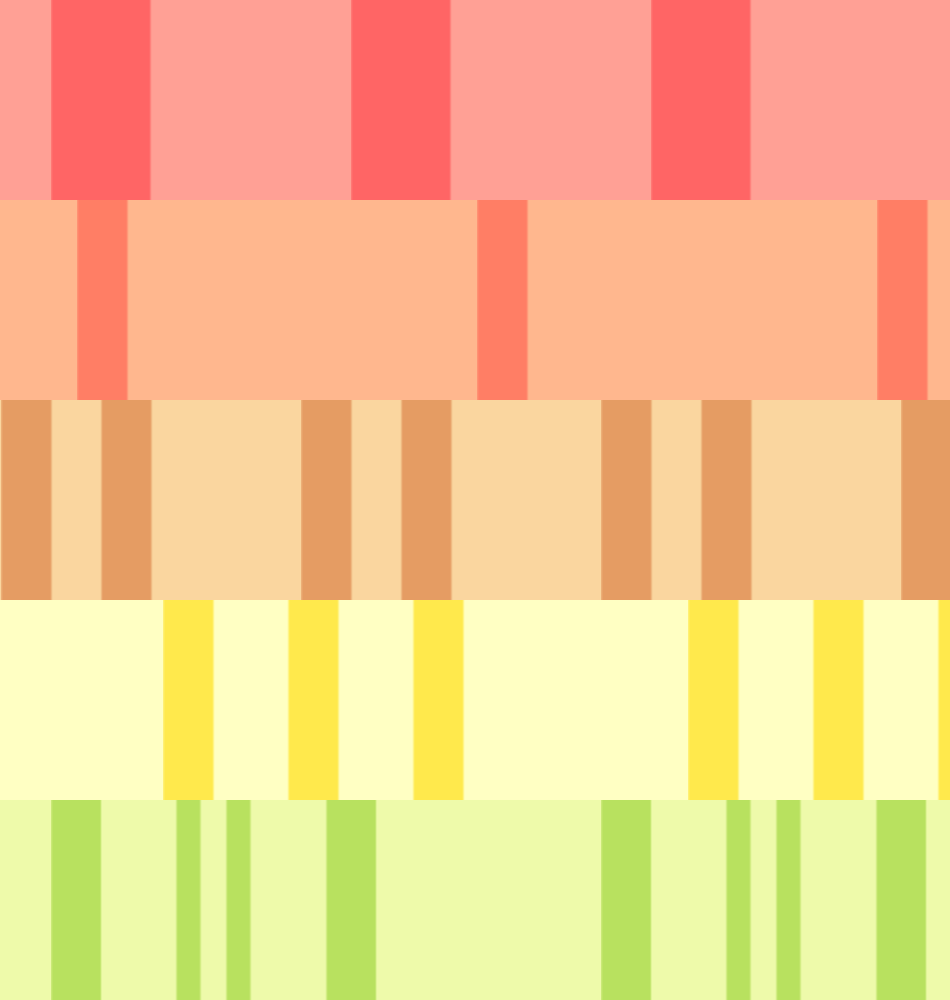
기본 줄무늬가 필요해서 재미로 만들었어요. 이 세트에는 필요할 때 쉽게 줄일 수 있는 줄무늬가 많아요: 25픽셀 줄무늬는 200픽셀보다 작게 줄일 수 있는 범위가 더 넓어요. 그림에서 테스트해 보면서 본인에게 가장 좋은 걸 찾아보세요. 큰 크기가 배경에 더 좋고, 작은 것은 옷이나 작은 공간에 더 좋습니다.
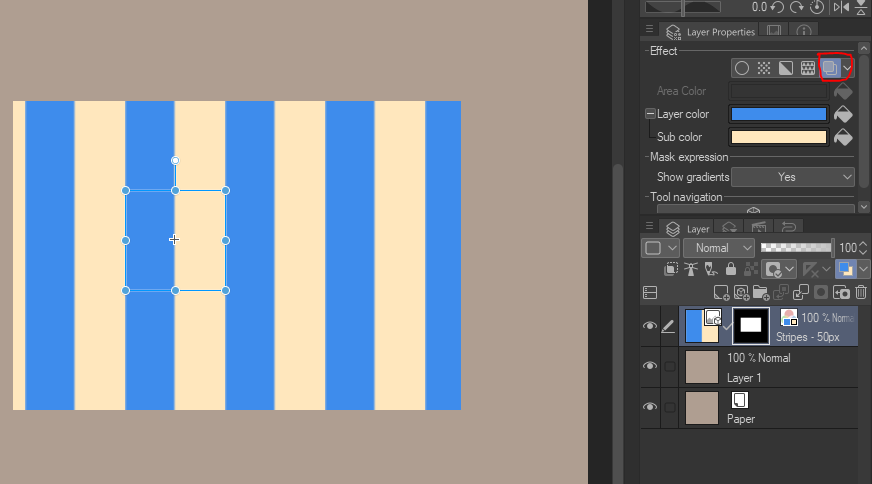
가장 빠른 방법은 "레이어 속성" 메뉴에서 "레이어 색상"을 클릭하는 것입니다. 거기서 원하는 흑백 화면으로 변경할 수 있습니다. :) 그라데이션이나 블렌딩 모드를 사용하는 것도 두려워하지 마세요.




"색깔은 어떻게 바꾸지?"
가장 빠른 방법은 "레이어 속성" 메뉴에서 "레이어 색상"을 클릭하는 것입니다. 거기서 원하는 흑백 화면으로 변경할 수 있습니다. :) 그라데이션이나 블렌딩 모드를 사용하는 것도 두려워하지 마세요.
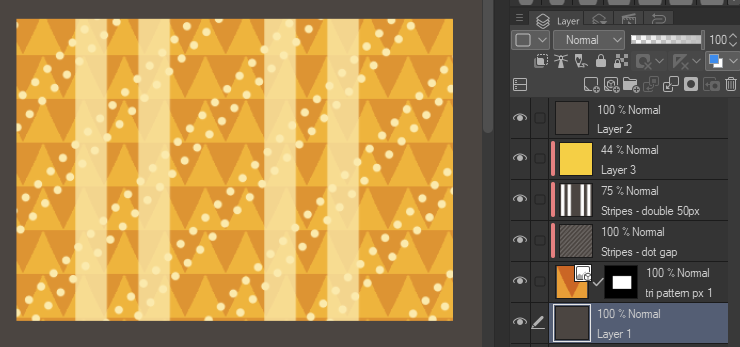
"투명한 줄무늬를 원하면 어쩌지?"
1. 줄무늬 레이어를 래스터화합니다.
2. "밝기 > 불투명도로 변환 편집"
3. 이제 줄무늬 아래에 다른 패턴을 겹칠 수 있습니다.
간단한 예시:


여기 100% 줌으로 찍은 모든 줄무늬입니다.


I needed some basic stripes and made these for fun. There's a lot of stripes in this set for easy shrinking when you need it: 25px stripes have a greater range of smallness they can shrink to than 200px. Test them on your art to see what's best in your case. Bigger sizes are better for backgrounds, smaller are better for clothes and other small areas.
The fastest way is by going to the "Layer Properties" menu, then clicking on "Layer Color". You can change the black & white to whatever you choose from there. :) Don't be afraid to use gradients or blending modes either.
"How do I change the color?"
The fastest way is by going to the "Layer Properties" menu, then clicking on "Layer Color". You can change the black & white to whatever you choose from there. :) Don't be afraid to use gradients or blending modes either.
"What if I want transparent stripes?"
1. Rasterize your stripe layer.
2. Go to "Edit > Convert Brightness to Opacity"
3. Now you can layer other patterns under your stripes.
Quick Examples:
Here's all the stripes at 100% zoom.
기본 Basic


멀티 Multi
-
줄무늬 - 더블 50px Stripes - double 50px
-
줄무늬 - 트리플 50px Stripes - triple 50px
-
줄무늬 - 혼합 더블 Stripes - mixed double
-
줄무늬 - 더블 믹스 2 Stripes - double mixed 2
-
스트라이프 - 더블 믹스 컴버스 Stripes - double mixed combined
-
줄무늬 - 두 배, 세 배 Stripes - double then triple
-
줄무늬 - 좁은 25px 네 개 Stripes - four narrow 25px
-
줄무늬 - 4개와 25px 2개 Stripes - four and two 25px
-
줄무늬 - 좁은 25px 4개 Stripes - four narrow wide 25px
-
줄무늬 - 두꺼운 줄무늬와 가늘한 줄무늬 Stripes - thick and thin









점과 대시 Dots and Dashes
-
줄무늬 - 대시와 두꺼운 줄무늬 Stripes - dash and thick
-
줄무늬 - 정사각형 점 Stripes - square dots
-
줄무늬 - 점 간격 Stripes - dot gap
-
줄무늬 - 타원형 행 Stripes - Oval Rows
-
줄무늬 - 점 행 Stripes - Dot rows
-
줄무늬 - 줄무늬 Stripes - striped stripes
-
줄무늬 - 줄무늬와 단색 Stripes - Striped and Solid
-
스트라이프 - 스트라이프와 솔리드 2색 투명 Stripes - Striped and Solid 2 color transparent
-
줄무늬 - 투명한 줄무늬 Stripes - striped stripes transparent
-
줄무늬 - 줄무늬와 솔리드 투명 Stripes - Striped and Solid transparent
-
줄무늬 - 투명한 줄무늬 Stripes - striped stripes transparent


'saturns_day'님의 다른 소재


'소재집'의 인기 소재


신규 소재





배지
-
 MVP ◆질문에 적절한 답변을 많이 게시하고 커뮤니티 운영에 크게 공헌한 사용자입니다. MVP는 3개월에 한 번, 그 사이에 획득한 포인트를 바탕으로 결정하고 표창을 실시하고 있습니다.
 -
 NVP(New Valuable Player) ◆MVP 다음으로 커뮤니티 운영에 공헌한 사용자입니다. 이제까지 MVP 수상 경험이 없는 분 중에서 획득한 포인트를 바탕으로 결정하여 표창을 실시하고 있습니다.
 -
 공식 엑스퍼트 ◆뛰어난 응답자의 증표인 MVP수상자 중에서 선택된 커뮤니티에서 가장 뛰어난 응답자의 증표입니다. 심사를 거쳐서 저희 회사에서 의뢰할 경우 취임되십니다.※ 옛 명칭 '에반젤리스트'
 -
 셀시스 공인 모더레이터 ◆모더레이터는 일본어와 기타 언어로 말할 수 있는 셀시스 공인 스태프입니다. 소프트웨어나 창작 전문가가 아니므로 직접 의문을 해결할 수는 없지만 여러분이 순조롭게 소통할 수 있도록 언어나 커뮤니케이션 측면에서 지원합니다.
 -
 셀시스 공식운영에 관련된 공식 계정입니다.