


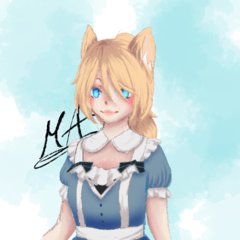

키스 자국/스테인 브러시는 제가 직접 만든 거예요 <3 a kiss mark/stain brush by yours truly <3
키스 마크 브러시

색상과 크기를 바꿀 수 있습니다
모험심이 있다면 설정을 바꿔볼 수도 있습니다
:3
내가 창조한 사람이야
Murasaki_A
(종이에 입술 자국을 스캔하고 스캐너에 얼룩이 생기지 않도록 확인하는 게 정말 번거로웠어요)
(사진이 좀 흐릿해서 죄송해요, 솔이 꽤 날카로워서 제가 바보 같아서 사진이 너무 흐릿해지지 않게 하는 거예요)

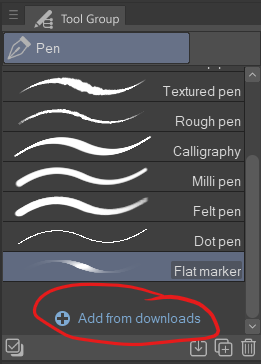
브러시 를 추가하는 방법(물론 다운로드한 후에)
도구 그룹 패널 맨 아래쪽으로 스크롤해서 '다운로드에서 추가'를 클릭하세요.
그러면 'Add Tool'이라는 창이 뜨게 됩니다
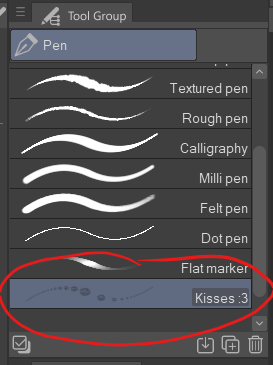
먼저 'Kisses :3'를 찾아서 클릭한 다음, '팔레트 추가' 버튼을 누르세요

그 후에는 빗이 비기닝에서 선택한 도구에 나타나야 합니다
즐거운 창작 되세요 :3
a kiss mark brush
you can change it's colour and size
you can play around with the settings if you're feeling adventurous
:3
created by yours truly
Murasaki_A
(scanning a lipmark on a piece of paper and making sure that i don't stain the scanner was a pain in the ass)
(sorry for a bit blurry photo, the brush is actually quite sharp, it's just me who's a dumbass and can't get the photo to not get blurred so much)
to add the brush (after you download it of course)
you want to scroll to the bottom of the tool group panel and click 'add from downloads'
then a window called 'add tool' will pop up
first you want to find and click 'Kisses :3' after wich you click 'add palette' button
after that the brush should appear in the tool that you picked at the biggining
happy creating :3


배지
-
 MVP ◆질문에 적절한 답변을 많이 게시하고 커뮤니티 운영에 크게 공헌한 사용자입니다. MVP는 3개월에 한 번, 그 사이에 획득한 포인트를 바탕으로 결정하고 표창을 실시하고 있습니다.
 -
 NVP(New Valuable Player) ◆MVP 다음으로 커뮤니티 운영에 공헌한 사용자입니다. 이제까지 MVP 수상 경험이 없는 분 중에서 획득한 포인트를 바탕으로 결정하여 표창을 실시하고 있습니다.
 -
 공식 엑스퍼트 ◆뛰어난 응답자의 증표인 MVP수상자 중에서 선택된 커뮤니티에서 가장 뛰어난 응답자의 증표입니다. 심사를 거쳐서 저희 회사에서 의뢰할 경우 취임되십니다.※ 옛 명칭 '에반젤리스트'
 -
 셀시스 공인 모더레이터 ◆모더레이터는 일본어와 기타 언어로 말할 수 있는 셀시스 공인 스태프입니다. 소프트웨어나 창작 전문가가 아니므로 직접 의문을 해결할 수는 없지만 여러분이 순조롭게 소통할 수 있도록 언어나 커뮤니케이션 측면에서 지원합니다.
 -
 셀시스 공식운영에 관련된 공식 계정입니다.