


레이어 템플릿: 웹툰 (매우 정교함) (Layer template: Webtoon (very elaborate)) Layer template: Webtoon (very elaborate)
콘텐츠 ID:2234444
-
24


안녕하세요, 저는 웹툰을 만들기 위해 정말 정교한 레이어 템플릿을 만들었어요. 모든 레이어를 분리하는 걸 좋아하거든요!
사용 방법:
- 모든 프레임 레이어를 "Frames" 폴더로 끌어와요. 스마트 선택 도구를 사용해 프레임 안쪽에 그려 상단 레이어에 그리면 모든 패널마다 템플릿을 붙여넣을 필요가 없습니다.
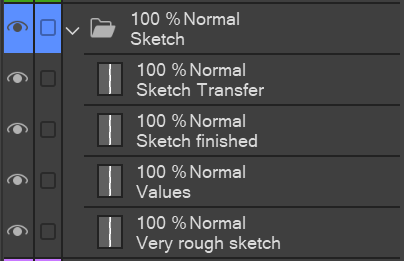
- "Sketch" 폴더에서는 먼저 "매우 러프 스케치" 레이어에서 스토리보드를 만들고 값을 생각한 뒤 더 정교한 스케치로 넘어가요.
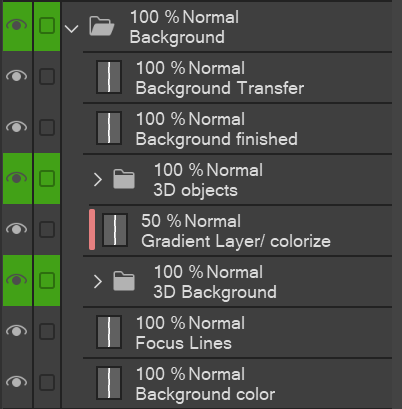
- 저는 "X 완료"와 "X 전송" 시스템(스 케치, 배경, 캐릭터 폴더에서 찾을 수 있음)을 사용합니다. 먼저 "전송" 레이어에 그려보고, 만족하면 "레이어" 아래에 있는 "하위 레이어로 전송" 기능을 사용해 "완성된" 레이어로 옮깁니다. 이렇게 하면 예를 들어 머리카락 선화만 먼저 그리는 데 집중할 수 있고, 얼굴 선화 일부를 지우는 걱정을 하지 않아도 됩니다. [저는 "레이어 병합" 기능보다 "전송" 기능을 선호하는데, 이렇게 하면 매번 새로운 레이어를 만들 필요가 없기 때문입니다.]
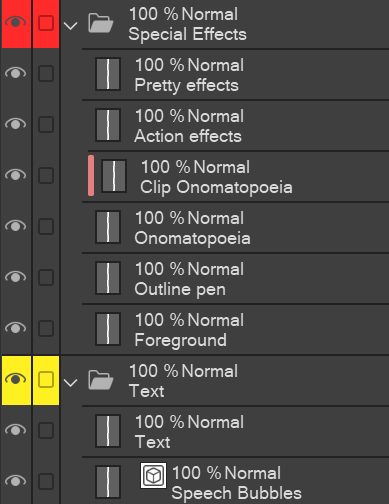
- 배경과 특수 효과 폴더에는 모든 패널에서 사용하지 않는 레이어와 하위 폴더가 있습니다. 예를 들어, 3D 배경을 사용하면 배경을 그릴 필요가 없고; 그리고 사랑스러운 효과음에는 액션 효과가 거의 동반되지 않는다.
- 특수 효과 레이어에 대한 설명: "전경"은 캐릭터를 부분적으로 덮는 모든 그림을 의미합니다. "아웃라인 펜"은 제가 아웃라인 펜으로 쓸 수 있는 모든 효과에 해당합니다. 예를 들어 수다/웃음, 짜증, 움직임 선, 킥킥 같은 소리 단어 등. "의성어"는 BOOM! 같은 큰 효과음에 쓰는 거예요.그리고 '클립' 버전은 내부에서 그라데이션이나 패턴을 만들고 싶을 때를 위한 거예요.
- 나머지는 자명할 수 있다고 생각합니다;)


필요에 맞게 자유롭게 맞춤화하세요!
Hey, I've created a seriously elaborate layer template for creating webtoons, because I like to separate all my layers!
How to use:
- Pull all your frame layers into the "Frames" folder. Use the Smart selection tool to draw inside the Frames, but on the layers above, so you don´t need to paste the template for every panel.
- In the "Sketch" folder, I like to first do the storyboard on the "very rough sketch" layer, and think the values through, before I move on to the more elaborate sketch.
- I work with a system of "X finished" and "X Transfer" (to be found in Sketch, Background, and Characters folders). I draw on the "Transfer" layer first, and once I´m satisfied, I use the "Transfer to lower layer" function (under "Layer") to transfer it onto the "finished" layer. This way, I can focus on drawing e.g. only the hair lineart first and not worry about erasing parts of the face lineart. [I prefer the "transfer" function to the "merge layers" function, because this way, I don´t need to create a new layer every time.]
- In the Background and Special Effects folders, there are some layers and subfolders that I don´t use in every panel. E.g. I don´t need to draw backgrounds if I use a 3D Background; and lovey-dovey effects are hardly accompanied by action effects.
- Explanations to the Special Effects layers: "Foreground" is for any drawings that cover the Characters partially. "Outline pen" is for every effect I would use the outline pen for, e.g. chatter/ laughing, annoyed, movement lines, sound words like snicker etc. "Onomatopoeia" is for the big sound effects like BOOM! and the "clip" version is in case you want to do gradients or patterns inside.
- The rest is self-explanatory, I think ;)
Feel free to personalize it to your needs!


'레이어 템플릿'의 인기 소재


신규 소재


배지
-
 MVP ◆질문에 적절한 답변을 많이 게시하고 커뮤니티 운영에 크게 공헌한 사용자입니다. MVP는 3개월에 한 번, 그 사이에 획득한 포인트를 바탕으로 결정하고 표창을 실시하고 있습니다.
 -
 NVP(New Valuable Player) ◆MVP 다음으로 커뮤니티 운영에 공헌한 사용자입니다. 이제까지 MVP 수상 경험이 없는 분 중에서 획득한 포인트를 바탕으로 결정하여 표창을 실시하고 있습니다.
 -
 공식 엑스퍼트 ◆뛰어난 응답자의 증표인 MVP수상자 중에서 선택된 커뮤니티에서 가장 뛰어난 응답자의 증표입니다. 심사를 거쳐서 저희 회사에서 의뢰할 경우 취임되십니다.※ 옛 명칭 '에반젤리스트'
 -
 셀시스 공인 모더레이터 ◆모더레이터는 일본어와 기타 언어로 말할 수 있는 셀시스 공인 스태프입니다. 소프트웨어나 창작 전문가가 아니므로 직접 의문을 해결할 수는 없지만 여러분이 순조롭게 소통할 수 있도록 언어나 커뮤니케이션 측면에서 지원합니다.
 -
 셀시스 공식운영에 관련된 공식 계정입니다.