



더러워 보이지 않도록 색칠과 그림자 처리를 배우고 있었는데, 이 색상이 그림자를 그리기에 딱 좋다고 생각해요. 색상은 3가지입니다
1 파란색: 노란색을 제외한 거의 모든 색상에 완벽합니다
2 보라색: 파란색과 같지만 더 부드럽습니다
3 빨강: 파랑과 보라색이 검은색 그림자를 만들 때마다 완벽합니다
I was learning how to do coloring and shadowing so it won't look dirty and i find this colors perfect for drawing shadows. There are 3 colors
1 blue: perfect with alomost all colors except yellow
2 Purple: same as blue but more soft
3 Red: perfect for every time when blue and purple gives black shadow
팔레트 다운로드 방법
1 클릭 다운로드
2 색상 세트 메뉴를 선택하고 색상 세트 추가를 클릭하세요
3 이 색상 세트를 추가하고 즐기세요
이 팔레트 사용 방법
1 새 레이어를 만들어서 색칠하고 싶은 다른 레이어 위에 올려놓습니다
2세트 불투명도는 30%입니다.
3 색칠하기 시작
이 예시 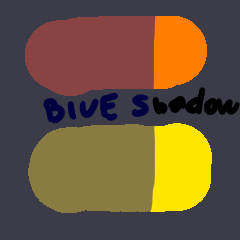 처럼 파란색과 보라색이 검은 그림자를 준다면
 처럼 파란색과 보라색이 검은 그림자를 준다면
 더 보기 좋게 빨간색으로 바꿔 보세요

불투명도를 조절해서 더 좋은 화면을 볼 수도 있습니다
How to download pallete
1 Click Download
2 Choose Color set menu and click add color set
3 Add this color set and enjoy
HOW TO USE THIS PALLETE
1 Create new layer and put it above other layers that you want to color
2 Set opacity to 30%
3 Start coloring
If blue and purple gives you black shadow like on this example
Change it to red for better look
You can also play with opacity for better look


'52vsemnashim'님의 다른 소재


'컬러 세트'의 인기 소재





신규 소재



배지
-
 MVP ◆질문에 적절한 답변을 많이 게시하고 커뮤니티 운영에 크게 공헌한 사용자입니다. MVP는 3개월에 한 번, 그 사이에 획득한 포인트를 바탕으로 결정하고 표창을 실시하고 있습니다.
 -
 NVP(New Valuable Player) ◆MVP 다음으로 커뮤니티 운영에 공헌한 사용자입니다. 이제까지 MVP 수상 경험이 없는 분 중에서 획득한 포인트를 바탕으로 결정하여 표창을 실시하고 있습니다.
 -
 공식 엑스퍼트 ◆뛰어난 응답자의 증표인 MVP수상자 중에서 선택된 커뮤니티에서 가장 뛰어난 응답자의 증표입니다. 심사를 거쳐서 저희 회사에서 의뢰할 경우 취임되십니다.※ 옛 명칭 '에반젤리스트'
 -
 셀시스 공인 모더레이터 ◆모더레이터는 일본어와 기타 언어로 말할 수 있는 셀시스 공인 스태프입니다. 소프트웨어나 창작 전문가가 아니므로 직접 의문을 해결할 수는 없지만 여러분이 순조롭게 소통할 수 있도록 언어나 커뮤니케이션 측면에서 지원합니다.
 -
 셀시스 공식운영에 관련된 공식 계정입니다.