


Fetlock 베터 브롬 + 그라디언트 세트 (Fetlock Better Bromines + Gradient Set) Fetlock Better Bromines + Gradient Set
콘텐츠 ID:2169088
-
472


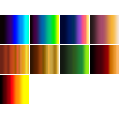
그라디언트 맵으로 '브롬 트릭'을 수행하는 자동 작업과 나중에 사용할 작은 그라디언트 선택. An auto action to do the 'bromine trick' with gradient maps, as well as a small selection of gradients to use afterwards.
작품 준비를 위해 번거로운 작업 없이 아래쪽에 색칠할 수 있는 브로민 해킹 방법을 원하시나요?
어떤 브로민 색깔을 원할지 결정이 안 되시나요?
여기 한 팩 드릴게요!
1. 꽤 단순한 전제 아래 작동하는 레이어 템플릿 : 기본적으로 모든 브로민 트릭은 그라데이언트 맵과 몇 개의 폴더, 적절한 설정으로 할 수 있는 일을 5,000스텝으로 하는 것입니다... 2초.
2. 폴더 세트가 하는 역할에 맞게 조정된 그라데이언트 세트로, 이미 그라데이언트 맵 세트가 많지 않고 CSP 기본 맵의 외관이 마음에 들지 않을 경우를 대비해서입니다. 이걸 처음 입력 하는 것 대신 사용하려면 폴더에서 어떤 그라데이션이 사용되는지 바꾸면 됩니다.


자주 묻는 질문 :
Q: 브로민 층을 사용하고 있는데, 색상이 잘 맞지 않아요.
A: 브로민 라인 층에 순수 검정색을 사용하고 있는지 확인하세요. 또한, 이 방법과 함께 나뭇결이나 투명한 붓이 가장 잘 어울립니다! G-펜이나 이와 비슷한 100% 투명도 선은 색상 변화가 미미할 뿐입니다. 그렇긴 해도, 선을 복제하고 그 아래에서 가우시안 블러를 하면 전통적인 셀 효과를 만드는 데 꽤 효과적일 수 있습니다.
Q: 색을 쓸 수가 없어요, 모든 게 브로민색으로 나오고 있는데...

Q: 이 효과가 마음에 들지만, 작품마다 다른 색상으로 브로민 효과를 표현하고 싶습니다. 이걸 할 수 있는 방법이 있을까요?
A: 네, 하지만 어지러워질 수 있습니다; 여러 개의 폴더를 만들어야 하며, 각 '조각'(옷, 피부)은 분리되어 있어야 합니다. 예를 들어 보라색 브로민 트릭 라인워크 폴더와 황갈색 색깔이 있는 폴더 같은 게 있죠.
A: 도구를 '모든 레이어' 대신 '참조 레이어'로 설정하고, '여기에 선 그리기'를 참조로 설정하거나, 해당 도구를 사용할 때 '흰색 유지' 레이어의 가시성을 잠시 꺼두었다가 다시 켜세요. '화이트 유지' 레이어는 이런 문제를 피하기 위해 기본적으로 드래프트로 설정되어 있습니다.

그렇게... 즐거운 시간 보내세요! (이 예 시에 묘사된 인물은 제 것이며, 제 엉성한 필체는 제 것입니다)
Want a bromine hack that will allow you to do coloring underneath without doing a bunch of nonsense to get your artwork prepped?
Indecisive about what color of bromine you want?
Here's a pack for you!
1. A layer template that works under a pretty simple premise : basically every single bromine trick out there is doing five thousand steps to do what a gradient map and a couple folders with the right settings could do in like... two seconds.
2. A set of gradients specifically tuned to what the folder set does, just in case you don't have a lot of gradient map sets already, and don't like the look of CSP's default ones. To use these instead of what initially pops in just swap which gradient is being used in the folder.
FAQ :
Q: I'm using the bromine layer, but the colors aren't working right.
A: Check to make sure that you're using pure black on the bromine lines layer. Additionally, brushes with grain or transparency are the ones that work best with this trick! A G-pen or any other similar solid 100% opacity line will only have mild color changes. That being said, that could work well for making interesting traditional cel effects, if you duplicate the lines and gaussian blur the duplicate underneath.
Q: I'm not able to use color, everything is turning out bromine color...
Q: I like this effect, but I would like to be able to do the bromine effect in different colors per piece of art. Is there a way to do this?
A: Yes, but it will get cluttered; you will need to have multiple folders, with each 'piece' (clothes, skin) separated out. So you'd have a purple bromine trick linework folder, and one that has a tan color in another one, or whatnot.
A: Set the tools to 'Reference Layer' instead of 'all layers', and set 'Draw Lines Here' as the reference, or temporarily toggle the visibility of the 'Keep White' layer off while using the tool in question, and turn it back on after you do so. The 'Keep White' layer is set as a Draft by default to avoid these issues in the first place.
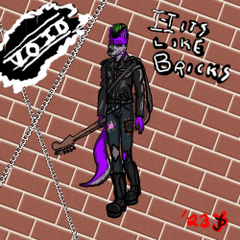
With that... Have fun! (Character depicted in these examples is mine, and my sloppy handwriting is mine)
브롬 The Bromines

갱신 이력
초기 업로드 시 일부 설명이 잊혀진 브로민 효과를 작동시키는 데 흔히 발생하는 문제를 해결하는 방법에 대한 추가 설명을 추가했습니다. added further explanation of how to fix common problems with getting the bromine effect to work, as some portions of the explanation were forgotten on the initial upload.







'AMORPHAGE'님의 다른 소재


'소재집'의 인기 소재


신규 소재



-
 MVP ◆질문에 적절한 답변을 많이 게시하고 커뮤니티 운영에 크게 공헌한 사용자입니다. MVP는 3개월에 한 번, 그 사이에 획득한 포인트를 바탕으로 결정하고 표창을 실시하고 있습니다.
 -
 NVP(New Valuable Player) ◆MVP 다음으로 커뮤니티 운영에 공헌한 사용자입니다. 이제까지 MVP 수상 경험이 없는 분 중에서 획득한 포인트를 바탕으로 결정하여 표창을 실시하고 있습니다.
 -
 공식 엑스퍼트 ◆뛰어난 응답자의 증표인 MVP수상자 중에서 선택된 커뮤니티에서 가장 뛰어난 응답자의 증표입니다. 심사를 거쳐서 저희 회사에서 의뢰할 경우 취임되십니다.※ 옛 명칭 '에반젤리스트'
 -
 셀시스 공인 모더레이터 ◆모더레이터는 일본어와 기타 언어로 말할 수 있는 셀시스 공인 스태프입니다. 소프트웨어나 창작 전문가가 아니므로 직접 의문을 해결할 수는 없지만 여러분이 순조롭게 소통할 수 있도록 언어나 커뮤니케이션 측면에서 지원합니다.
 -
 셀시스 공식운영에 관련된 공식 계정입니다.