



이 팩에는 2개의 브러시, 2개의 이미지, 1개의 색상 세트 팔레트 및 1개의 색상 그라디언트 맵 팔레트가 포함되어 있어 캐릭터를 쉽고 빠르게 "눈 플레어"할 수 있습니다. This pack contains 2 brushes, 2 images, 1 color set palette and 1 color gradient map palette to make easy and fast “eye flare” for your characters.

"Mizu Flare 브러시": 플레어에 색상을 가져 오도록 "기본 및 보조 색상"을 설정합니다. 이 팩의 색상 세트 팔레트 또는 좋아하는 색상 조합을 사용하십시오.

"Mizu Flare brush Grey": 그라디언트 맵을 사용하여 플레어를 채색합니다. 새 레이어에 플레어를 칠한 다음 그 위에 새 보정 레이어> 그라디언트 맵을 추가하기만 하면 됩니다. 이 경우 "아래 레이어 클리핑"이 유용합니다. 그라디언트 맵 세트를 제공했습니다.

레이어 효과를 사용하여 눈 플레어를 향상시킬 수도 있습니다! "추가", "하드 라이트", "핀 라이트", "컬러 닷지", "라이트닝", "스크린"을 시도하고 좋아하는 :) 선택하십시오.

“Mizu Flare brush”: set up “main and secondary color” to bring color to the flare. Use the color set palette in this pack or your favorite color combinations.
“Mizu Flare brush Grey”: use gradient maps to color the flare. You only have to paint the flare in a new layer and then add a New correction layer> Gradient Map over it. “Clip a layer Below” is useful in this case. I provided a set of gradient maps.
You can also use Layer effects to enhance the Eye flare! Try “Add”, “Hard Light”, “Pin light”, “Color Dodge”, “Lighten”, “Screen”and chose your favorite :)
이미지 Image

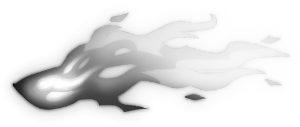
그라디언트 맵 Gradient map
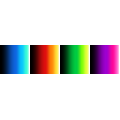
색상표 Color palette

브러시 Brush


갱신 이력
초기 버전 Initial version




'MizuNya'님의 다른 소재


'소재집'의 인기 소재


신규 소재



-
 MVP ◆질문에 적절한 답변을 많이 게시하고 커뮤니티 운영에 크게 공헌한 사용자입니다. MVP는 3개월에 한 번, 그 사이에 획득한 포인트를 바탕으로 결정하고 표창을 실시하고 있습니다.
 -
 NVP(New Valuable Player) ◆MVP 다음으로 커뮤니티 운영에 공헌한 사용자입니다. 이제까지 MVP 수상 경험이 없는 분 중에서 획득한 포인트를 바탕으로 결정하여 표창을 실시하고 있습니다.
 -
 공식 엑스퍼트 ◆뛰어난 응답자의 증표인 MVP수상자 중에서 선택된 커뮤니티에서 가장 뛰어난 응답자의 증표입니다. 심사를 거쳐서 저희 회사에서 의뢰할 경우 취임되십니다.※ 옛 명칭 '에반젤리스트'
 -
 셀시스 공인 모더레이터 ◆모더레이터는 일본어와 기타 언어로 말할 수 있는 셀시스 공인 스태프입니다. 소프트웨어나 창작 전문가가 아니므로 직접 의문을 해결할 수는 없지만 여러분이 순조롭게 소통할 수 있도록 언어나 커뮤니케이션 측면에서 지원합니다.
 -
 셀시스 공식운영에 관련된 공식 계정입니다.