



내 웹툰 레이어! my webtoon layers!
안녕! 이것은 꽤 자명합니다 ... 이것이 내 레이어를 정렬하는 방법입니다!
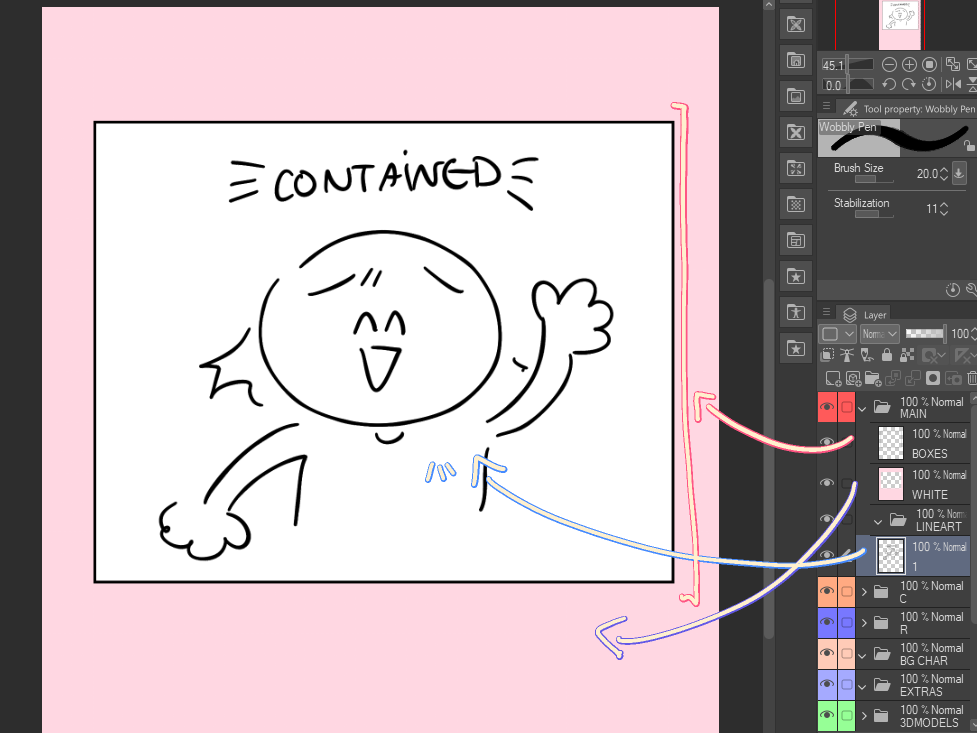
"MAIN"폴더를 명확히하려면 ...
"BOXES" 레이어는 모양 도구를 사용하여 만든 패널 상자용입니다. "WHITE" 폴더는 웹툰의 배경용입니다. 이렇게하면 모든 선화, 색상, 배경 등이 모두 패널 상자에 포함됩니다! "LINEART"폴더는 위에서 말했듯이 그렇습니다!
나머지 폴더에 관해서는, 그것은 (다시) 꽤 자명합니다! ^^ "C" 및 "R" 폴더를 문자 이름으로 변경할 수 있습니다. 그것들은 내 2명의 주인공 이름의 글자일 뿐입니다. :) 더 많은 폴더를 추가하고, 항목을 삭제하고, 전환할 수 있습니다! 이것은 나에게 더 쉽고 내 레이어를 공유하고 싶었습니다! 이것이 당신에게 도움이 되기를 바랍니다!
hi! this is pretty self explanatory ... this is how i sort my layers!
to clarify the "MAIN" folder ...
the "BOXES" layer is for panel boxes, made using the shape tool. the "WHITE" folder is for the background of your webcomic. this way, all of your lineart, colors, backgrounds etc are all contained within the panel box! as for the "LINEART" folder, it's as i said above!
as for the rest of the folders, it's (again) pretty self explanatory! ^^ you can change the "C" and "R" folders to characters names. those are just the letters of my 2 main characters names. : ) feel free to add more folders, delete things and switch it around! this is just easier for me, and i wanted to share my layers! i hope this can benefit you!


'amyahue'님의 다른 소재


'레이어 템플릿'의 인기 소재


신규 소재




배지
-
 MVP ◆질문에 적절한 답변을 많이 게시하고 커뮤니티 운영에 크게 공헌한 사용자입니다. MVP는 3개월에 한 번, 그 사이에 획득한 포인트를 바탕으로 결정하고 표창을 실시하고 있습니다.
 -
 NVP(New Valuable Player) ◆MVP 다음으로 커뮤니티 운영에 공헌한 사용자입니다. 이제까지 MVP 수상 경험이 없는 분 중에서 획득한 포인트를 바탕으로 결정하여 표창을 실시하고 있습니다.
 -
 공식 엑스퍼트 ◆뛰어난 응답자의 증표인 MVP수상자 중에서 선택된 커뮤니티에서 가장 뛰어난 응답자의 증표입니다. 심사를 거쳐서 저희 회사에서 의뢰할 경우 취임되십니다.※ 옛 명칭 '에반젤리스트'
 -
 셀시스 공인 모더레이터 ◆모더레이터는 일본어와 기타 언어로 말할 수 있는 셀시스 공인 스태프입니다. 소프트웨어나 창작 전문가가 아니므로 직접 의문을 해결할 수는 없지만 여러분이 순조롭게 소통할 수 있도록 언어나 커뮤니케이션 측면에서 지원합니다.
 -
 셀시스 공식운영에 관련된 공식 계정입니다.