


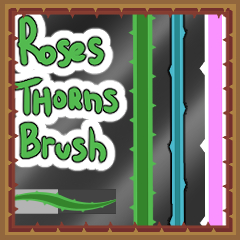


この筆は4回作り、間隔やトゲの大きさが違いました。 (この投稿の最後にカラーチェンジガイド)


自分に一番合うサイズの組み合わせ(素材2 - シェイプサイズとチップサイズ)を探してみてください。 (GIF参照)

レイヤーモードやオプションと好きなように組み合わせてください


一筆の輪郭が重なってはなりません
(中にトゲのない球体を作れる)

<3をお楽しみください
さて、ここからは(少し)難しいところです。
- メインカラーがアウトライン部分を定義します。
- セカンダリーカラーが内側の部分を定義します。
- ブラシ を使うには必ずメインカラー で使ってください。
セカンダリーカラーにいると、最終的には
「二次色のみ」のセリフ。
( 両方のスロットで同じ色を選ぶことも可能です)。

I made 4 iterations of this brush, with different spacing and thorn sizes. (color change guide at bottom of this post)
You can try and find the combination of sizes that satisfy you best (material 2 - shape and tip sizes). (see gif)
Combine with layer modes and options anyway you want
A single brush stroke's outline won't overlap itself
(you can make a sphere with no thorn inside)
Enjoy <3
Now, the tricky part (somewhat)
- Your Main color will define the Outline part.
- Your Secondary color will define the Inside part.
- Be SURE to be on the MAIN color to use the brush.
Being on the secondary color will end up as
"Secondary color only" lines.
(You could also select the same color on both slots).
更新履歴





バッジ
-
 MVP ◆質問に対して適切な回答を数多く投稿し、コミュニティの運営に大きく貢献したユーザーです。MVPは3ヶ月に一度、その間に獲得したポイントを元に決定し、表彰を行っています。
 -
 NVP (New Valuable Player) ◆MVPに次いでコミュニティの運営に貢献したユーザーです。これまでMVPの受賞経験のない方から、獲得したポイントを元に決定し、表彰を行なっています。
 -
 公式エキスパート ◆優れた回答者の証であるMVP受賞者の中からさらに選ばれた、コミュニティで最も優良な回答者の証です。審査を経て当社から依頼し就任いただいています。※旧名称「エバンジェリスト」
 -
 セルシス公認モデレーター ◆モデレーターは、日本語とその他の言語が話せるセルシス公認のスタッフです。ソフトウェアや創作のエキスパートではないので、直接疑問を解決することはできませんが、みなさんがスムーズにコミュニケーションできるように、言葉やコミュニケーションの側面からサポートします。
 -
 セルシス公式運営に関連した公式アカウントです。