


Roses/Thornsブラシパック(無料) (Roses/Thorns brush pack (free)) Roses/Thorns brush pack (free)
コンテンツID:2304690
-
71


非常に特定のブラシの小さなパックを作り、輪郭線とインラインカラー選択で簡略化されたソーンの模様を描きました。 A small pack of very specific brushes, I made to draw simplified Thorn patterns with outline and inline color selection.


- メインカラーがアウトライン部分を定義します。
- セカンダリーカラーが内側の部分を定義します。
- ブラシ を使うには必ずメインカラー で使ってください。

- Your Main color will define the Outline part.
- Your Secondary color will define the Inside part.
- Be SURE to be on the MAIN color to use the brush.
デュアルカラー ソーンブラシパック Dual colors Thorn Brush Pack
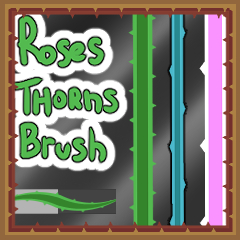
更新履歴
-名前と説明を変更し、タグを削除しました -Name and description changed, tags removed



"素材集"の人気素材


新着素材


-
 MVP ◆質問に対して適切な回答を数多く投稿し、コミュニティの運営に大きく貢献したユーザーです。MVPは3ヶ月に一度、その間に獲得したポイントを元に決定し、表彰を行っています。
 -
 NVP (New Valuable Player) ◆MVPに次いでコミュニティの運営に貢献したユーザーです。これまでMVPの受賞経験のない方から、獲得したポイントを元に決定し、表彰を行なっています。
 -
 公式エキスパート ◆優れた回答者の証であるMVP受賞者の中からさらに選ばれた、コミュニティで最も優良な回答者の証です。審査を経て当社から依頼し就任いただいています。※旧名称「エバンジェリスト」
 -
 セルシス公認モデレーター ◆モデレーターは、日本語とその他の言語が話せるセルシス公認のスタッフです。ソフトウェアや創作のエキスパートではないので、直接疑問を解決することはできませんが、みなさんがスムーズにコミュニケーションできるように、言葉やコミュニケーションの側面からサポートします。
 -
 セルシス公式運営に関連した公式アカウントです。