


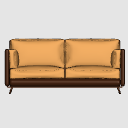
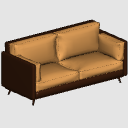
[3D] モダンソファ / ソファ(ツートーン) ([3D] Modern Sofa / ソファ (Two-tone)) [3D] Modern Sofa / ソファ (Two-tone)
コンテンツID:2298483
-
277


シックでモダンなツートンレザーソファで、コミック、マンガ、ウェブトゥーンの屋内シーンにぴったりです!リビングルーム、オフィス、アパート、コーヒーショップの背景に最適です。
特徴:
- 低ポリゴンで滑らかなキャンバス性能に高度に最適化されています。
- リアルで居心地の良い雰囲気で、背景のディテールを瞬時に向上させます。
このモダンなソファを、あなたの背景にぴったり楽しんでください!もし役に立つと感じたら、店内での評価をいただけると大変ありがたいです。
A chic and modern two-tone leather sofa, perfect for your comic, manga, or webtoon indoor scenes! Ideal for living rooms, offices, apartments, or coffee shop backgrounds.
Features:
- Low poly and highly optimized for smooth canvas performance.
- Realistic and cozy look to instantly improve your background details.
Enjoy this modern sofa for your backgrounds! If you find it useful, I would greatly appreciate a positive rating in the store.
1. 3DソファをClip Studio Paintのキャンバスにドラッグ&ドロップします。
2. ソファをクリックして3Dマニピュレーターを起動し、カメラアングルをパネル構成に合わせて調整します。
3. マンガやウェブトゥーンの線画で使うには、「レイヤープロパティ」パレットに行き、「ライン抽出」をクリックしてください(またはレイヤーのLT変換を使います)。
4. 均一なスケールのランチャーリングを使って簡単にスケールアップ・ダウン!
1. Drag and drop the 3D Sofa into your canvas in Clip Studio Paint.
2. Click on the sofa to active the 3D manipulator and adjust the camera angle to fit your panel composition.
3. To use it for Manga or Webtoon lineart: Go to the "Layer Properties" palette and click on "Extract Line" (or use the LT conversion of layer).
4. Scale it up or down easily using the uniform scale launcher ring!
素材 Material
-
デフォルト素材 Default material
配分 Allocate
-
デフォルトのレイアウト Default layout


"ChefcitoNerd"さんの別の素材

"3Dオブジェクト"の人気素材


新着素材


-
 MVP ◆質問に対して適切な回答を数多く投稿し、コミュニティの運営に大きく貢献したユーザーです。MVPは3ヶ月に一度、その間に獲得したポイントを元に決定し、表彰を行っています。
 -
 NVP (New Valuable Player) ◆MVPに次いでコミュニティの運営に貢献したユーザーです。これまでMVPの受賞経験のない方から、獲得したポイントを元に決定し、表彰を行なっています。
 -
 公式エキスパート ◆優れた回答者の証であるMVP受賞者の中からさらに選ばれた、コミュニティで最も優良な回答者の証です。審査を経て当社から依頼し就任いただいています。※旧名称「エバンジェリスト」
 -
 セルシス公認モデレーター ◆モデレーターは、日本語とその他の言語が話せるセルシス公認のスタッフです。ソフトウェアや創作のエキスパートではないので、直接疑問を解決することはできませんが、みなさんがスムーズにコミュニケーションできるように、言葉やコミュニケーションの側面からサポートします。
 -
 セルシス公式運営に関連した公式アカウントです。