



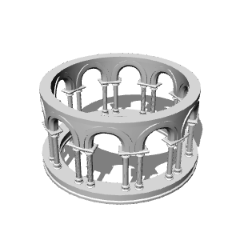
柱のある簡易なガゼボの模型です。
Blenderで作ったものです。
A simple model of a gazebo with pillars.
Made with Blender.
モデルはダウンロードタブで利用可能で、その後キャンバスに誘導できます。
モデルはClip Studio Paintで次のように見えるはずです:


基本的な構造を作るには、ダウンロード画面や3Dタブで3つのモデルすべてを同時に選択し、キャンバスにドラッグします。次に、矢印または座標を使ってそれらを重ね合わせます:

また、セグメントパーツを複数重ねて高い構造を作ることもできます(ただしポリゴン数を増やすとパフォーマンスに影響があることに注意してください):


The models should be available in the downloads tab, after which they can be directed onto the canvas.
The model should look like this in Clip Studio paint:
To build the basic structure, select all three models simultaneously in the downloads or 3-D tab, and drag them onto the canvas. Then, use either the arrows or coordinates to stack them on top of each other:
You could also stack the segment piece multiple times to create a taller structure (though be aware that increasing the amount polygons could affect performance):
カテゴリー1 Category 1









"aBookshelf"さんの別の素材


"素材集"の人気素材


新着素材




バッジ
-
 MVP ◆質問に対して適切な回答を数多く投稿し、コミュニティの運営に大きく貢献したユーザーです。MVPは3ヶ月に一度、その間に獲得したポイントを元に決定し、表彰を行っています。
 -
 NVP (New Valuable Player) ◆MVPに次いでコミュニティの運営に貢献したユーザーです。これまでMVPの受賞経験のない方から、獲得したポイントを元に決定し、表彰を行なっています。
 -
 公式エキスパート ◆優れた回答者の証であるMVP受賞者の中からさらに選ばれた、コミュニティで最も優良な回答者の証です。審査を経て当社から依頼し就任いただいています。※旧名称「エバンジェリスト」
 -
 セルシス公認モデレーター ◆モデレーターは、日本語とその他の言語が話せるセルシス公認のスタッフです。ソフトウェアや創作のエキスパートではないので、直接疑問を解決することはできませんが、みなさんがスムーズにコミュニケーションできるように、言葉やコミュニケーションの側面からサポートします。
 -
 セルシス公式運営に関連した公式アカウントです。